4.2.3 Menu Button Operations and Functions
You can operate the button using the touch panel of the tablet or your mouse. (In some
operations, the buttons on the control unit are also used. )
For detailed functions, please check the reference in the function description reference
column.
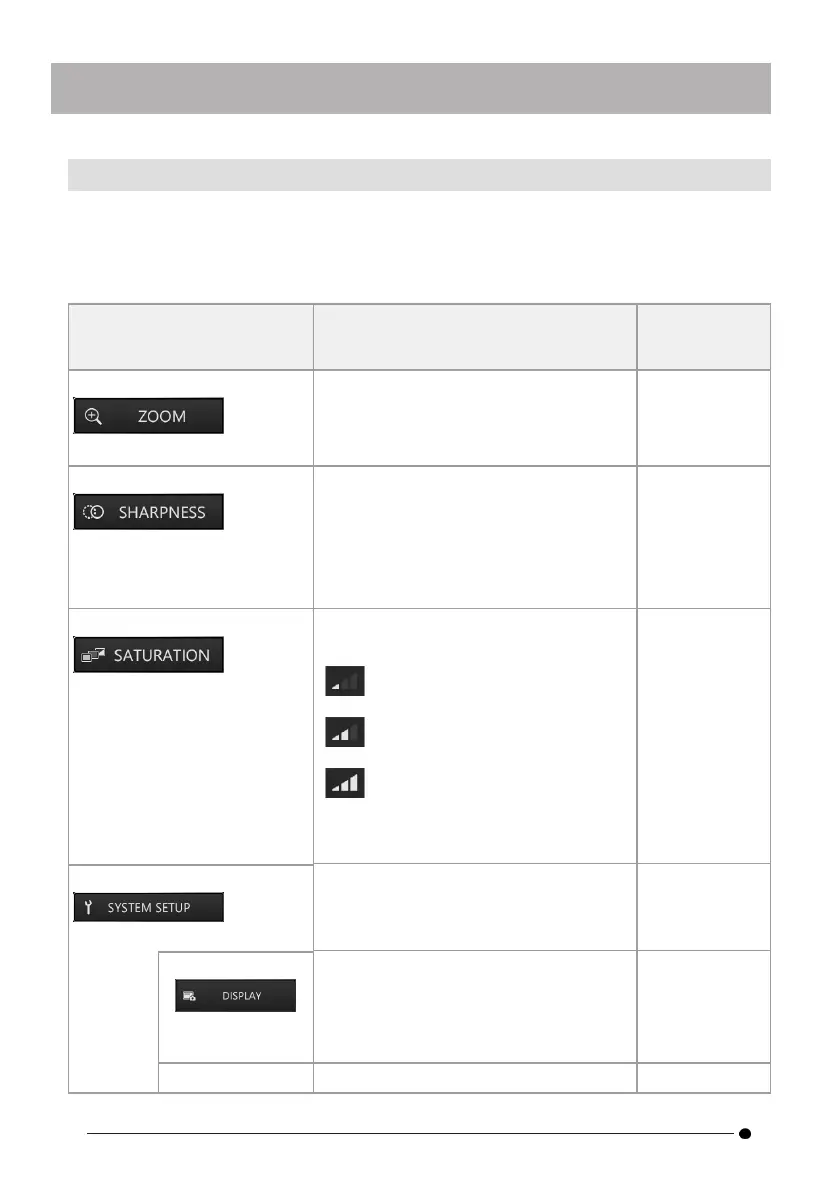
Menu button Function
Function
description
reference
<ZOOM> Changes the zoom factor.
Changes the magnification between x1
and x2 (i.e., two levels).
Only available in GUI mode.
"Zoom
(magnifying
images) " (page
34)
<SHARPNESS> Adjusts the sharpness of the image.
Images become sharper as the button is
moved to the right (with three levels of
sharpness).
Not available for frozen screens.
Only available in GUI mode.
"Adjusting
sharpness "
(page 35)
<SATURATION> Adjusts and displays the colors of the
observation images.
Black and White: displays the
images in black and white.
Standard: displays standard
observation images.
Dark: displays generally darker
images.
Not available for frozen screens.
Only available in GUI mode.
"Adjusting color
" (page 35)
<SYSTEM SETUP>
Displays the system settings screen. "Displaying the
system settings
screen " (page
36)
<DISPLAY>
Allows you to select information
displayed on the screen.
<ZOOM> <BRIGHT> <LIGHT> <GAIN>
<DATE/TIME> <LOGO> display can be
selected individually.
"Selecting
screen display "
(page 37)
<CHANGE Allows you to select where to save "Setting the
30



 To Next Page