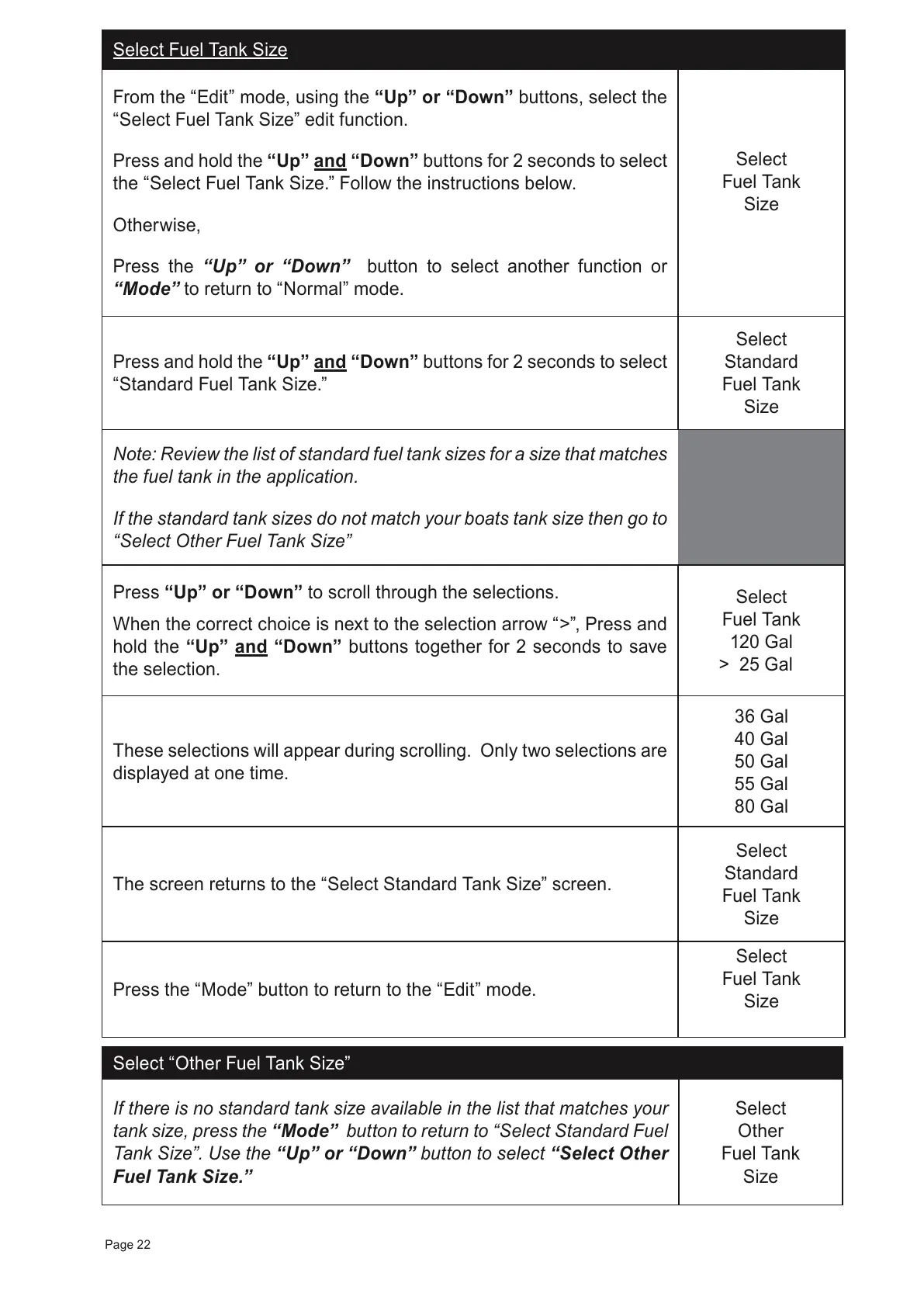
Select Fuel Tank Size
From the “Edit” mode, using the “Up” or “Down” buttons, select the
“Select Fuel Tank Size” edit function.
Press and hold the
“Up” and “Down”
buttons for 2 seconds to select
the “Select Fuel Tank Size.” Follow the instructions below.
Otherwise,
Press the “Up” or “Down” button to select another function or
“Mode” to return to “Normal” mode.
Select
Fuel Tank
Size
Press and hold the “Up” and “Down” buttons for 2 seconds to select
“Standard Fuel Tank Size.”
Select
Standard
Fuel Tank
Size
Note: Review the list of standard fuel tank sizes for a size that matches
the fuel tank in the application.
If the standard tank sizes do not match your boats tank size then go to
“Select Other Fuel Tank Size”
Press “Up” or “Down” to scroll through the selections.
When the correct choice is next to the selection arrow “>”, Press and
hold the “Up” and “Down” buttons together for 2 seconds to save
the selection.
Select
Fuel Tank
120 Gal
> 25 Gal
These selections will appear during scrolling. Only two selections are
displayed at one time.
36 Gal
40 Gal
50 Gal
55 Gal
80 Gal
The screen returns to the “Select Standard Tank Size” screen.
Select
Standard
Fuel Tank
Size
Press the “Mode” button to return to the “Edit” mode.
Select
Fuel Tank
Size
Select “Other Fuel Tank Size”
If there is no standard tank size available in the list that matches your
tank size, press the “Mode” button to return to “Select Standard Fuel
Tank Size”
. Use the “Up” or “Down” button to select “Select Other
Fuel Tank Size.”
Select
Other
Fuel Tank
Size
Page 22



 To Next Page