FARO Gage
May 2011
20
Chapter 3: Operation
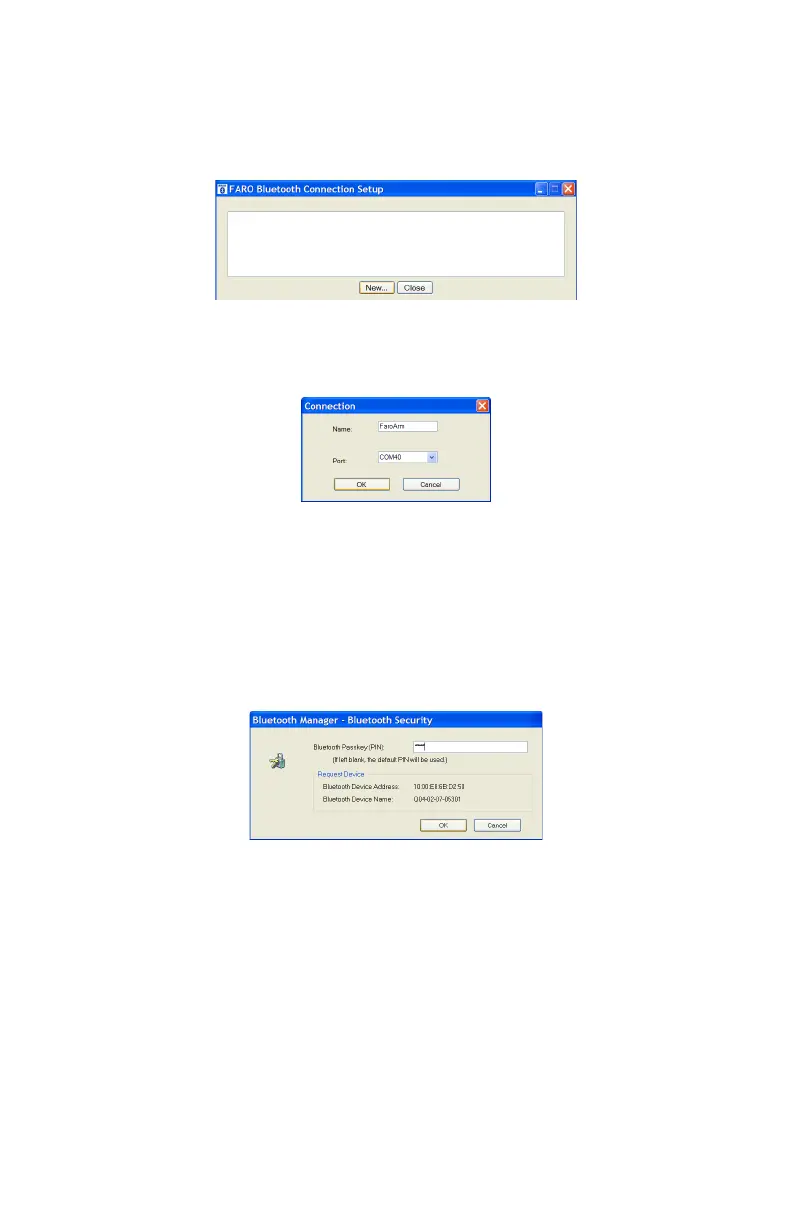
The Gage USB driver connects to the SPP connection using the FARO Bluetooth
Connection Setup utility software.
• Start FARO Bluetooth Connection Setup utility software program.
• Click the NEW button.
• Type a name for your connection
•In the P
ORT list select the proper COM from the platform specific Bluetooth
Wizard (e.g. COM10). This is the port that you previously wrote down.
• Click the OK button.
A test is automatically run to verify that the COM port is connected to the
Gage.
• Enter the Gage PIN security code, faro.
• Click OK to save the connection.
Figure 3-6 Connecting the Gage to the Computer
Figure 3-7 Connection Name and COM port
Figure 3-8 Gage Bluetooth PIN
08M47E00_FAROGage.book Page 20 Wednesday, June 8, 2011 4:12 PM



 To Next Page