FARO Gage
May 2011
64
Chapter 7: Configuring the FARO Gage in CAM2 Gage
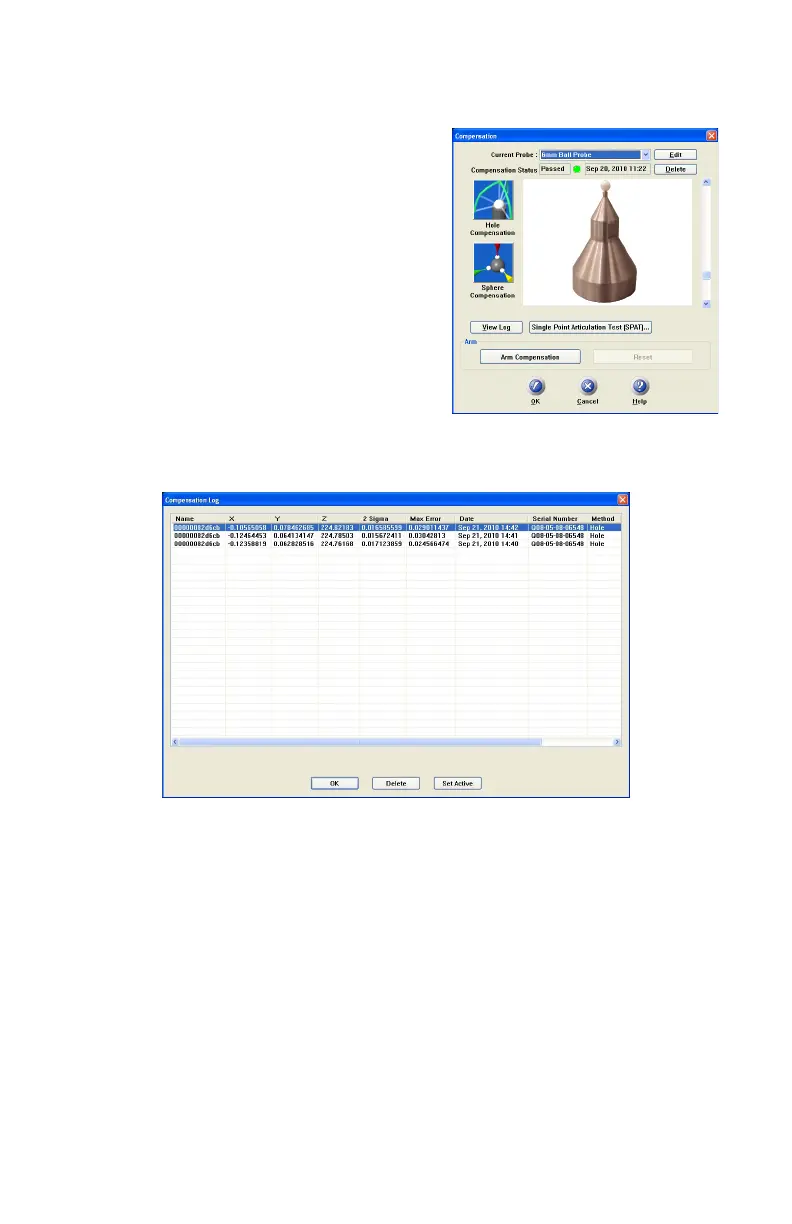
The digitized compensation points then
calculate and the C
OMPENSATION STATUS
updates. If the probe passes, the current date
and time is added to the probe information.
You can view the details for all of the
compensations of a probe by clicking the View
Log button. See “View Log” on page 64.
View Log
The COMPENSATION LOG dialog box displays
the compensation history of the current probe.
You can set to active or delete any previous
compensation. You can also select the compensation values and copy them to the
windows clipboard.
• The X, Y, Z values are the location of the center of the ball probe in the last
joint coordinate system.
• The 2 Sigma value is the deviation of all the points taken during the
compensation.
• The Max. Error column displays the displacement of the point with the largest
displacement. In order to pass compensation, this value has to be less than the
single point accuracy specification of the arm. See “Gage Calibration” on
page 32.
Figure 7-5 Compensation Log dialog box
08M47E00_FAROGage.book Page 64 Wednesday, June 8, 2011 4:12 PM



 To Next Page