FARO Gage
May 2011
48
Chapter 6: Maintenance and Troubleshooting
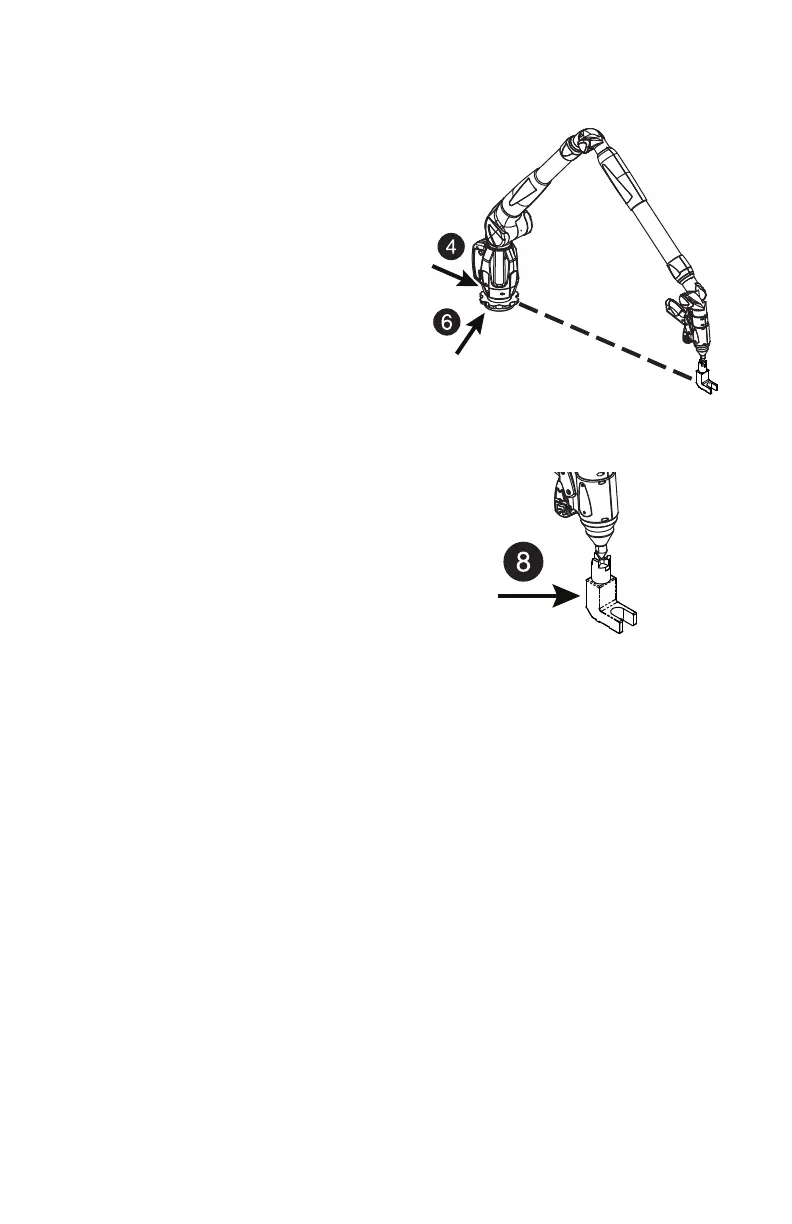
1 Line up front of Gage base with the
compensation cone.
2 In CAM2 Gage, select
DIAGNOSTICS from the GAGE
menu and look at the X, Y, Z values.
See “Diagnostics” on page 65.
3 Place the probe in the cone and hold
the Gage very still.
4 Apply approximately five (5) pounds
of force to the base ring in the
direction of the cone.
5 Note the Y deviation. It should not
exceed 25% of the Gage's accuracy.
6 Apply approximately five (5) pounds
of force to the base ring 90° away from
the previous direction.
7 Note the Y deviation. It should not
exceed 25% of the Gage's accuracy.
8 Apply approximately five (5) pounds
of force to the cone.
9 Note the X, Y and Z deviations. They should not exceed 25% of the Gage's
accuracy.
Single Point Articulation Test (SPAT)
Mounting should always be tested prior to a SPAT test. The SPAT test checks the
repeatability of the Gage's X, Y and Z coordinates throughout its range of
motion.
In CAM2 Gage software, start the SPAT routine from the D
IAGNOSTICS or
C
OMPENSATION dialog box. For more information, see “Diagnostics” on
page 65 or “Probes” on page 54.
08M47E00_FAROGage.book Page 48 Wednesday, June 8, 2011 4:12 PM



 To Next Page