Panda xControl
Seite/Page 156 - Kaptitel/Chapter 11: Panda xControl 10.6.16
11.0.7 Switching on the generator
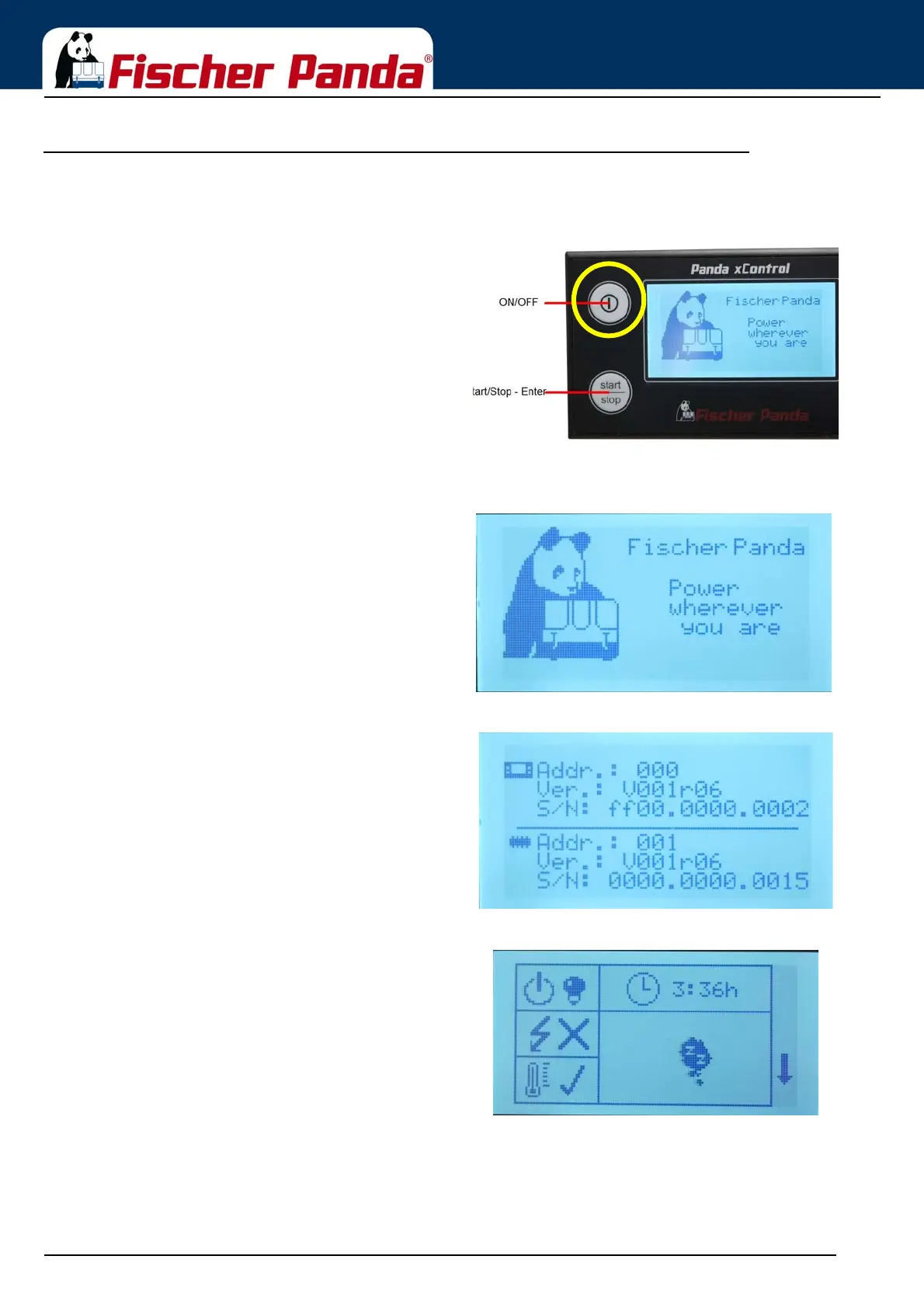
Fig. 11.0.7-1: Switch the generator onPress the „ON/OFF“ Button to switch the generator on
With this you switch the generator into the standby mode.
If the automatic start option is set in the menu, the
generator may start by an external signal.
Fig. 11.0.7-2: Welcome screenThe CP-G Panel shows the welcome screen for 2 seconds.
Fig. 11.0.7-3: Address screenAfter that the CP-G shows the address screen for 1 second
Fig. 11.0.7-4: Overview screen 1 symbolicAt the end of the switch on, the CP-G Panel will show the first
overview screen.
Which screen the display shows (symbolic-english text-
german text) can be set up in the menu.





 To Next Page