Panda xControl
Seite/Page 160 - Kaptitel/Chapter 11: Panda xControl 10.6.16
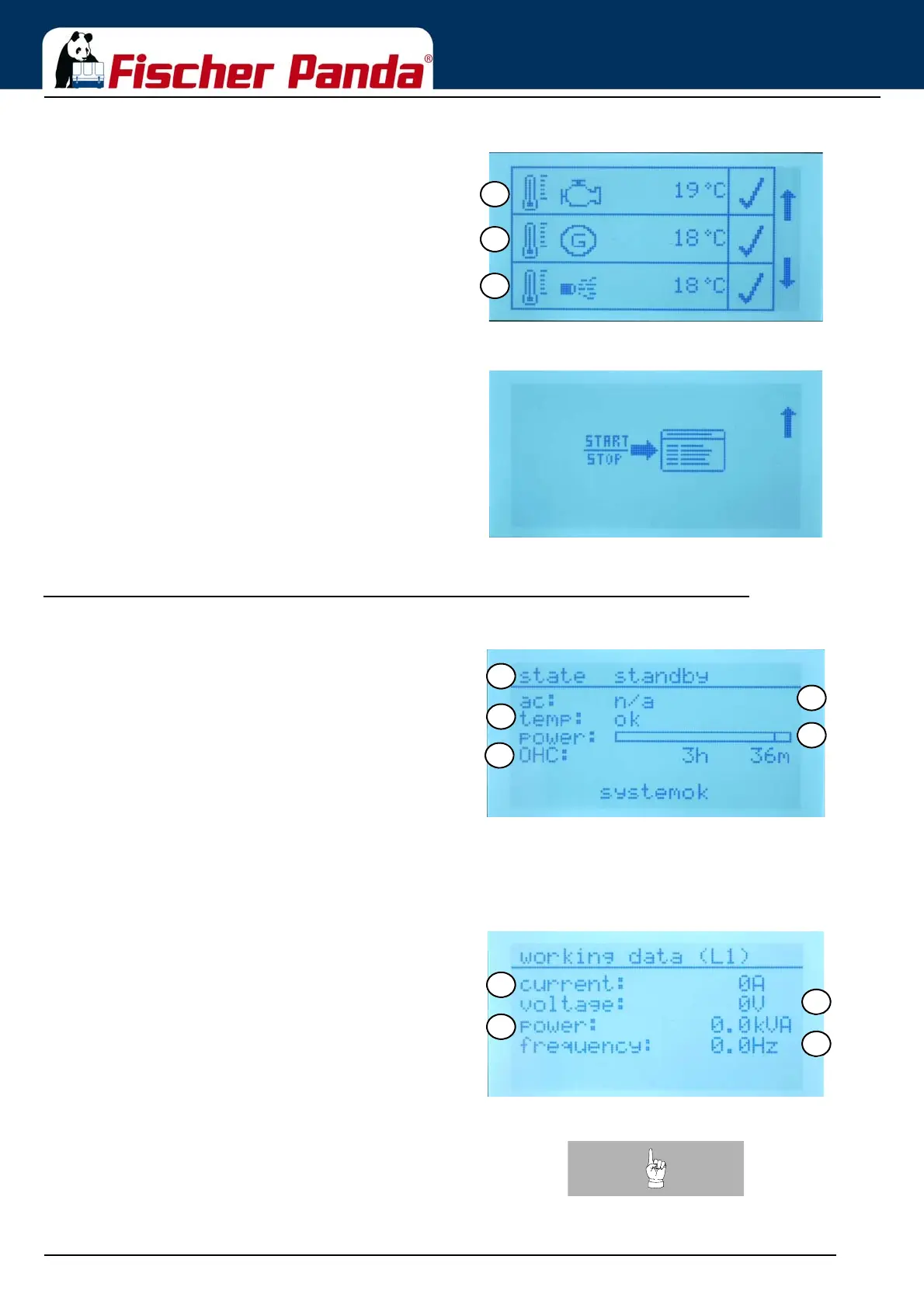
Fig. 11.0.9-4: Overview screen 4 symbolicThe fourth screen shows
11. Temperature of the cylinder head
12. Temperature of the generator coil
13. Temperature of the exhaust
Fig. 11.0.9-5: Overview screen 5 symbolicThe fifth screen is the „Enter the menu“ screen.
Press the Start/Stop - Enter button to enter the menu
11.0.10 Overview Screens English Text
Fig. 11.0.10-1: Overview screen 1 english textWhich screen the display shows (symbolic or english text or
german text) can be set up in the menu.
The first screen shows:
01. Generator status
02. AC present
03. Temperature of the generator ok
04. Percentage of power
05. Operating hours of the generator
Fig. 11.0.10-2: Overview screen 2 english textThe second screen shows
06. Voltage of the generator
07. Current of the generator
08. Power (kVA) of the generator
09. Frequency of the generator
Note:At 3 phase generator the voltage, the current and power
will be displayed on separate screens. Each screen
shows the value for the 3 phases one below the other.




 To Next Page