Manual Flamcomat G4 + Flamcomat Starter G4
We reserve the right to change designs and technical specifications of our products.
16
ENG
Flamcomat starter
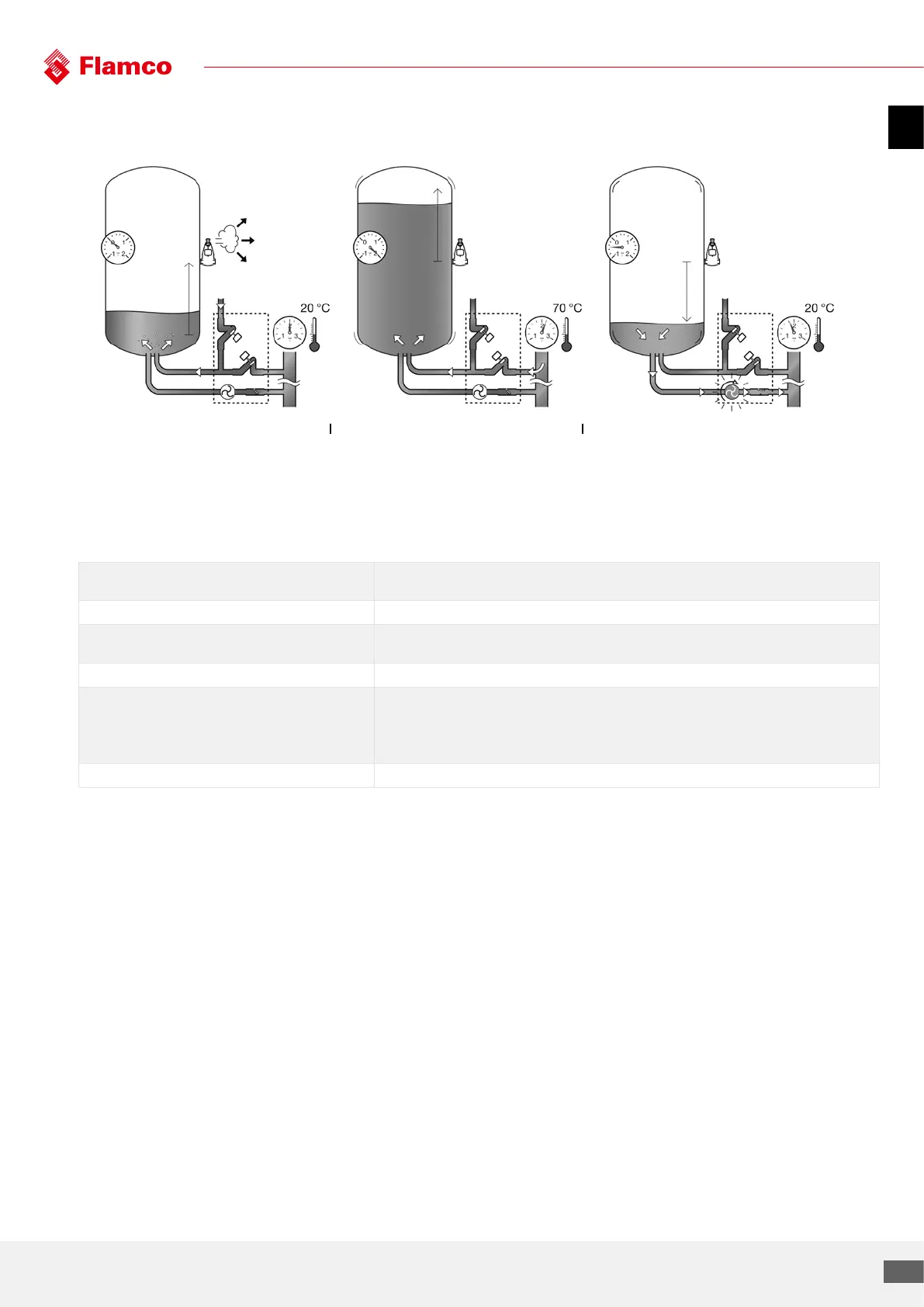
1. Initial filling, refilling and heating 2. Heating up, maximum operation 3. Cooling down, minimum operation
Degassing
Pressure
Vacuum
5.2 Connectivity options
Connectivity options Designated use
Ethernet port To connect Flamcomat to a Building Management System (BMS) via modbus or bacnet.
Standard USB (aka USB-A) For saving the oline log and the configuration parameters. The second option for this port is to update
the firmware of the controller (to download a new control SW)
CAN This pair of the ports is dedicated for the networking of multiple Flamcomats (master-slave)
RS-485 The primary designation is to connect Flamcomat to Internet (via Gateway and HFC protocol).
Alternatively – BMS via Modbus
Alternatively – BMS via bacnet
(only one out of three options at the same time)
Wireless To connect a smartphone application


 To Next Page