Manual Flamcomat G4 + Flamcomat Starter G4
We reserve the right to change designs and technical specifications of our products.
31
ENG
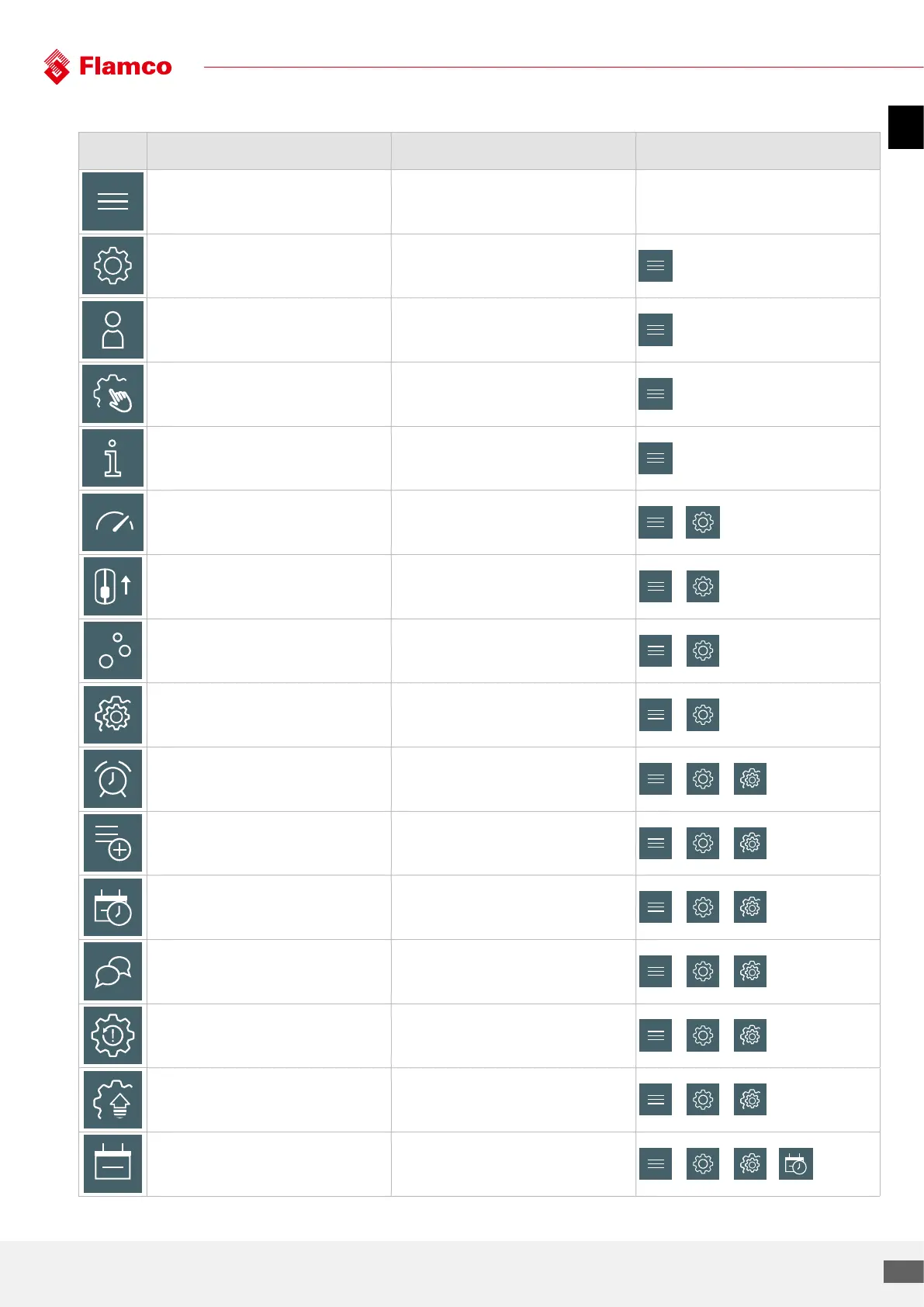
7.4 Clarification of menu icons, function and location
Icon Name Function Location
Home To observe the status of the automat
Settings To launch the settings menu
Login To login to access the advanced settings
Manual mode To run a manual activation of the actuators
Service info To observe the service information
Pressure
To change the operating pressure and the
pressure tolerance interval
▶
Refill Level To set the refill, drain and alarm levels
▶
Degassing
To select the degassing mode and the restricted
hours profile
▶
General To launch the general settings menu
▶
Alarms
To assign the alarm message(s) to the potential
free output(s)
▶ ▶
Accessoires To activate the advanced control accessories
▶ ▶
Time | Date To set the time and the date
▶ ▶
Language To change the language of the interface
▶ ▶
Factory reset* To reset the automat
▶ ▶
Firmware update* To update the firmware
▶ ▶
Date To set the date
▶ ▶ ▶


 To Next Page