User’s manual FlexGain Plex, V2
Version 1.3
23 from 99
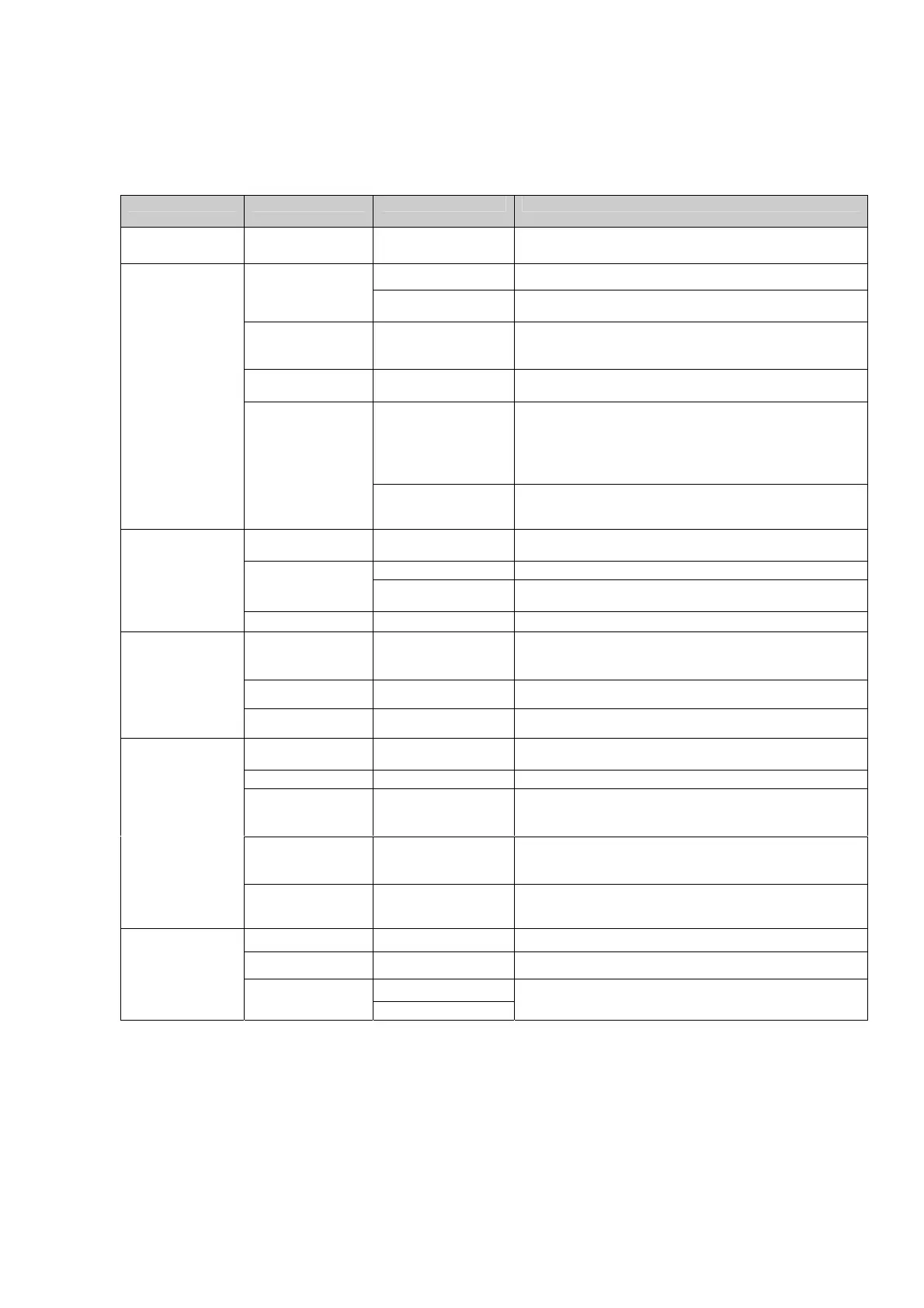
Table 3. Description of the device statuses and LEDs corresponding to these statuses.
Note: the Е1 LED can display the status of the PCM1 stream or the PCM2 stream (see the
<PCMLED> command).
LED LED color LED status Device status
All LEDs Absent Off The device is not powered, or the power supply source
is malfunctioning.
On Normal operation of the Е1 port. Green
Blinking A digital loop is set on the E1 stream (see the <LDL>
command).
Amber
On Non-urgent alarm of the Е1 port:
CRC4 > 150 errors per second;
AIS receive.
Red/ Green Color changing
A slip over Е1 (forward or backward buffer overflow).
On Urgent alarm of the E1 port:
• LOS (loss of signal)
• LFA (loss of frame alignment)
• LMFA (loss of multiframe alignment)
• CRC4 > 300 errors per second
Е1
Red
Blinking A remote digital loop is set on the E1 stream (see the
<RDL> command).
Absent Off The interface is switched off by the program (time slots
are not used).
On Normal operation of the V.35 port. Green
Blinking A loop is set on the V.35 interface
(see the <EDL> command).
V.35
Red On Urgent alarm of the V.35 port.
Absent Off The device is not connected to the local Ethernet
network.
Improper connection to the local Ethernet network.
Green On Correct connection to the local network.
Eth
Amber Blinking Receive TCP/IP packets.
Absent Off
The channel is in the idle mode or blocked.
Green On The channel is busy.
Amber Blinking
synchronized with
dialing
Dialing in the pulsed mode.
Amber Blinking
synchronized with
calling signal
Incoming call.
LEDs
1 – 8
Red Frequent blinking Time slots for the interface are not set. The daughter
board is either absent or malfunctioning.
Green On Normal operation of the device.
Amber On Configuring over RS-232 or TELNET being in process.
On
S
No legend on the
front panel.
Red
Blinking
Hardware failure.



 To Next Page