Using Memory, PC and Printer
Documenting Screens
6
63
Setting up the Printing Configuration
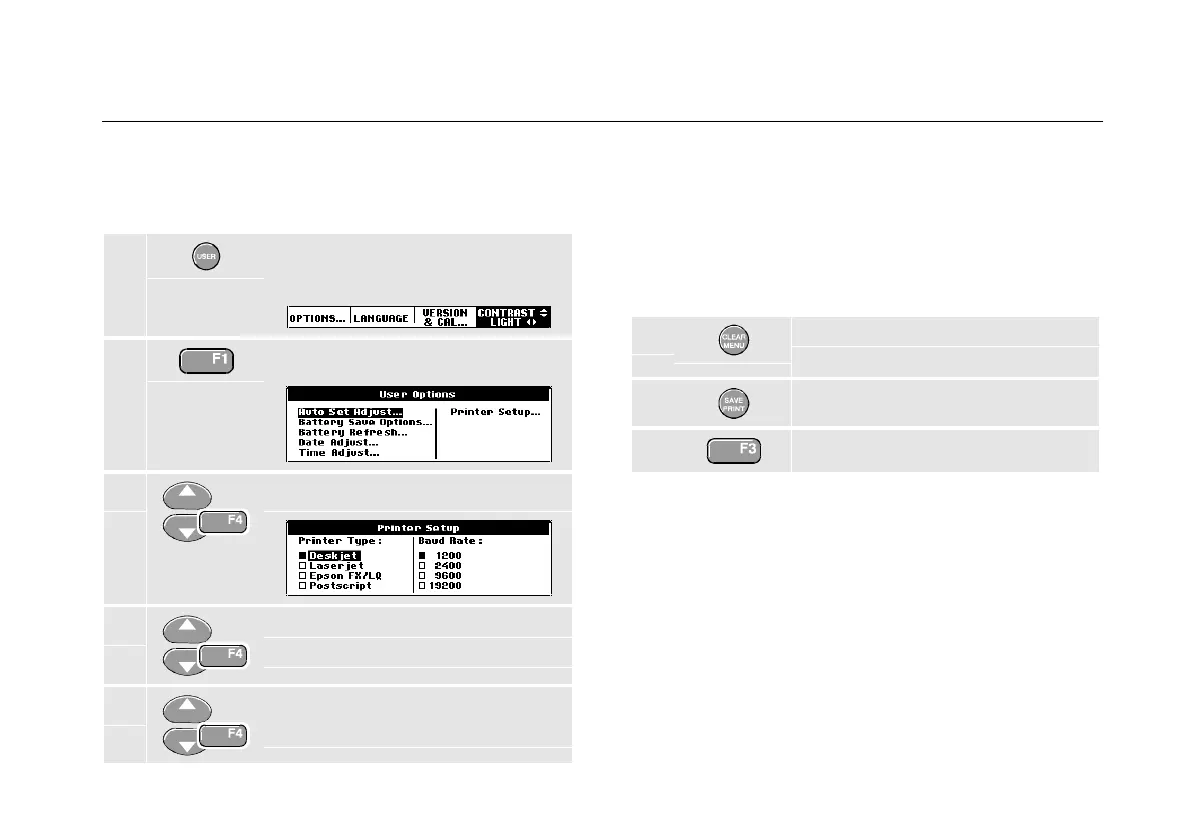
This example demonstrates how to set up the test tool for
printing on a postscript printer with a 9600 baud rate:
1 Display the USER OPTIONS key
labels.
2 Open the User Options menu.
3 Open the Printer Setup submenu.
4 Select Postscript and jump to
Baud Rate.
5 Select a baud rate of 9600 and
return to normal mode.
Whenever possible, choose the option Postscript when
printing screens. This option gives the best printing
results. Consult the manual that came with your printer to
find out whether it has Postscript printing possibilities.
Printing a Screen
To print the currently displayed screen, do the following:
1 Clear the menu if you do not want
to print it.
2 Display the SAVE/PRINT key labels.
3 Start printing.
A message appears at the bottom of the screen
indicating that the test tool is busy printing.










 To Next Page