Set-up
l Mount the sensor and the reflector on either side of the coupling, ensuring that they are
aligned with the 0 or reference mark.
l
Switch the touch device on, then tap in the home screen to start the vertical align-
ment application.
Note: If the icon is inactive, tap to activate the vertical alignment icon.
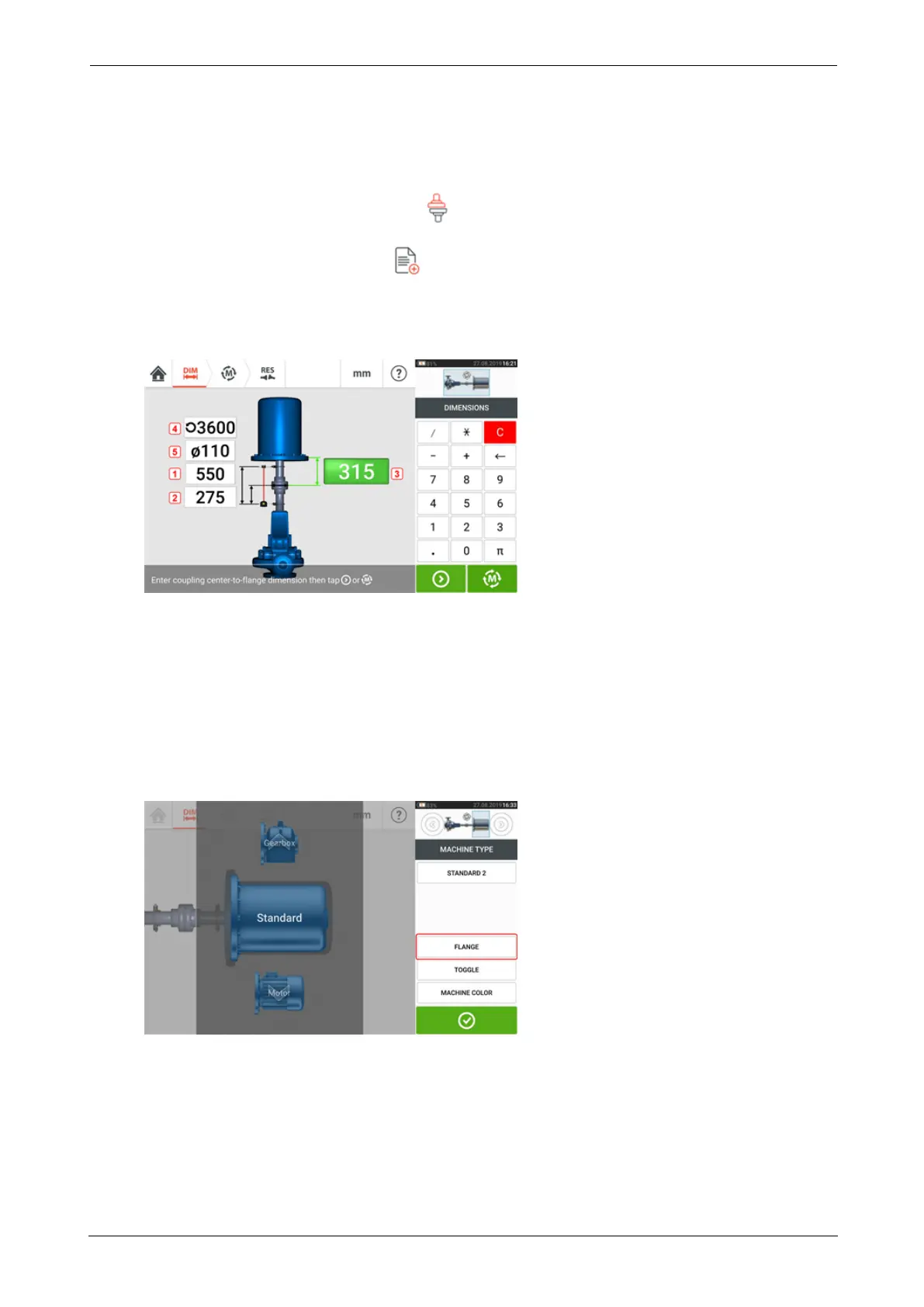
l Configure the machines as appropriate by tapping the machines to select the desired
machine type from the carousel.
l Enter the following required machine dimensions:
l (1) Sensor to reflector
l (2) Sensor to coupling center — This dimension is calculated as half the sensor-to-
reflector distance automatically. The dimension may be edited as required.
l (3) Coupling center to flange
l (4) RPM
l (5) Coupling diameter
l When entering machine dimensions, the flange geometry must be taken into account.
Tap the flange-mounted machine.
The menu items on the screen may be used to edit machine name, access the "Flange
details" screen, change the flange position with respect to the shaft, flip the machine
along the shaft axis (toggle) and edit machine color.
SHAFTALIGNtouch 101
On-board help



 To Next Page