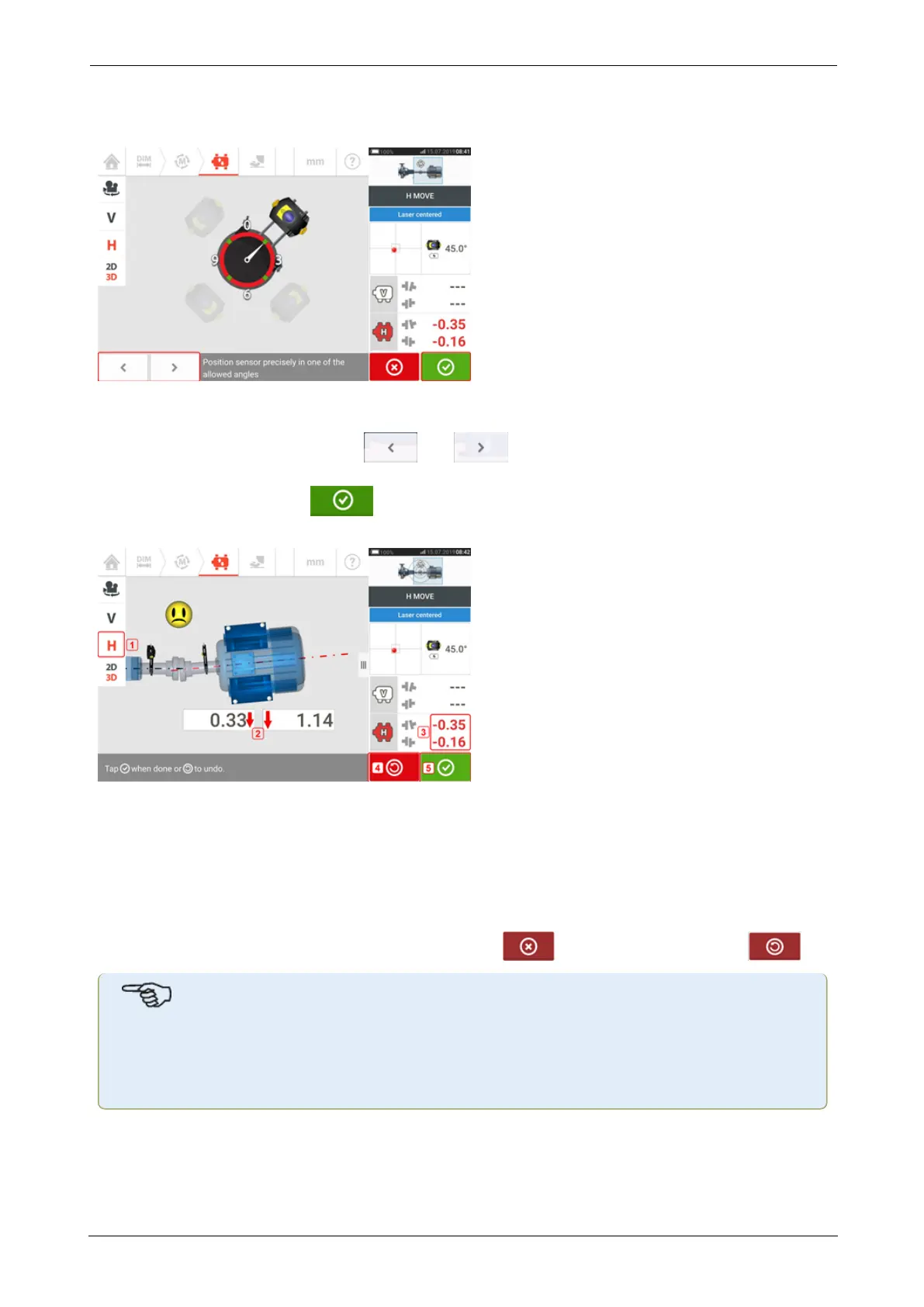
In Static measurement mode, four 45° positions (10:30, 1:30, 4:30 and 7:30 o'clock position
as viewed towards the sensor) are available.
In Active Clock, the Live Move screen appears if the laser has been centered and the shafts are
rotated to any one of the four sectors.
In Static measurement mode, use and to place the displayed sensor at the
desired 45° position. This position corresponds to the actual angular position of the sensor and
reflector on the shafts. Tap to confirm position. If the laser beam is centered, the Live
Move screen appears.
l (1) The selected Live Move plane (in this example 'H' – horizontal)
l (2) Arrows indicate direction and magnitude to move machine feet
l (3) Tolerance coded gap and offset coupling values
l (4) Tapping the 'Undo' icon allows user to re-measure or start Live Move afresh
l (5) Tapping the 'Proceed' icon allows user to re-measure or start Live Move afresh
Once Live Move has been detected, the 'Cancel' icon replaces the 'Undo' icon .
Note
To change the Live Move plane, tap the desired plane (in this example 'V' – vertical). A
hint appears requiring confirmation on whether to change plane or proceed with Live
Move in present plane.
SHAFTALIGNtouch 79
On-board help



 To Next Page