12
1 INTRODUCTION
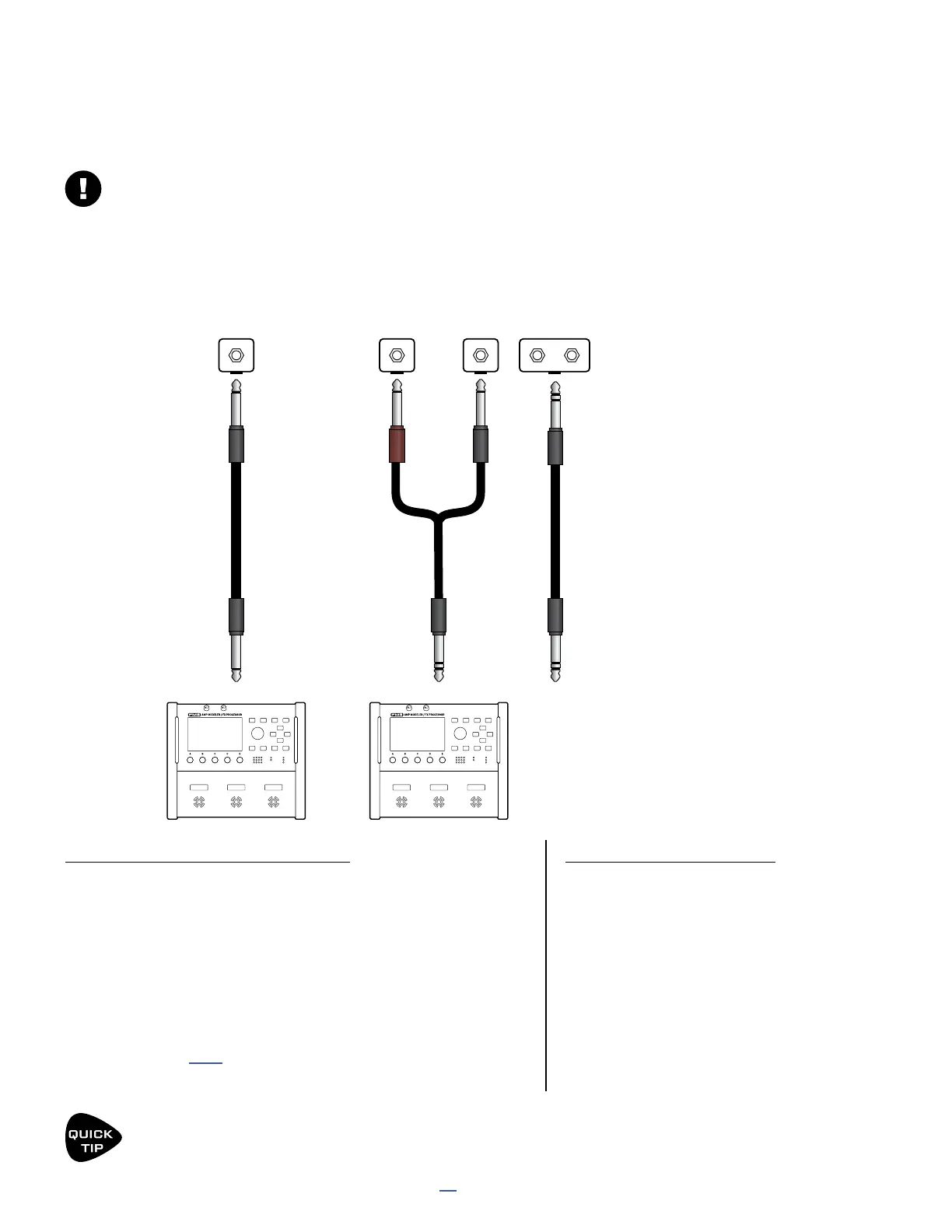
Each of the two Pedal jacks of the FM3 can support one or two switches instead of one expression pedal. This
requires a simple setting change. Any make-break switch type may be used with the FM3 in this way. Connect
switches in any of the ways illustrated below:
EXTERNAL SWITCHES
This section is for switches connected to the local “Pedal” jacks of the FM3.
For switches connected to an FC Series controller, see your FC Owner’s Manual.
FM3
EXPRESION
PEDAL
TRS
PEDAL JACK
TRS
FM3
SINGLE SWITCH
(TIP)
TS TRS
PEDAL JACK
TS
Guitar Cable
Insert Cable
TRS
TRS
TRS Cable
TS TS
FM3
PEDAL JACK PEDAL JACK
SWITCH
(TIP)
SWITCH
(RING)
“DUAL”
SWITCH
Some “Dual”
switches work
over a single
TRS cable.
EXTERNAL SWITCH SETTINGS
External switches require a simple setup:
Page to the Pedal page of the I/O menu under SETUP.
Set Pedal 1 Setup to “ONE SWITCH” or “TWO SWITCHES”
depending on what you have connected
(or use Pedal 2 Setup if that’s the jack you’re connecting to).
Next, navigate down to the SWITCH SETTINGS section
and select the TYPE and POLARITY for each of your
switches. See p. 94 for more on this setting.
Press HOME to nish.
SWITCH ASSIGNMENT
Since each jack supports TWO
different switches, you’ll nd multiple
options for assignment in the modier
source menu and the various MIDI/
Remote menu pages.
Pedal 1 (EXP/SW TIP) is switch 1 tip.
Pedal 1 (SW RING) is switch 1 ring.
Pedal 2 (EXP/SW TIP) is switch 2 tip.
Pedal 2 (SW RING) is switch 2 ring.
Switch RING
function is
disabled in
this mode.
External Switches can be used with many per-preset and global options found in the MIDI/REMOTE MENU.
Even more powerful, however, is the STAND IN SWITCH feature, which allows them to perform the same
functions as the onboard switches.



 To Next Page