30
4 SETTING UP
NEUTRAL (FRFR) POWER AMP & SPEAKERS
Global Settings: Modied (see below)
Presets: Factory or Custom
This popular setup uses both traditional guitar speakers and full range and flat response (“FRFR”) power amp.
Such amps are usually solid-state and designed specically for pro audio or FRFR guitar. This is a “neutral” amp
without tonal coloration. What goes in is what comes out — only louder.
This setup uses amp modeling in the FM3. Effect blocks can be used before and/or after the amp. Since we’re
using traditional guitar speakers, we don’t need speaker cab modeling from a Cab block.
DISABLE SPEAKER CAB MODELING
Using real speakers and modeled speakers at the same
time would be redundant, so this setup requires you to
disable or remove the FM3 Cab block. You can do this
manually in every preset you use, or take advantage of
an easy global setting:
Navigate to SETUP: Global Settings: Cong.
Change Cabinet Modeling to “BYPASSED”.
A “NEUTRAL” POWER AMP...
This setup uses a sonically “neutral” power amp.
This will typically be a solid-state amp designed
specically for “FRFR Guitar” or pro audio applications.
In comparison, the power amp in most tube amps is not
flat at all. Power amps can have a very pronounced tone
and dynamic feel, making up a huge part of the sound of
a guitar rig.
The FM3 is in fact capable of modeling both preamp
and power amp tone. While other setups use just the
preamp modeling (see next page) this setup also uses
power amp modeling since our neutral power amp is
contributing little to nothing in this regard.
Using power amp modeling in the FM3 has several
benets. First, since the power sections of different
amps sound and feel very different from one another,
modeling provides a very accurate experience as you
change amp models. The power amp of a “deluxe amp”
with no master volume is going to be extremely different
from that of a “recto”, for instance. Therefore, do NOT
disable power amp modeling in the FM3 when using a
neutral power amp.
One setting you should change, however, is OUTPUT
MODE on the Advanced page of the Amp block edit
menu. Set it to “SS PWR AMP + CAB”. See the Blocks
Guide (p. 17) for more on this parameter.
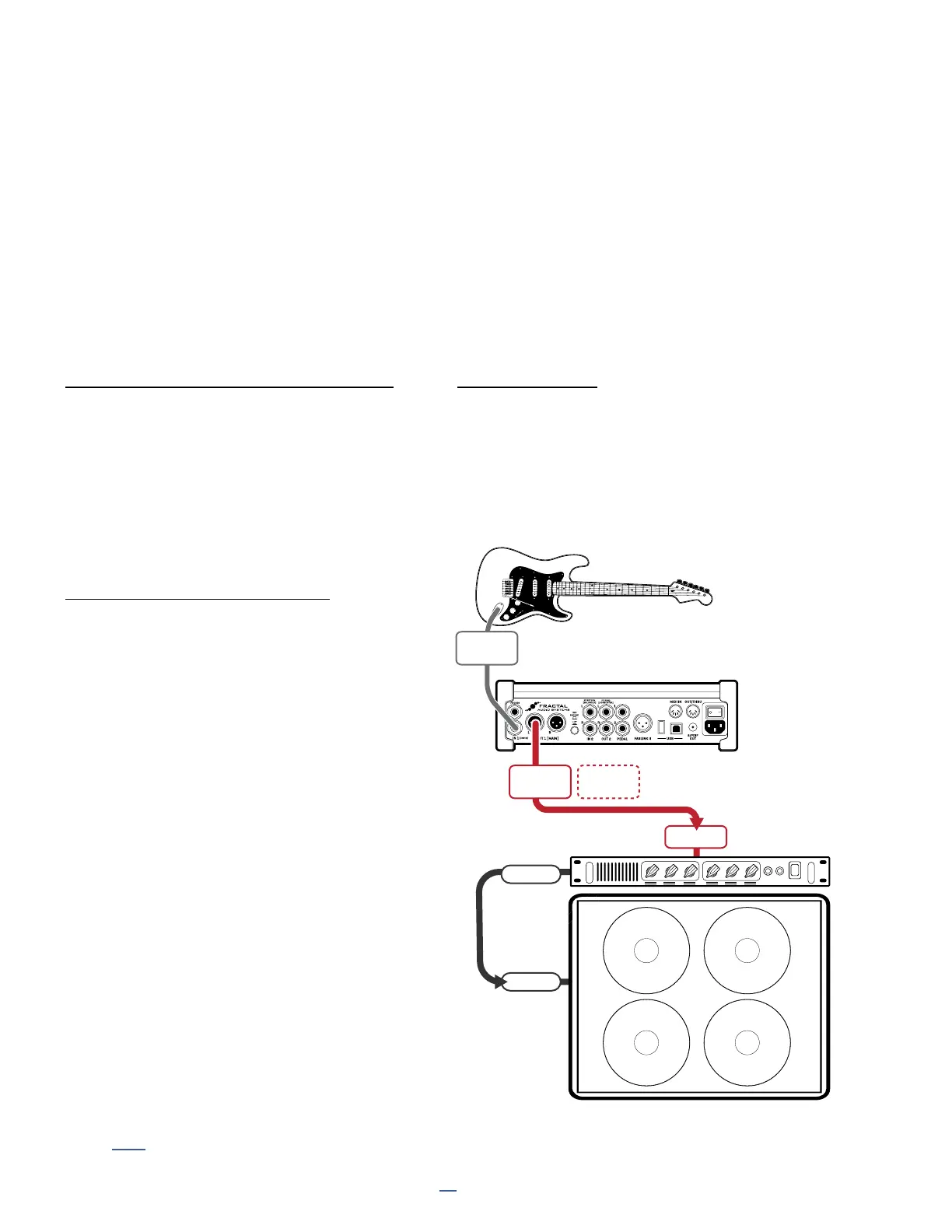
CONNECTIONS
Connect your guitar to Input 1 Instrument.
Connect Output 1 L to the input
of your power amp, which will typically be XLR.
You can also use an XLR to 1/4" cable if needed.
Connect the power amp to a speaker
as directed by the manufacturer.
FM3
IN 1
(INSTR)
POWER
AMP
GUITAR
SPEAKER
CABINET
OUTPUT
1R
Optional
for Stereo
INPUT
OUTPUT
1L
SPKR OUT
SPKR IN



 To Next Page