14
1 INTRODUCTION
Behind every preset is the Grid, a matrix of rows and columns that is the key to unlocking the true potential of
the FM3. In the world of traditional gear, our options are restricted by budget, space, weight, and the limits of the
equipment itself. Building a rig means making hard choices. With the FM3 however, these limits are replaced by a
vast, ever-growing “inventory” of virtual amps, cabs, effects, and more. Every single preset gives you the flexibility
to design a unique rig composed of whichever components you choose.
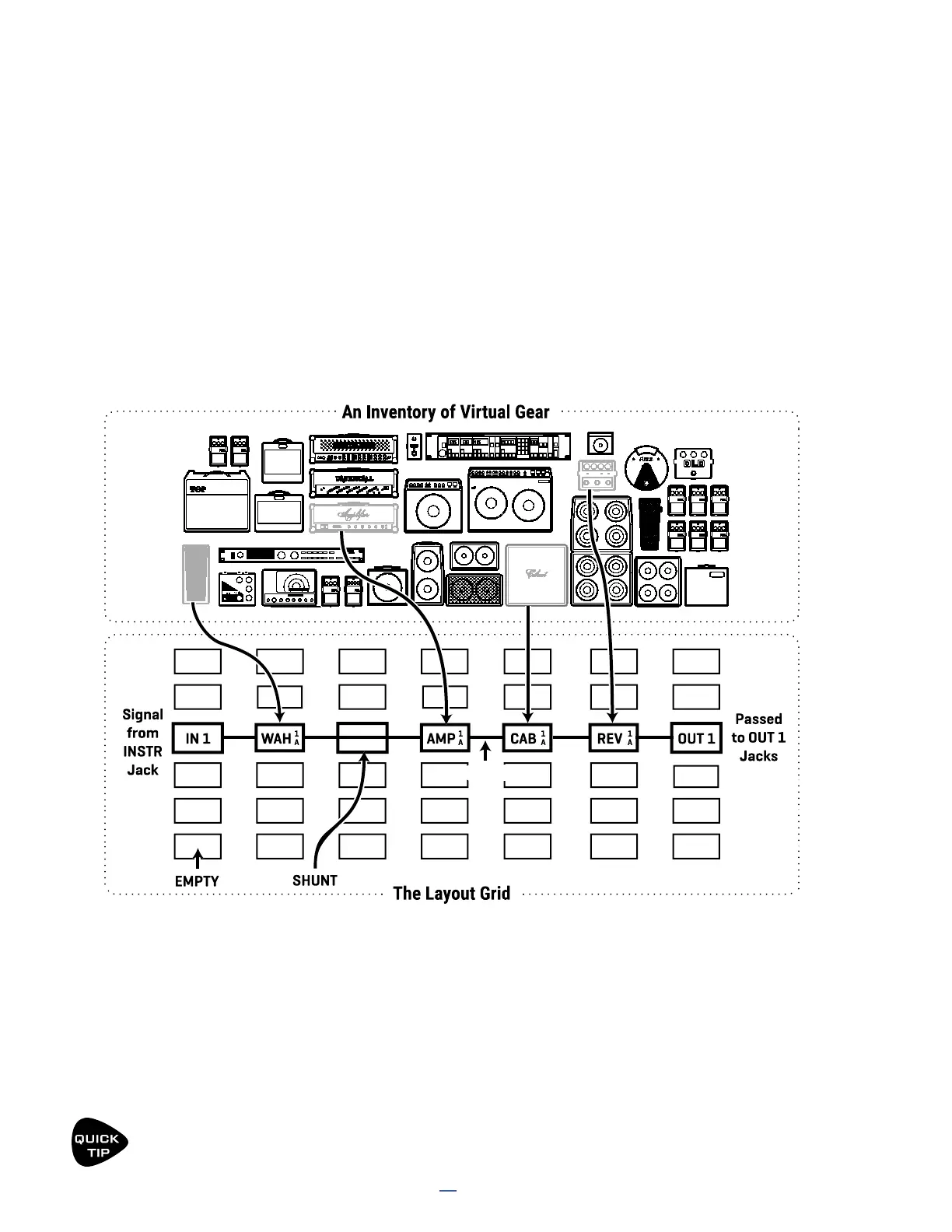
To create a preset, virtual pieces of gear called blocks are selected from an inventory and placed into the slots
of the layout grid. Each block represents a different component like a wah pedal, amp, or reverb unit. Blocks are
connected together using virtual cables. You can split, merge, or create parallel paths as needed. Passive shunts,
like cables, carry signal through empty grid spaces. Special input and output blocks connect to the various jacks
and USB signals of the FM3. Here is an illustrated overview of the concept:
INTRO TO THE LAYOUT GRID
Let’s review what’s happening above. Signal flow begins at the Input 1 block on the left. It is connected by a cable
to the Wah block, which in turn connects to a shunt. The shunt has no effect on the sound and is shown only to
introduce the idea of how it can be used to carry signal from one block to another. The shunt is connected to
an Amp block (we might set its type to “Plexi 100W High”), which in turn feeds a Cab (one of the many “4×12”
options, perhaps). This is connected to a Reverb and then to an Output block. In this limited example, many grid
spaces are empty, and only some of the columns are shown. In reality, the size of a preset is limited only by the
grid structure, block inventory, and total processing power (“CPU”). The FM3 can create presets large enough to
cover a song, a set, or even an entire show.
The layout “ZOOM” feature shows the whole grid at once. Look for the ZOOM button on Layout menu pages.
CABLE



 To Next Page