32
4 SETTING UP
CONNECTIONS
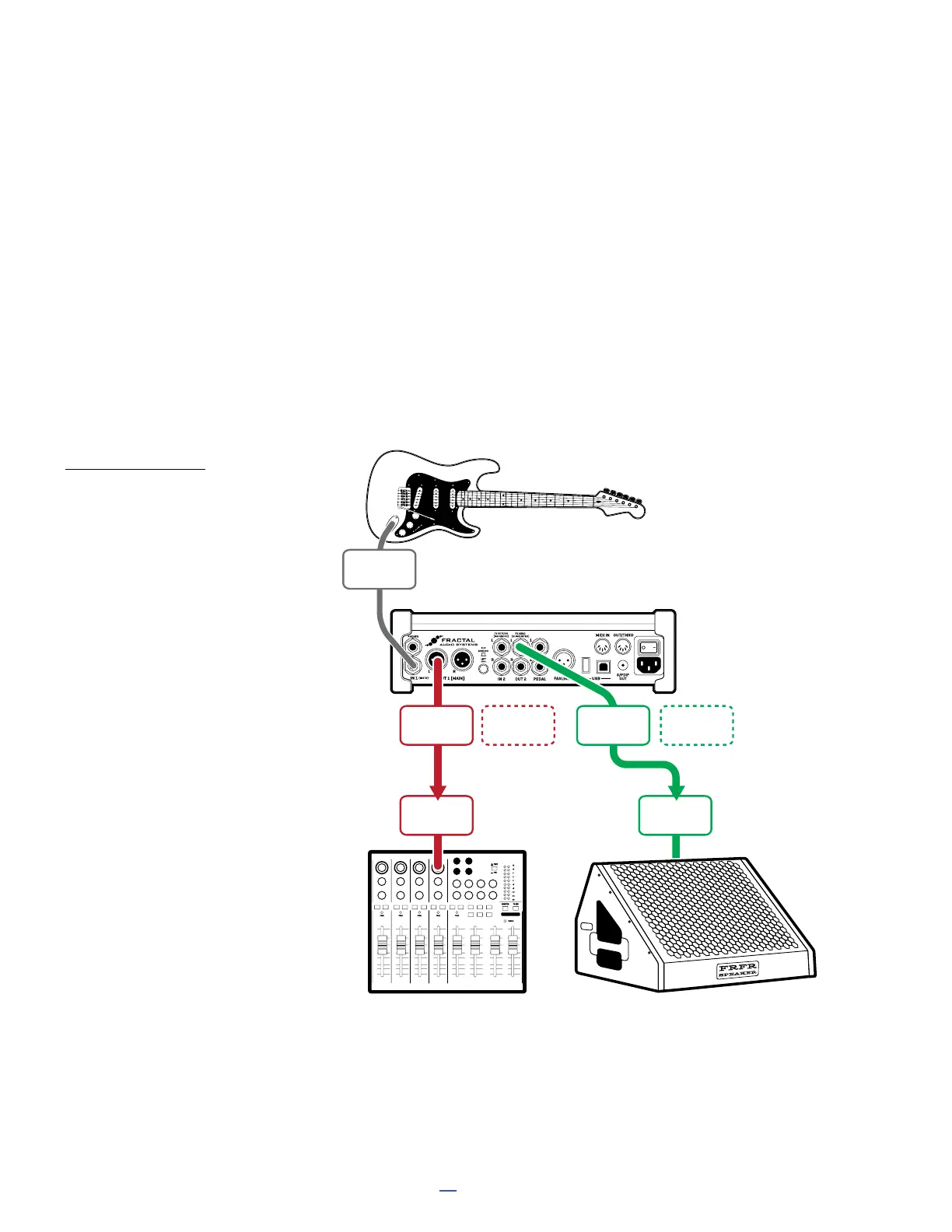
Connect your guitar to FM3
Input 1 (Instrument).
Connect Output 1 to the
front-of house system.
If you are working with a sound
technician, be sure to tell them
that you are outputting a line
level input — NOT a microphone
level signal. They should use a
balanced line input without a
preamp.
Also tell them you are sending
a fully processed “mix-ready”
sound, and that — at least to start
— they should “zero” the channel
with no EQ or processing.
Connect Output 2 to the input
of your FRFR monitor. This is
NOT a balanced output, so use
Humbuster™ or regular guitar
cables and adapters as needed.
FRONT-OF-HOUSE + PERSONAL FRFR MONITOR
Global Settings: “Out 2 Copy Out 1” Turned ON
Presets: Factory or Custom
This setup sends identical signals to the front-of-house PA and your personal FRFR monitor, with separate level
controls for each. The FM3 creates a fully modeled end-to-end guitar tone for the ultimate in flexibility—stompboxes,
amps, cabs, post effects, and more.
Output 1 is used for the PA. This will presumably be a balanced connection, so use XLR cables. Set your levels using
the front panel OUT 1 knob (and leave them alone... keep the sound tech happy!)
Output 2 is used as an independent copy of Out 1 to feed your FRFR monitor. To produce the copy, you can use an
easy global setting change instead of inserting the Output 2 block manually in every preset. Navigate to SETUP:
I/O: Audio and change Output 2/Copy Output 1 to “ON”. Output 2 will now replicate the signal being sent to Out 1.
FM3
IN 1
(INSTR)
PERSONAL FRFR MONITORFRONT-OF-HOUSE
MIXER/PA
OUTPUT
1L
OUTPUT
2L
OUTPUT
2R
OUTPUT
1R
LINE
INPUT
LINE
INPUT
Optional
for Stereo
Optional
for Stereo



 To Next Page