35
4 SETTING UP
TIP: OPTIMIZE FOR LOW NOISE
The optional Boost/Pad function on Output 2 can be used to lower the noise floor. To nd the right setting, adjust
this to be as high as possible without clipping, as indicated by a red LED on the front panel meters. The volume
won’t change but you should hear the FM3’s noise floor drop as you increase boost/pad. Find this option under
SETUP: I/O: Audio.
FX PROCESSOR ONLY (“POST”)
Global Settings: check I/O Mono/Stereo settings, see “Tip” Below
Presets: Custom
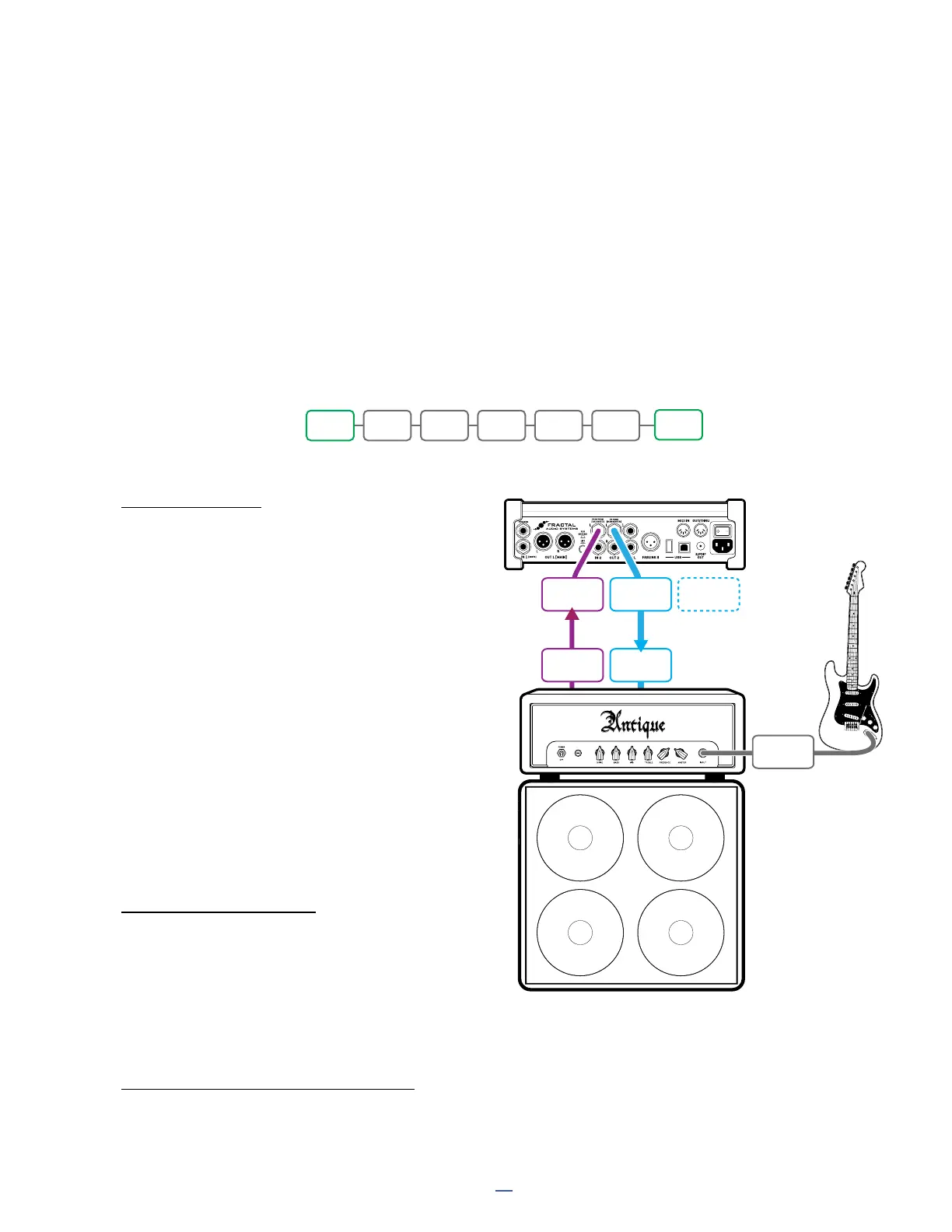
The FM3 can be used as a multi-effects processor in the loop of an amp, providing access to our industry leading
effects for those who may not be not ready to make the jump to amp modeling (Don’t worry, it’s OK; you’ll get
there someday).
FM3 Input 2 is used in this setup to accommodate your amp’s line level FX send.
FM3 Output 2 is used in this setup, because it operates at unity gain when the Out 2 knob is all the way up.
You will need to create custom presets for this setup. These must have NO Amp or Cab blocks, and must contain
only those effects that sound good to you after the distortion stage of your preamp. An example is shown below:
CONNECTIONS
Connect your guitar to your amp’s
instrument input as you normally would.
Connect the FX Send of your amp to FM3
Input 2 L. Adjust Input trim on the FM3
if needed in SETUP:I/O:Input.
For the setup shown here, set Input 2 Mode to
“LEFT ONLY” under SETUP: I/O: Audio. (It is rare
but not unheard of to use two preamps in stereo.)
Connect FM3 Output 2 L to the FX Return of your
amp. A Humbuster™ cable is recommended.
Set the front panel OUT 2 knob fully
clockwise for unity gain, or as desired
for appropriate volume levels.
To extend this conguration for optional stereo,
you would typically connect Output 2 R to the FX
return of a second amplier.
PARALLEL FX LOOP?
If your amp’s FX loop is parallel, your FM3 presets must
be further customized so that no dry signal passes
through the FM3. This generally limits the effects you
can use, how they must be arranged, what their mix
setting must be, and more. If your amp is switchable,
the series setting is certainly easier to use in this case.
FM3
AMP
SPEAKER
CABINET
INPUT
2L
FX
SEND
FX
RETURN
Model 50
OUTPUT
2L
OUTPUT
2R
Connect to FX RTN
of a second amp for
optional stereo.
INSTR
IN
IN 2 EQ CHO DLY1 DLY2 REV
OUT2



 To Next Page