19
2 HARDWARE OVERVIEW
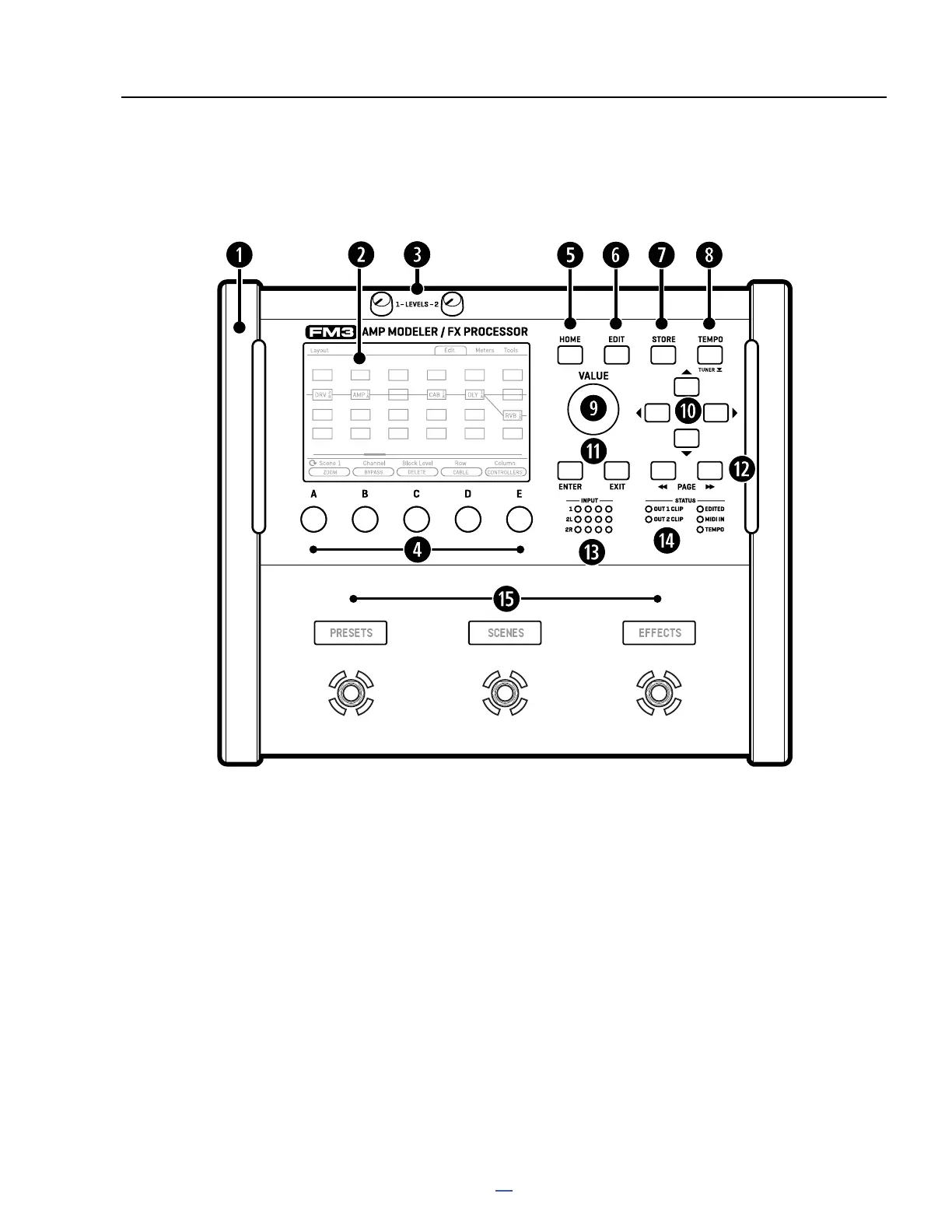
THE TOP PANEL
q
Chassis — The FM3 is housed in a rugged 3U steel chassis with a sleek anodized aluminum front panel and
protective end caps. A pair of high-strength handles make the unit easy to manage.
w
Color Display — A large 800×480 color display is optimized for readability in the most difcult conditions,
with greater brightness and contrast than “off-the-shelf” displays.
e
Output Level Knobs 1&2 — These knobs independently control the volumes at the corresponding rear panel
outputs. Output 2 is at unity gain when set fully clockwise.
A, B, C, D, and E knobs — Five endless rotary push-knobs perform different functions depending on which
page is shown in the display. Many pages show turn functions in blue and push functions as buttons. Most
Edit pages show one or two rows of ve knobs for easy 1:1 operation. On vertical menu pages, knob functions
are indicated on-screen with labels (“A” through “E”).
HOME Button — This button shows the Home menu—a convenient starting point for loading or editing
presets, and accessing the tuner, controllers, metering, global setup options, and performance pages.
2 HARDWARE OVERVIEW



 To Next Page