34
4 SETTING UP
FX PROCESSOR ONLY (“PRE”)
Global Settings: check I/O Mono/Stereo settings, see also “Tip” below
Presets: Custom
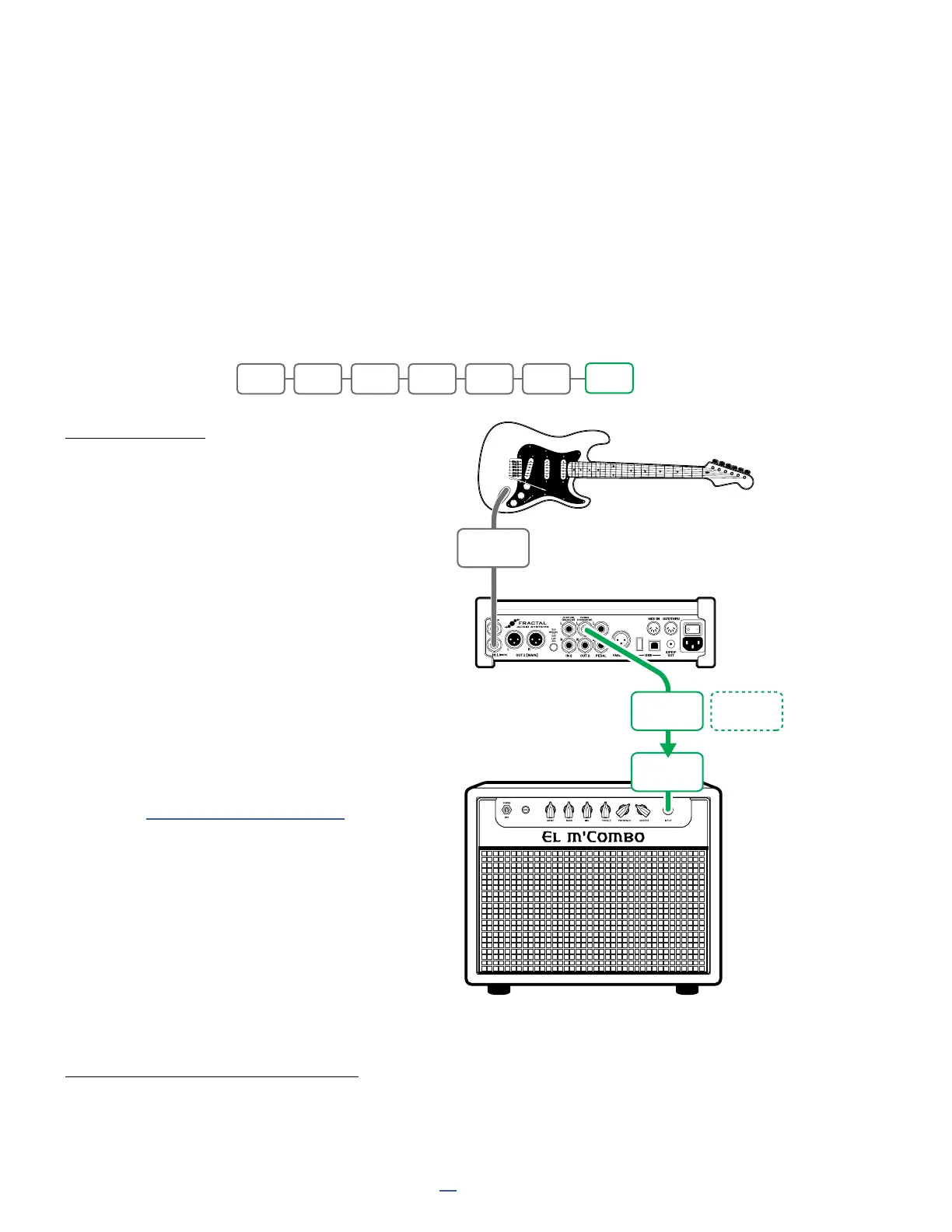
In this setup, the FM3 is used as a virtual pedalboard, providing access to our vast collection of industry-leading
effects. It is placed between your guitar and amp like a traditional stompbox. You’ll need custom presets, but as
with all FM3 setups, you are free to insert effects in any order or arrangement. Presets must not contain Amp or
Cab blocks for this setup. They should be created with an understanding of how effects sound in front of your
amp’s preamp and the distortion it generates. (You may wish to look into the term “pedal platform amp” for more
on this subject.) FM3 Output 2 is used in this setup, because it is designed for unity gain. A sample preset layout
is shown below:
CONNECTIONS
Connect your guitar to FM3
Input1 Instrument.
Connect Output 2 L to the input of your amp.
A Humbuster™ cable is recommended.
To extend this conguration for optional
stereo, connect Output 2 R to the input of a
second amplier.
You can in fact use the FM3 to select
between two different amps by changing
channels on the Output 2 block. You might
program this by making the following
settings:
- Channel A: Balance Center (Both Amps)
- Channel B: Balance Left (Left Amp)
- Channel C: Balance Right (Right Amp)
- Channel D: (Not used)
(See “Scenes & Channels” on p. 49 for
more info.)
Set the FM3 OUT 2 knob fully clockwise
for unity gain if desired, and adjust
your amp as you normally would.
TIP: OPTIMIZE FOR LOW NOISE
The optional Boost/Pad function on Output 2 can be used to lower the noise floor. To nd the right setting, adjust
this to be as high as possible without clipping, as indicated by a red LED on the front panel meters. The volume
won’t change but you should hear the FM3’s noise floor drop as you increase boost/pad. Find this option under
SETUP: I/O: Audio.
Combo 50
GUITAR
AMP
INSTR
IN
Optional for
Stereo
INPUT
OUTPUT
2L
OUTPUT
2R
FM3
IN1 CMP WAH DRV DLY REV
OUT2



 To Next Page