64
9 MODIFIERS
START: 0.0%
MID: 50%
END: 100%
SCALE: 2.0
OFFSET: 100%
START: 0.0%
MID: 50%
END: 100%
SCALE: 10.0
OFFSET: 0%
START: 47.2%
MID: 0%
END: 60.6%
SCALE: 10.0
OFFSET: -100%
ADVANCED MODIFIER CURVES AND SHAPES
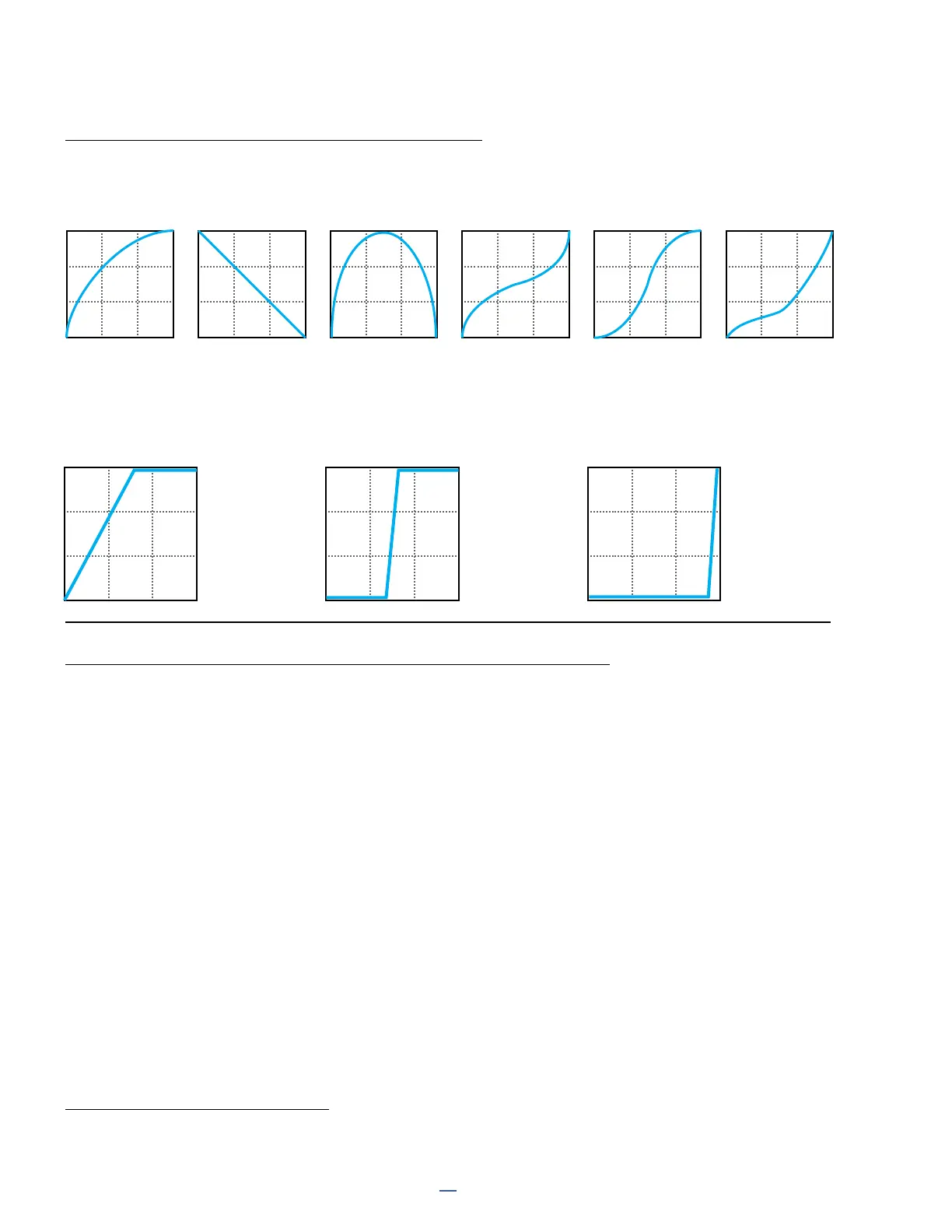
You can also adjust Start, End, and Slope (which introduces an “S” or “backwards S” shape). The numbers
beneath each example below show the settings for Start, Mid, End and Slope. With a bit of experimentation, you
will learn to achieve desired modier effects quickly. Try dialing in the shapes below for practice:
Scale and Offset also re-map modier response. Scale adds vertical exaggeration or compression, while Offset
moves the entire curve up or down on the Y-axis. Segments outside the graph boundaries will be clipped and
replaced by line segments. The examples below show some interesting possible applications.
AUTO-ENGAGE TURNS EFFECTS ON/OFF AUTOMATICALLY
If you have used a Wah pedal with no toe-switch, you will instantly understand the principle of “auto engage.” This
type of Wah turns on automatically when you rock it forward it and then bypasses when you pull it back. That’s the
idea behind Auto-Engage.
Auto-Engage engages or bypasses a block when the Source of a modier changes. Once you try it, we believe you
will quickly nd that this capability comfortably eliminates the need for expression pedal “toe” switches.
Set it up using two parameters on the Modify page:
MODIFIERS AND CHANNELS
A modier is normally shared across all of the channels of the block where it exists. However, you can also limit it
to operating on just a single channel—your choice—using the Channel parameter in the modier menu.
Auto-Engage – Determines whether or not the block will automatically engage or bypass. FAST, MEDIUM and
SLOW settings determine how quickly the effect turns ON/OFF once Auto-Engage is triggered. Use SLOW settings
to “relax” auto-engage, so your effect doesn’t switch off too suddenly while you’re still using it.
The three POSITION (“POS”) options trigger the effect based on OFF VALUE (see below).
The three SPEED (“SPD”) options engage the effect when the controller is moved quickly.
Set to “OFF” to disable Auto-Engage.
Off Value – Sets the position threshold that the source must cross for auto-engage to occur. When Off Value is
set below 50%, the effect is bypassed when the controller goes below that value. If Off Value is set to 50% or
higher, the effect is bypassed when the controller goes above that value.
For “heel down = bypassed”, set to 5%. For “toe down = bypassed”, try 95%.
0,75,100 50 100,50,0 50 0,100,0 50 0,50,100 0 0,50,100 100 0,25,100 10



 To Next Page