Address: Room 1705,Block A1, Longyuan Plaza, Longkouxi Road, Guangzhou, China, 510640 Website: http://www.arm9.net
Sales: +86-20-85201025 Tech Support: +86-13719442657 Fax: +86-20-85261505
Email for Business and Cooperation: capbily@163.com Email for Tech Support: dev_friendlyarm@163.com
Now you can run the SDK you will be prompted to confirm if you want to run it as an
administrator. Please click on “Yes” to go on.
6.1.3 Download and Install Android 2.3 Packages
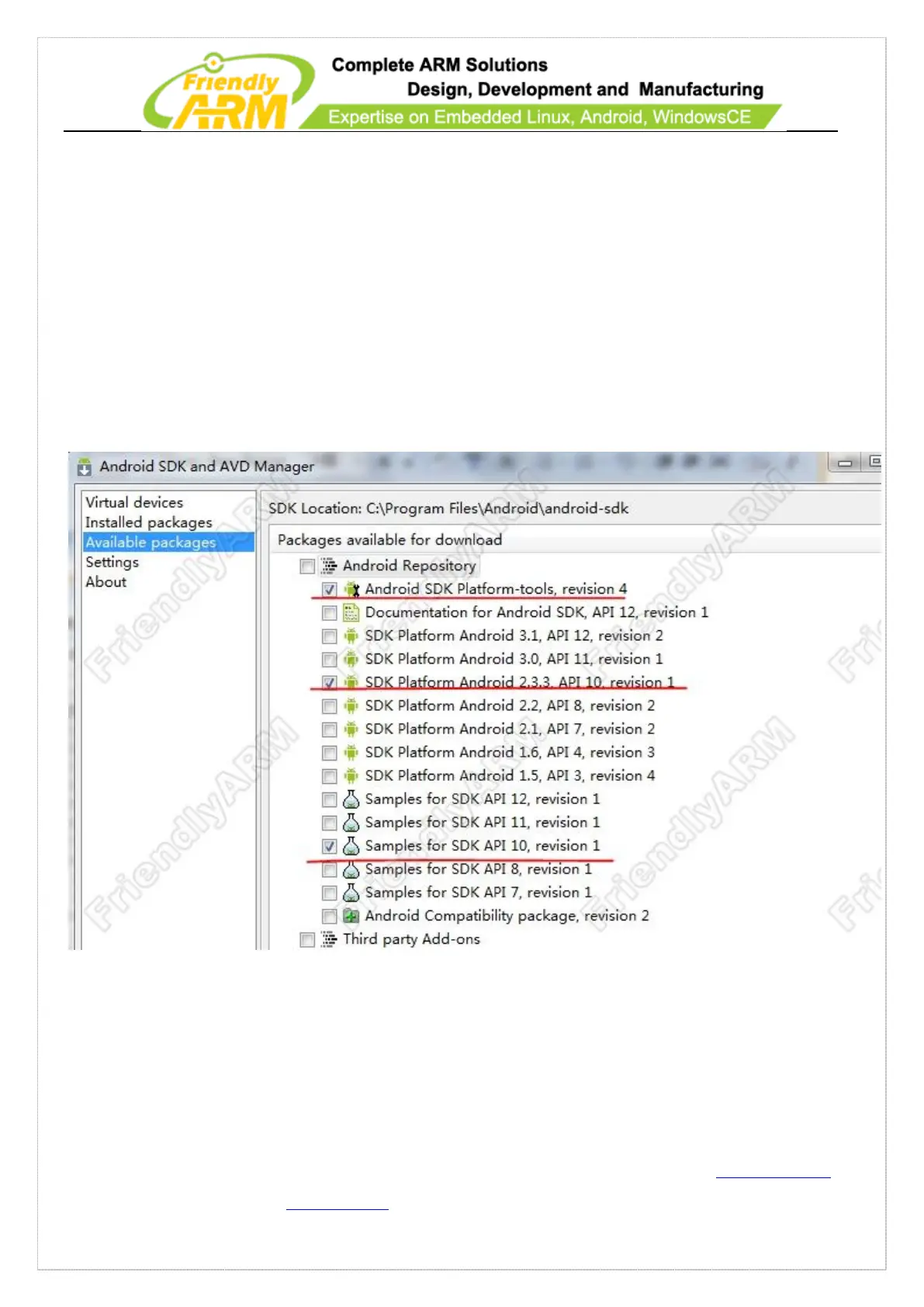
Run the SDK Manager as an administrator, select “Available Packages”, and click on
the “>” icon beside “Android Repository” to expand it and check the options shown
below:
Click on “Install Selected”, select “Accept All” in the “Choose Packages to Install”
dialog and click on “Install” to begin download. This may take a while.
After download is completed a message box will pop up asking you whether you



 To Next Page