12
Individual part names
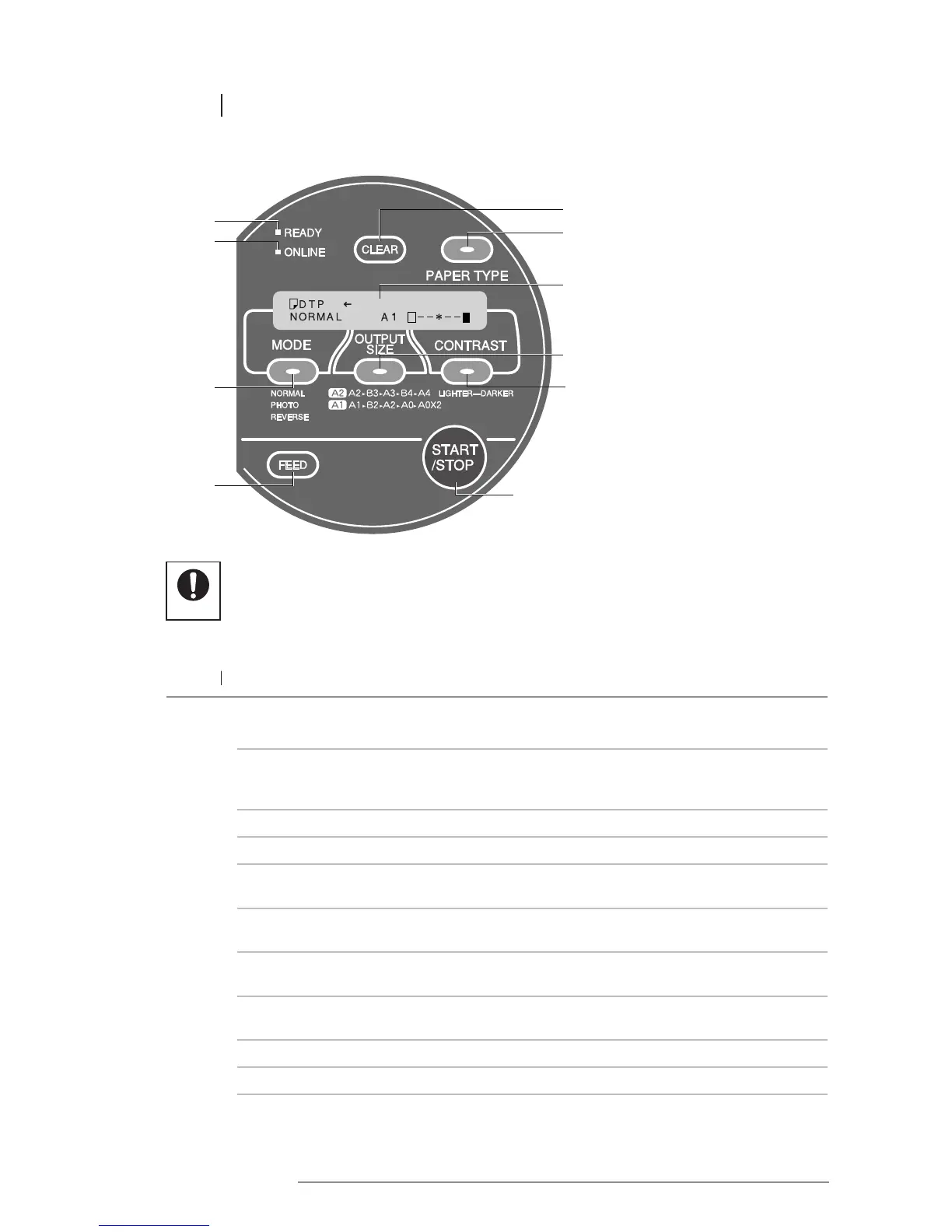
2.5 CONTROL PANEL
No. Name Function
1
MESSAGE display The message display indicates the paper type and output color, mode, output
size, contrast, an any operating/error messages.
2
PAPER TYPE key Press the PAPER TYPE key to set the type of paper installed in the printer
(DTP, TTP, HDP). If the paper type is set incorrectly, contrast on the poster
may be affected.
3
MODE key Press the MODE key to set the desired mode (normal, photo, reverse).
4
OUTPUT SIZE key Press the OUTPUT SIZE key to set the desired output size.
5
CONTRAST key Press the CONTRAST key to lighten or darken contrast in accordance
with the input document.
6
START/STOP key Press the START/STOP key to either start printing, or to stop the printing
process midway.
7
FEED key Press the FEED key to feed the paper through the printer
(approximately 77 mm at a time).
8
CLEAR key The CLEAR key is mainly used when printing in online mode.
(Refer to the “Interface Kit User’s Guide”.)
9
ONLINE lamp The printer is in online mode with a computer when this lamp is lit.
10
READY lamp The printer is ready to use when this lamp is lit.














 To Next Page