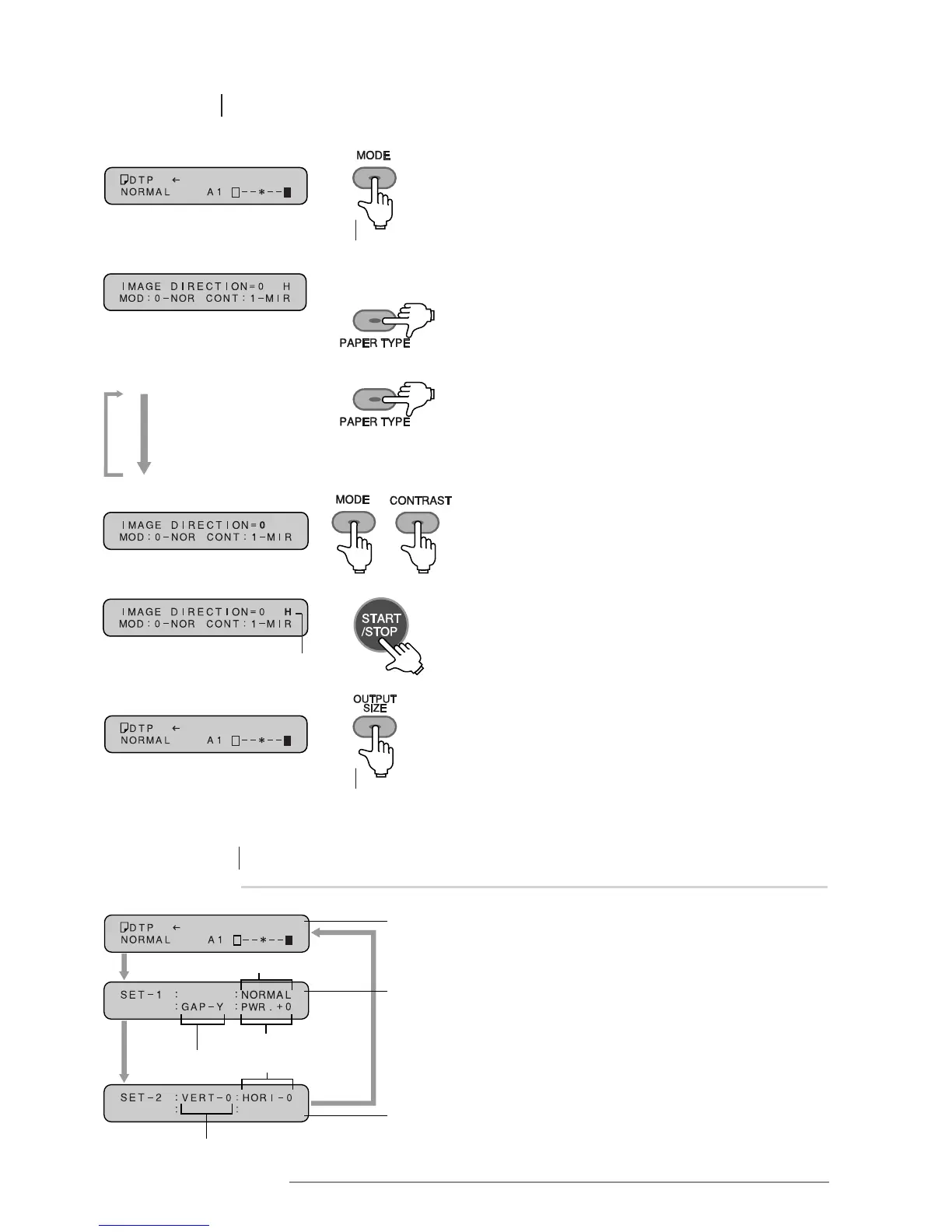
1 Press the MODE key for at least 3 seconds to set the
printer in function mode.
4 Press the START/STOP key to store the input data.
Repeat steps 2 to 4 to set additional parameters.
3 Use the MODE and CONTRAST keys to select
the parameters as desired.
2 Press the PAPER TYPE key to select
the desired function.
The “IMAGE DIRECTION” screen will be displayed.
SELECTING DIFFERENT ITEMS IN FUNCTION MODE:
Repeatedly pressing the PAPER TYPE key will
display all of the functions in function mode.
Press for at
least 3 seconds
5 Press the OUTPUT SIZE key for at least 3 seconds
to revert to the original message display.
“H” (Hold) will be displayed
Press for at
least 3 seconds
Checking current setting
Original
screen
Setting
screen 1
Setting
screen 2
Press for at least
3seconds
Press for
at least
3 seconds
Image direction
Printing power
Horizontal line
Vertical line
• Pressing the OUTPUT SIZE key for at least 3 seconds
when the printer is in NORMAL mode displays the
first setting screen.
• Pressing the OUTPUT SIZE key for a further 3 seconds
displays the second setting screen.
• Pressing the OUTPUT SIZE key again will revert
the screen to the original message display.
Page gap
Press for at least
3 seconds














 To Next Page