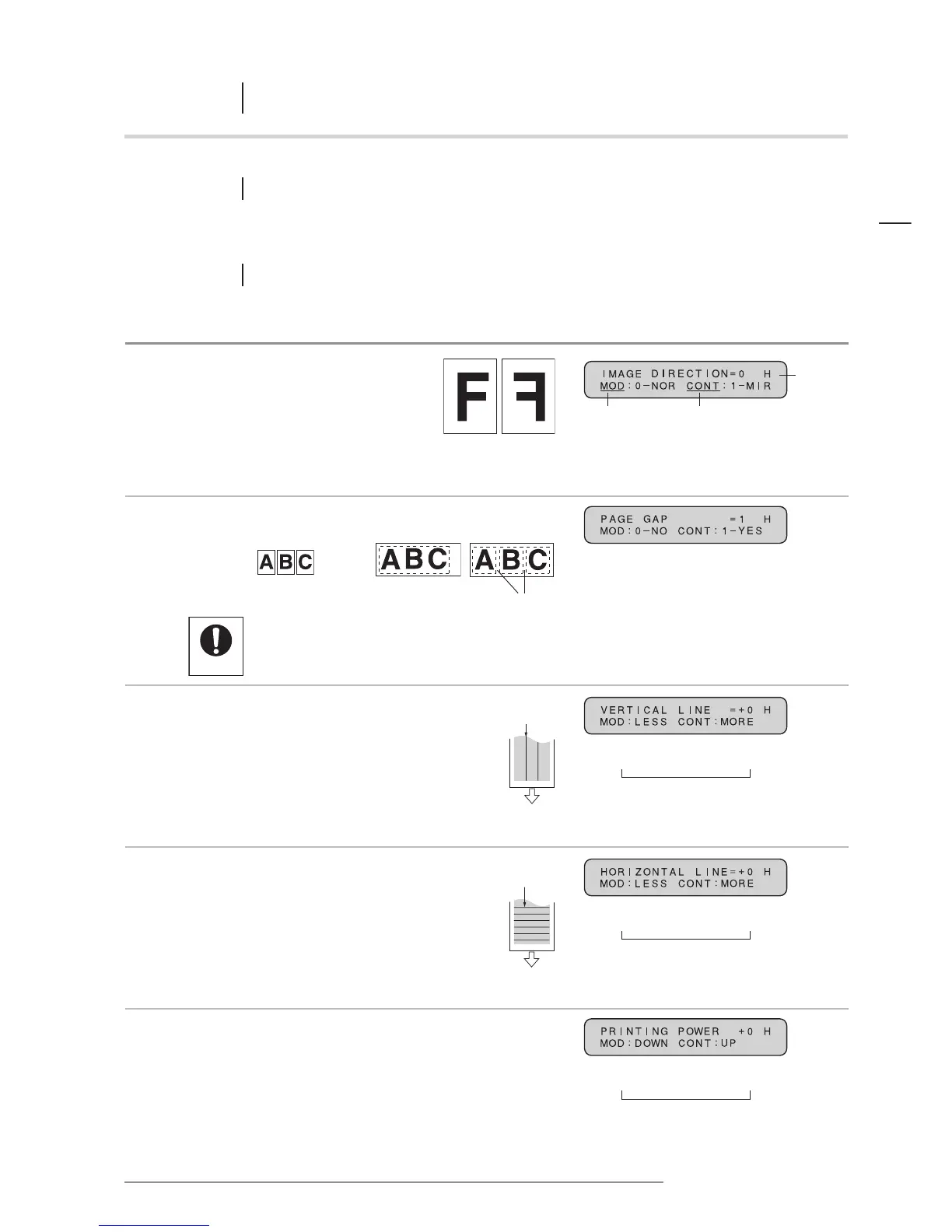
IMAGE
DIRECTION
PAGE GAP
VERTICAL LINE
ADJUSTMENT
HORIZONTAL LINE
ADJUSTMENT
PRINTING
POWER
Additional functions
25
ENGLISH
CHAPTER
6 Additional functions
6.1 FUNCTION MODE
The following parameters can be input into the printer, to adjust printing functions and quality.
6.1.1 Function description and messages
Function/Description
The direction of the image can
be changed to create a mirror
image of the original.
The white gaps between pages can be eliminated
when printing banners from a series of original sheets.
• If “NO” is selected for PAGE GAP, cutting marks
will not be printed on the poster.
• If “NO” is selected for PAGE GAP, be sure to press
the paper FEED key before cutting the banner.
Vertical lines which may show up
on the printed image can be adjusted
to appear less conspicuous. For dark
lines, press the MODE key to reduce
the setting level. For white lines,
press the CONTRAST key to increase
the setting level. Note that it is
difficult to completely eliminate lines
that appear on the output document.
Horizontal lines which may show up
on the printed image can be adjusted
to appear less conspicuous. For dark
lines, press the MODE key to reduce
the setting level. For white lines,
press the CONTRAST key to increase
the setting level. Note that it is
difficult to completely eliminate lines
that appear on the output document.
Thermal head printing power can be adjusted
to any of 19 levels. Press the MODE key (-)
and the CONTRAST key (+) to shift the setting
one level in that direction.
Message display
MODE key
0: The poster is printed in its original direction
1: The poster is printed as a mirror image
of the original
Initially, the printer is set at 0.
CONTRAST key
- 4 • • • + 0 • • • + 4
minimum normal maximum
9 levels
Initially, the printer is set at + 0.
0: The poster is printed without gaps
between the pages
1: The poster is printed with gaps
between the pages
Initially, the printer is set at 1.
0: normal 1: mirror
Vertical
lines
Output
direction
Horizontal
lines
Output
direction
0: NO 1: YES
Margins
Hold
Input documents
- 8 • • • + 0 • • • + 8
minimum normal maximum
17 levels
Initially, the printer is set at + 0.
- 9 • • • + 0 • • • + 9
minimum normal maximum
19 levels
Initially, the printer is set at + 0.














 To Next Page