EasyManua.ls Logo

FujiFilm FinePix A607 - DPOF Set Frame (Reset All)

FujiFilm FinePix A607
88 pages
Print Icon
To Next Page IconTo Next Page
To Previous Page IconTo Previous Page
Loading...
37
Advanced Features
3
3
DPOFDPOF
WITHWITHDATEDATE
WITHOUTWITHOUTDATEDATE
RESETRESETALLALL
2
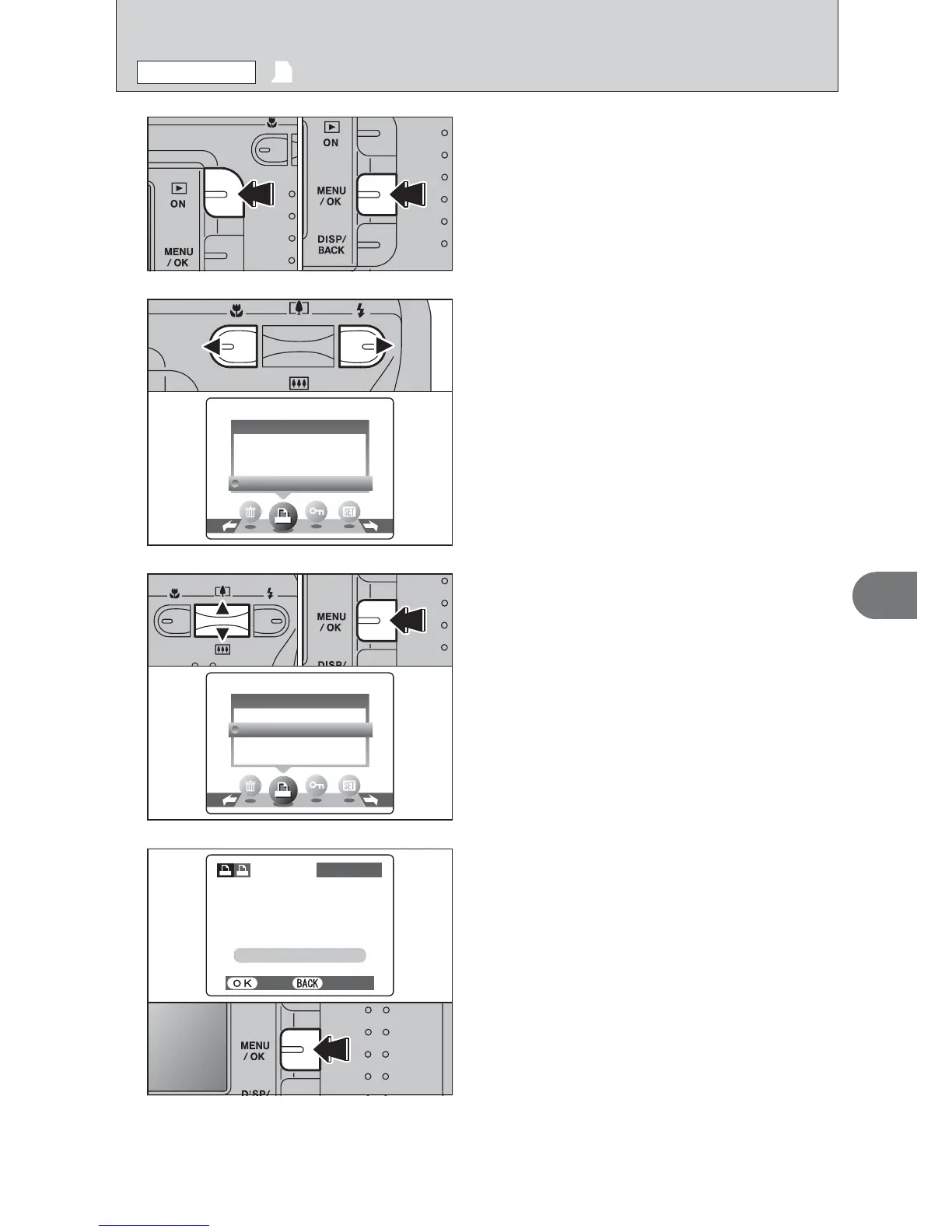
Press “d” or “c” to select “u” DPOF.
1Press the “Playback” button for approx. 1
second to turn the camera on in Playback mode.
2Press the “MENU/OK” button to display the
menu on the LCD monitor.
1Press “a” or “b” to select “RESET ALL”.
2Press the “MENU/OK” button.
4
A message appears.
To reset all the DPOF settings, press the
“MENU/OK” button.
1
01 02
u DPOF SET FRAME
(
RESET ALL
)
PLAYBACK MENU

DPOFDPOF
WITHWITHDATEDATE
WITHOUTWITHOUTDATEDATE
RESETRESETALLALL
01 02
RESET DPOF OK?RESET DPOF OK?
YESYES CANCELCANCEL
100−0009100−0009

Table of Contents

Related product manuals