90
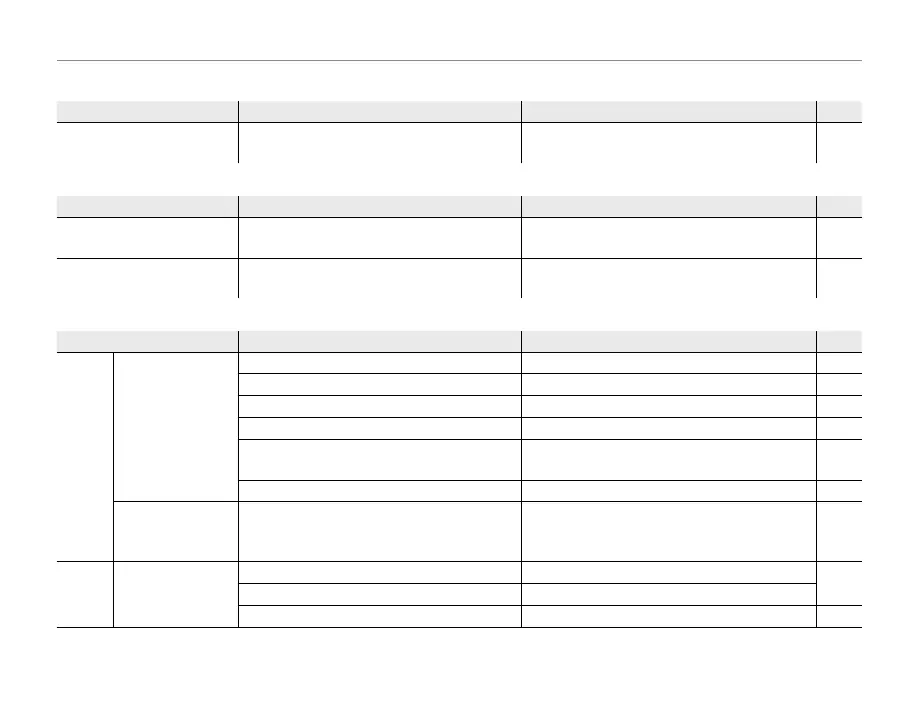
Troubleshooting
Menus and Displays
Problem
Possible cause
Solution
Page
Menus and displays are not
in English.
English is not selected for the L a
option in the setup menu.
Select ENGLISH.79
C/D
Problem
Possible cause
Solution
Page
C mode not available.
NOT 3D DISP is selected for r 3D CAU-
TION DISP .
Select OFF or ON.85
C display not available in
C mode.
v POWER SAVE 1 is selected for S POW-
ER MANAGEMENT.
Select another power management option. 80
Shooting
Problem
Possible cause
Solution
Page
Taking
pictures
No picture is taken
when the shutter
button is pressed.
Memory is full. Insert a new memory card or delete pictures. 9, 42
Memory is not formatted.
Format the memory card or internal memory.
82
There is dirt on the memory card contacts. Clean the contacts with a soft, dry cloth. —
The memory card is damaged. Insert a new memory card. 9
The battery is exhausted.
Charge the battery or insert a fully-charged
spare battery.
5, 6
The camera has turned o automatically. Turn the camera on. 12
The monitor goes
dark after shoot-
ing.
The ash has red.
The monitor may darken while the ash
charges. Wait for the ash to charge.
19
Focus
The camera does
not focus.
The subject is close to the camera. Select macro mode.
34
The subject is far away from the camera. Cancel macro mode.
The subject is not suited to autofocus. Use focus lock. 32



 To Next Page
 Loading...