Instructions for SL500DC/SL800DC
www.gatexpertstore.com
A. Operation Instruction
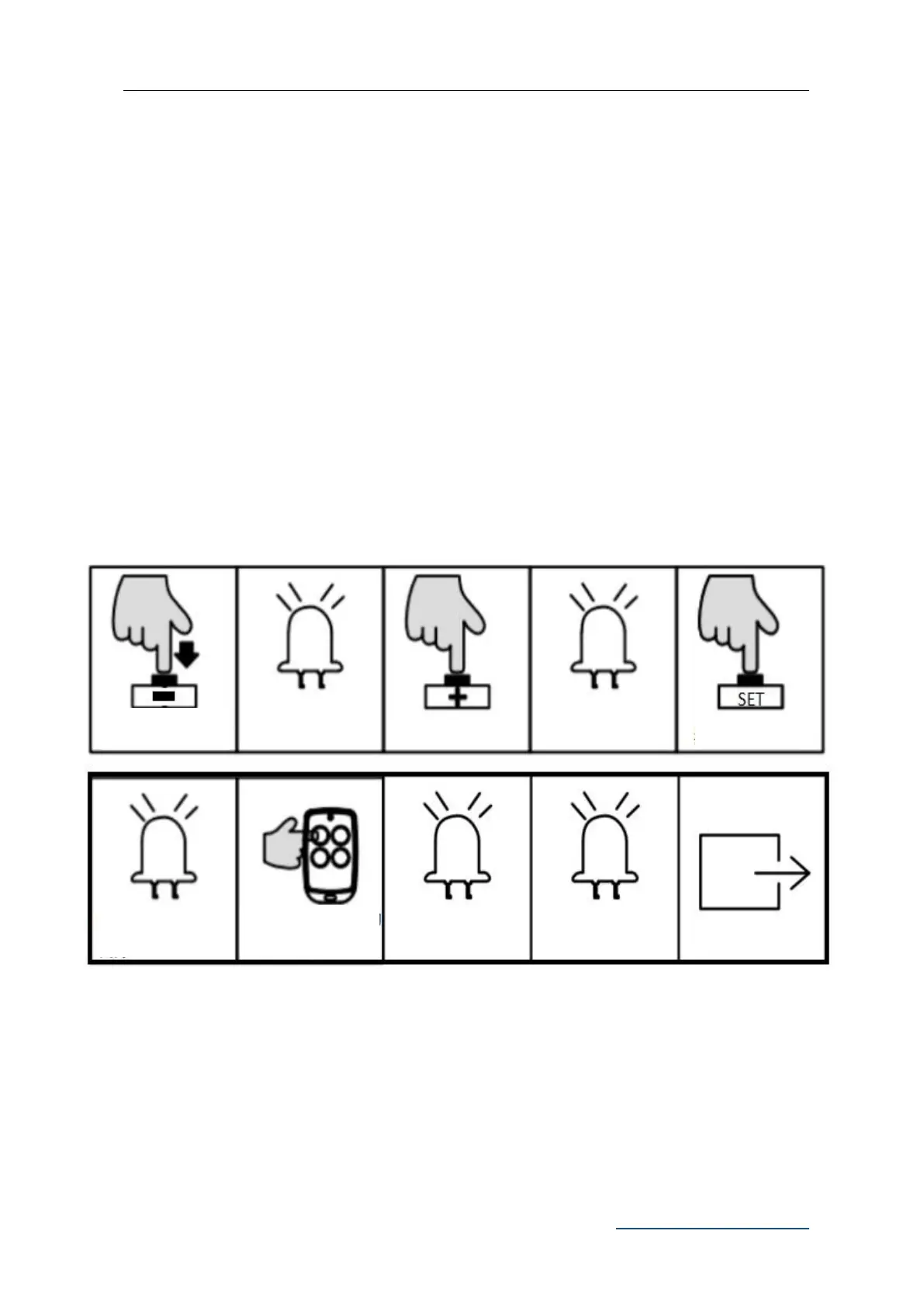
1. Press and hold “-” button for 2 sec. to enter into remote control management mode.
Indicator light L1 will be steady on.
2. Press “+” button once to select three button learning mode option. Indicator light L2
will be steady on.
3. Press “SET” button once to enter into three button learning mode. All indicator lights
will flicker repeatedly from L1 to L5. (If an alarm lamp is connected, it’ll blink as well)
4. Press the button which is to be paired on the remote control twice. The indicator lights
L1-L5 will be on in sequence, then all will flicker once and off. (If an alarm lamp is
connected, it’ll be on for one sec.) Learning is complete thereafter.
B. Operation Graphic Illustration
Note: If there is no operation under the remote control learning status for 20 sec., system
will automatically exit the setting and save all the paired remote controls.
Pedestrian Mode on Remote Control (L3)
Pedestrian mode function: when gate is closed, press the Pedestrian button on the remote
L1-L5 will flicker
repeatedly
Press the button to be
paired twice
L1-L5 will be on in
sequence



 To Next Page