Instructions for SL500DC/SL800DC
www.gatexpertstore.com
2. To ensure the reliability of learning, please operate the quick learning function within 2
meters from the gate opener.
3. Please make sure that the gate opener is equipped with an alarm lamp, which will help
you to check the status of remote control learning.
A. Operation Instruction:
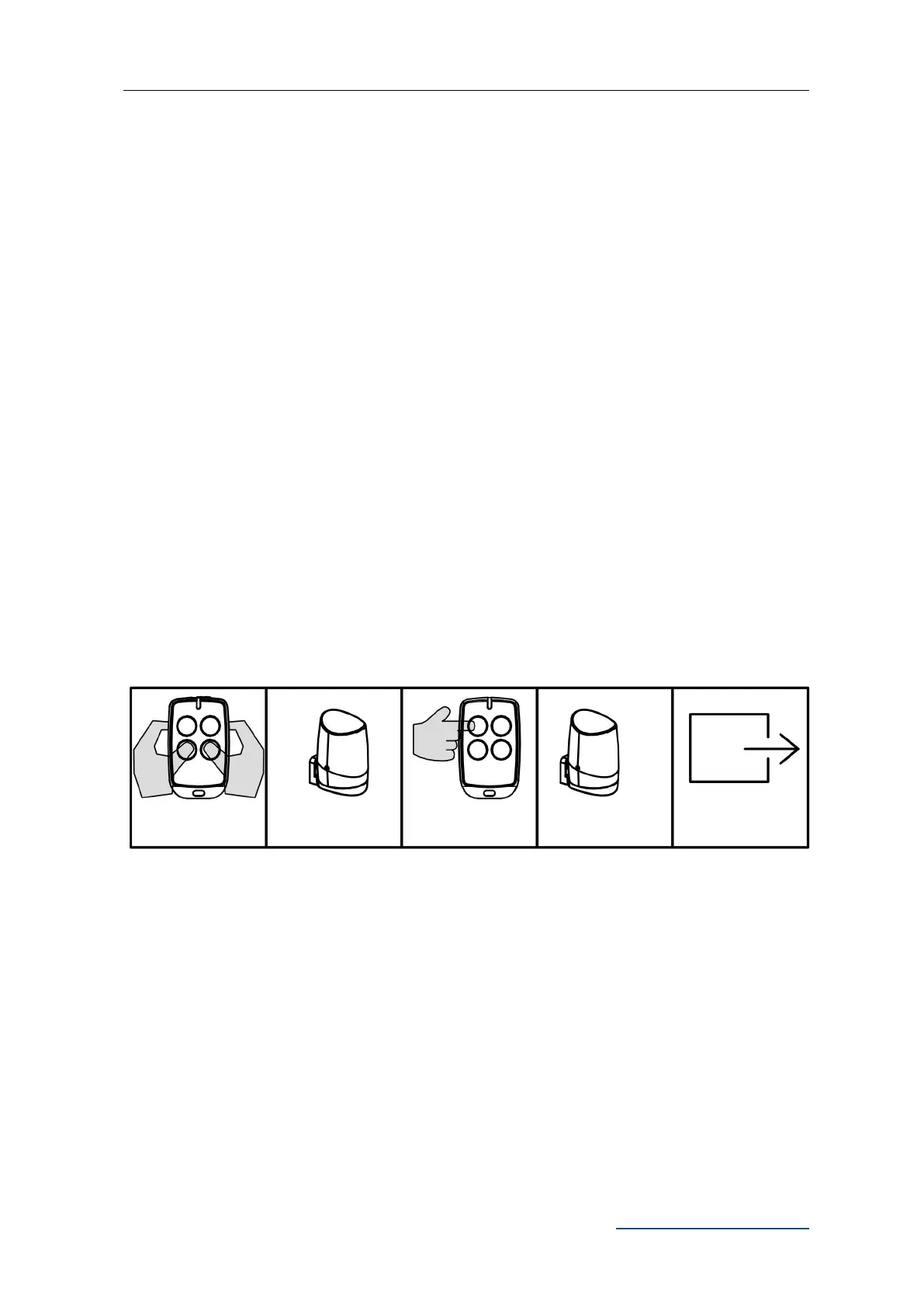
1. Simultaneously press and hold the third and the fourth buttons of the paired remote
control for 6 sec. The alarm lamp will flash, which indicates that the learning
function of the control board is on working.
2. Press the button to be learned on the remote control under the above status. The
alarm lamp will be off. Then remote control learning is complete.
3. The system will automatically exit the learning mode after pairing finished.
Note: The remote control working mode will be copied from original one to new
paired one.
B. Operation Graphic Illustration:
Basic Menu Setting
Operation Instruction:
1. Under standby mode, press and hold “PROG” button for 3 sec., the indicator light L0 will
flicker once and enter into basic menu setting.
2. Press “+” or “-” button to select the different function settings.
3. Press “SET” button to enter into the selected function setting.
Press these 2 buttons
together for 6 sec.
Press the button to
be paired twice



 To Next Page