4-10 W650 Wind Generator Protection System GEK-113032A
4.1 ENERVISTA 650 SETUP SOFTWARE INTERFACE 4 HUMAN INTERFACES.
4
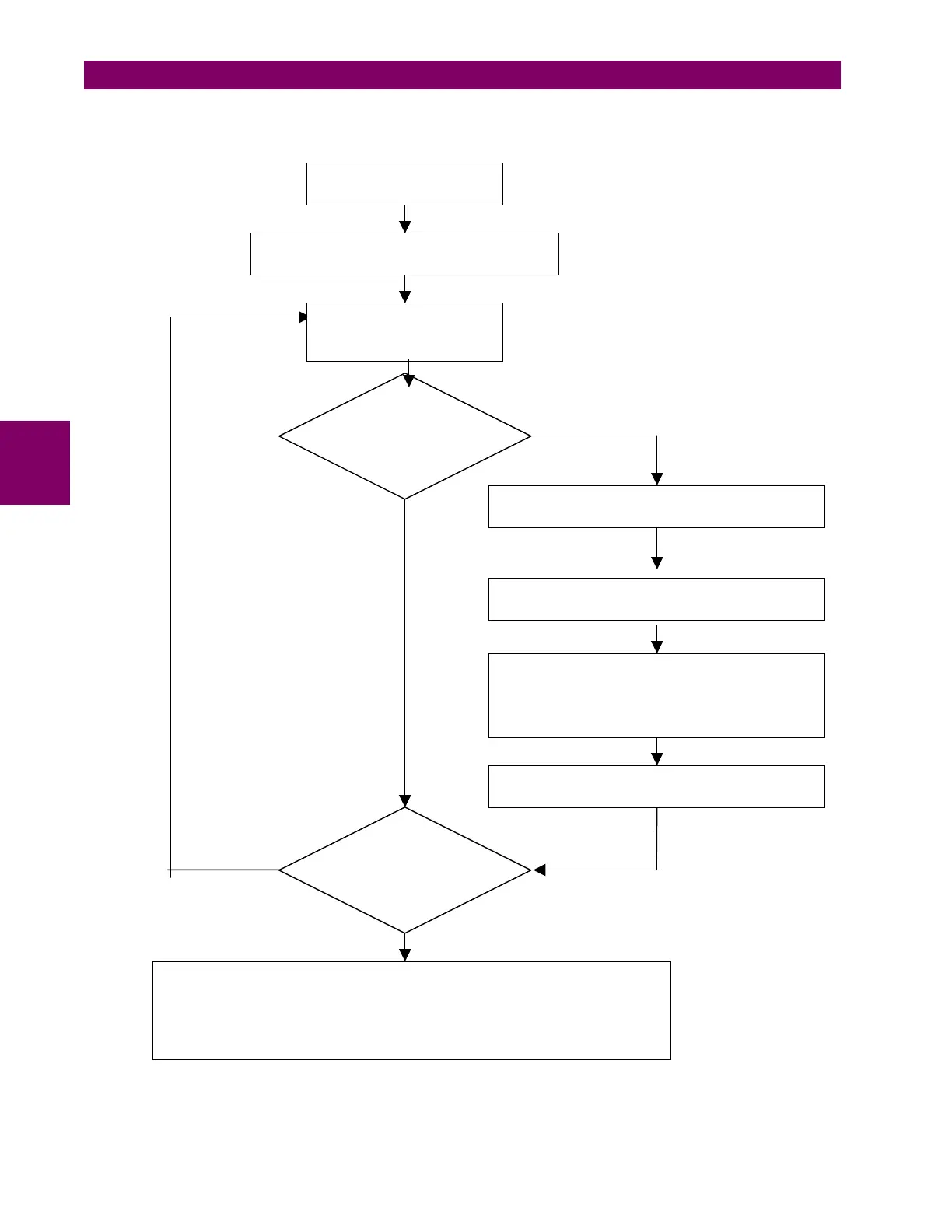
4.1.5.2 ON LINE MODE
Figure 4–4: ON LINE MODE FILE MANAGEMENT
NO
Run EnerVista 650 Setup
Connect to the relay
“Communication>Com
uter>O
”
Modify and send to the
relay protection Settings
and rela
confi
uration
Is it necessary to
program
additional logic?
Launch the Logic Configuration tool in EnerVista
650 Setu
“Set
oint>Lo
ic Confi
uration”
Create new or modify the existing logic
“File>O
en Pro
ect”
Compile (“Run>Compile”)
and save logic file (*.pep) and drawing design
(*.aut) in Logic Configuration tool (“File>Save
Project”)
Send logic to relay (“Run>Send Equations to
Rela
”
and Exit PLC Gra
hic Edito
Is the relay
completely
configured?
Save all settings & configuration (“File>Get info from relay”)
Store in the relay the Logic configuration files (*.pep, *.aut, *.lib) as well as the
*.650 for further logic changes. (“Communication>Upload info files to relay”)
NO
YES
YES


 To Next Page