63
Multi Timbral Operation
Track 1 can record a Single, Layer or Split Preset.
Track 2 can record a Preset (Single, Split, Layer) independent from Track 1.
During playback, it is possible to play along with the song using another
Preset (Single, Split, Layer).
Therefore, RP220 achieves 6 part multitimbral capability, 4 parts played
by the sequencer and 2 in real time on the keyboard.
The DSP parameters recalled (Reverb & Effect) are always those of the
last Preset selected, while the section send levels remain independent.
Selecting the tracks for recording
Record Track 1
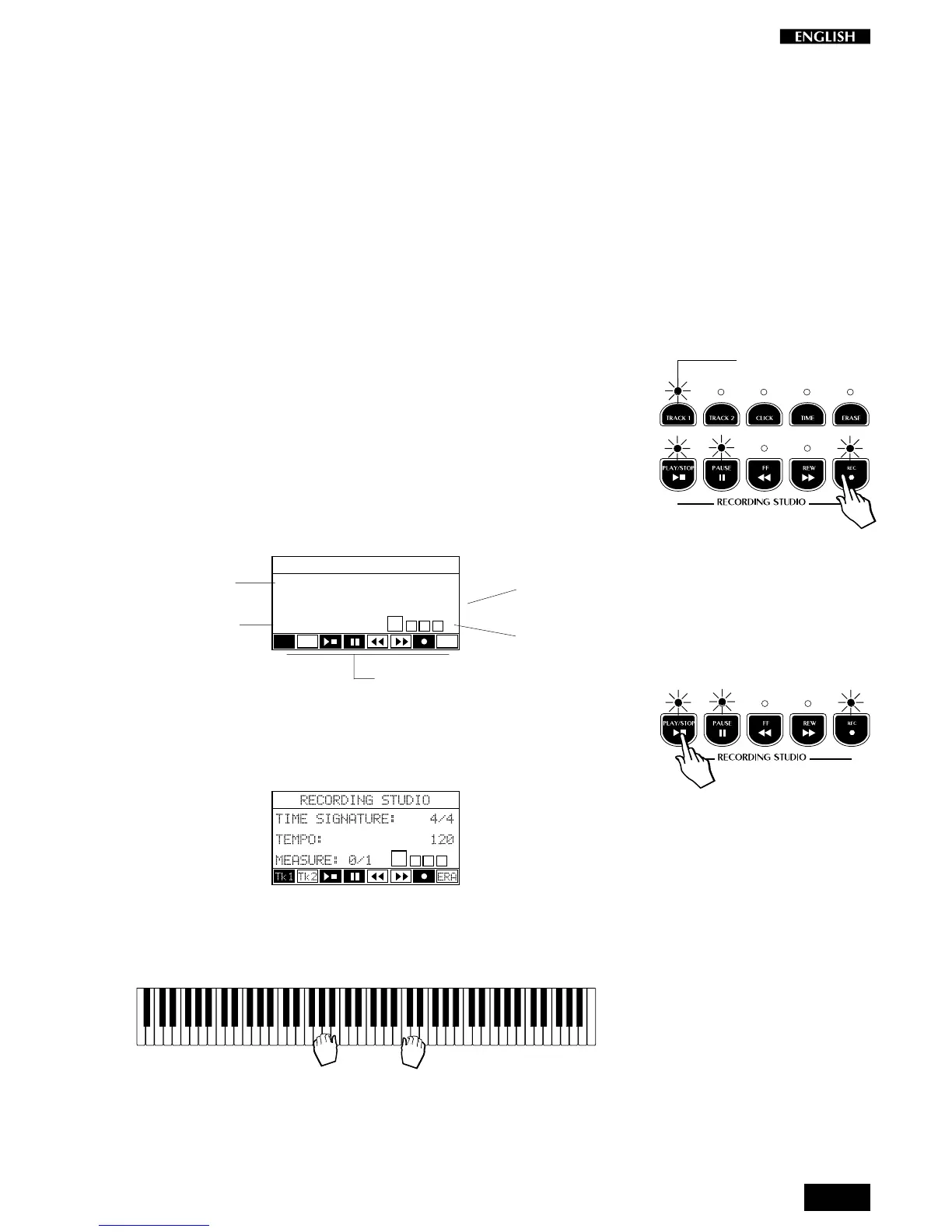
1. Press the REC button.
The sequencer activates automatically to record Track 1 (Track 1
LED flashing, Play/Stop, Pause and Rec LED on).
At the same time the Recording Studio display also activates
showing the status of the recording parameters:
RECORDING STUDIO
TIME SIGNATURE: 4/4
TEMPO: 120
MEASURE:
Tk1 Tk2
ERA
2. Press Play/Stop (or Pause) to start the recording.
A one measure countdown into the recording starts, monitored by
the Measure counter.
During this stage, anything you play will not be recorded.
3. As soon as the countdown measure ends, start to play on the
keyboard.
The sequencer records the song just as you play it. Any Preset
changes you make will also be recorded.
Measure counter
Tempo setting
Time Signature
Virtual sequencer control panel
Graphical
metronome
Flashing



 To Next Page