25
The Effects
The Presets include DSP data (Reverb and modulating Effects), of
fundamental musical importance, because it allows you to select Preset
sounds together with appropriate effects settings without additional
operations. For example, the Preset “Rhodex1” (El Piano n. 1) carries the
Stage reverb and a Chorus effect, while the Preset “Wurlie” (El Piano n.
2) recalls the Room reverb and a Tremolo effect.
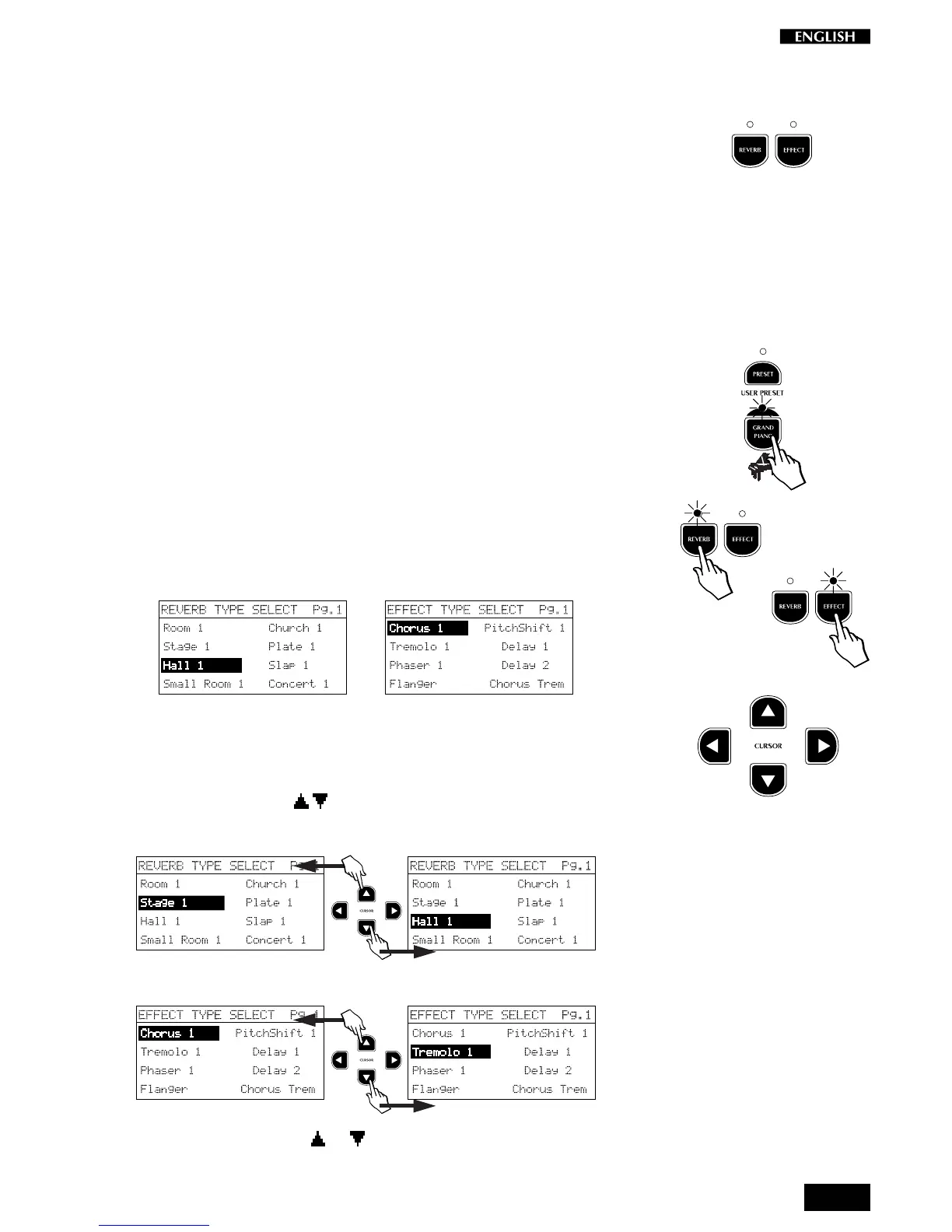
To insert or deactivate the effects, simply press the corresponding effect
button (Reverb and/or Effect). When the LEDs of either or both buttons
are on, the corresponding effect types are active. When the LEDs are off,
the effects are deactivated.
Selecting different effects
When you press one of these buttons, the effect assigned to the current
Preset is displayed for a short period.
Example:
1. Press the GrandPiano button.
2. Press the Reverb or Effect button.
The display shows the Reverb or Effect type memorized for the
GrandPiano sound (Hall 1 for Reverb and Chorus 1 for Effect in this
case):
Reverb display: Effect display:
…
3. If, during the temporary display period, you press the CURSOR
buttons to the right of the display, you can change the Reverb or
Effect type.
Pressing the Cursor / buttons scroll the Reverb or Effect types.
Reverb displays:
Effect displays:
If you hold the Cursor or button, you can scroll through both
columns of the current display.



 To Next Page