17
Recording a song
The RP220 sequencer (Recording Studio) allows you to record a simple
song just as you play it.
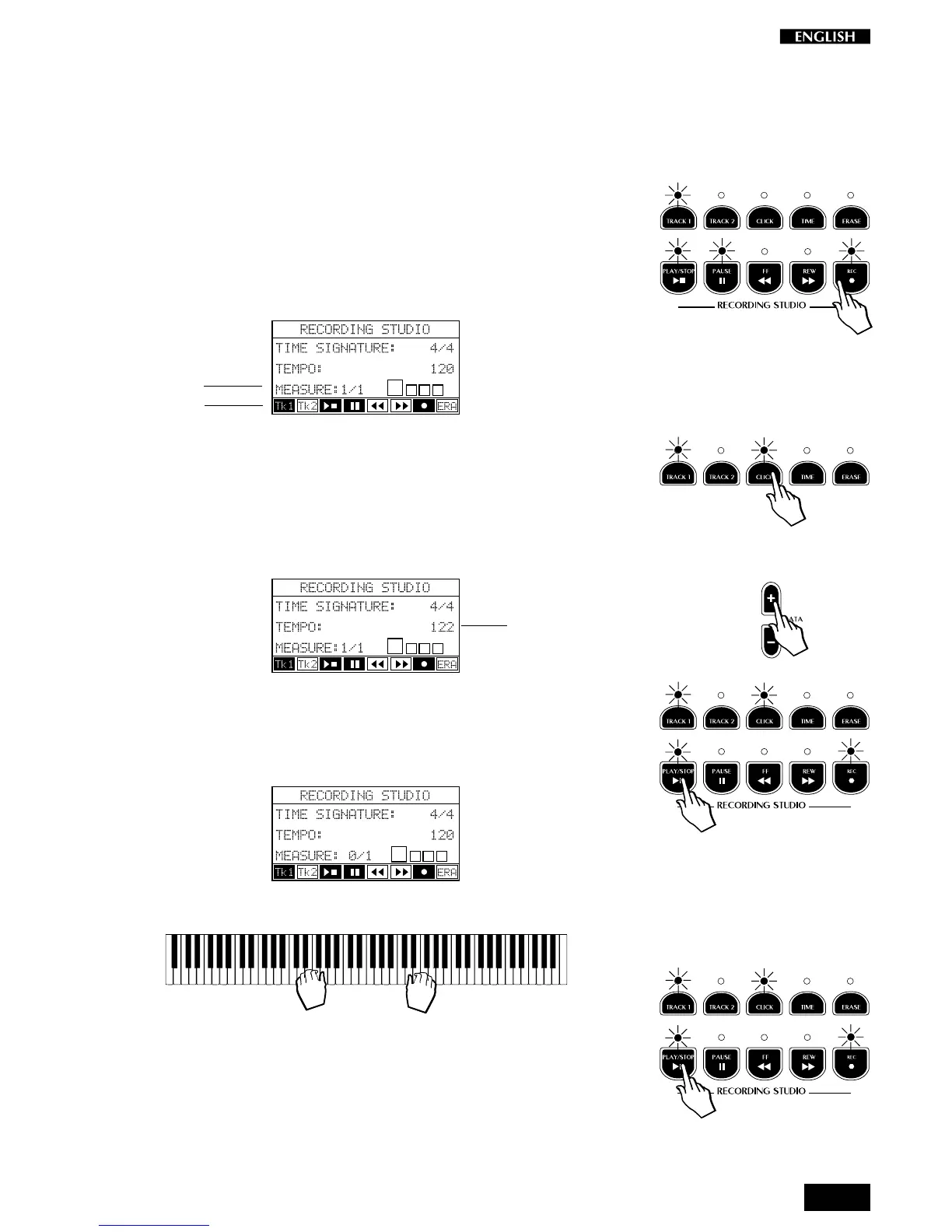
1. Select the Preset that you want to record.
2. Press the REC button.
The LED of the TRACK 1 button starts to flash and the display shows
the Time Signature, the Measure counter (Song pointer) and the
current Tempo setting.
3. If you want to record with the click of the Metronome, press the
CLICK button in the Recording Studio.
4. Using the DATA +/– buttons you can adjust the recording and
playback speed (Tempo):
5. Press the PLAY/STOP or PAUSE button.
A one measure countdown into the recording starts, indicated by the
Measure counter (0/1, 0/2, 0/3, 0/4):
6. Start to play after the one measure countdown.
7. When you have finished playing, press PLAY/STOP.
The LED of the Track 1 button remains on to show that the track
contains recorded data.
At this point, you can activate the Track 2 button and repeat the
recording procedure to record the second track. Pressing Play/
Stop activates the Track 1 playback and the Track 2 recording
Tempo setting
Song pointer
Flashing



 To Next Page