Rev. 00 04/19
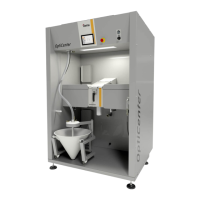
OptiCenter OC06 Touch panel / operating panel
27
The rest of the non-separated powder (most of it is fine particles) goes into the after filter (5). The after filter separates the powder into a waste container (6), which is positioned directly under the filter elements and is very easy to empty. Then, the cleaned air leaves the filter and is fed directly back into the workshop environment.
Touch panel / operating panel
Typical characteristics
– Powder coating in 2 operating modes
– Cleaning in cleaning mode
– User administration and language management
– Configuration and parameter data management
– Alarm handling
– Diagnostic functions
– Operating data acquisition
– Storage of operating data on SD cards
– Data exchange with higher-level plant controls (option)
– 7.0" display with symbol elements
– TFT color screen with touch screen function
– CAN bus technology
– Multilingual version


 To Next Page