EasyManua.ls Logo

Gema OptiCenter OC06 - Symbols

Gema OptiCenter OC06
126 pages
Print Icon
To Next Page IconTo Next Page
To Previous Page IconTo Previous Page
Loading...
Rev. 00 04/19
32
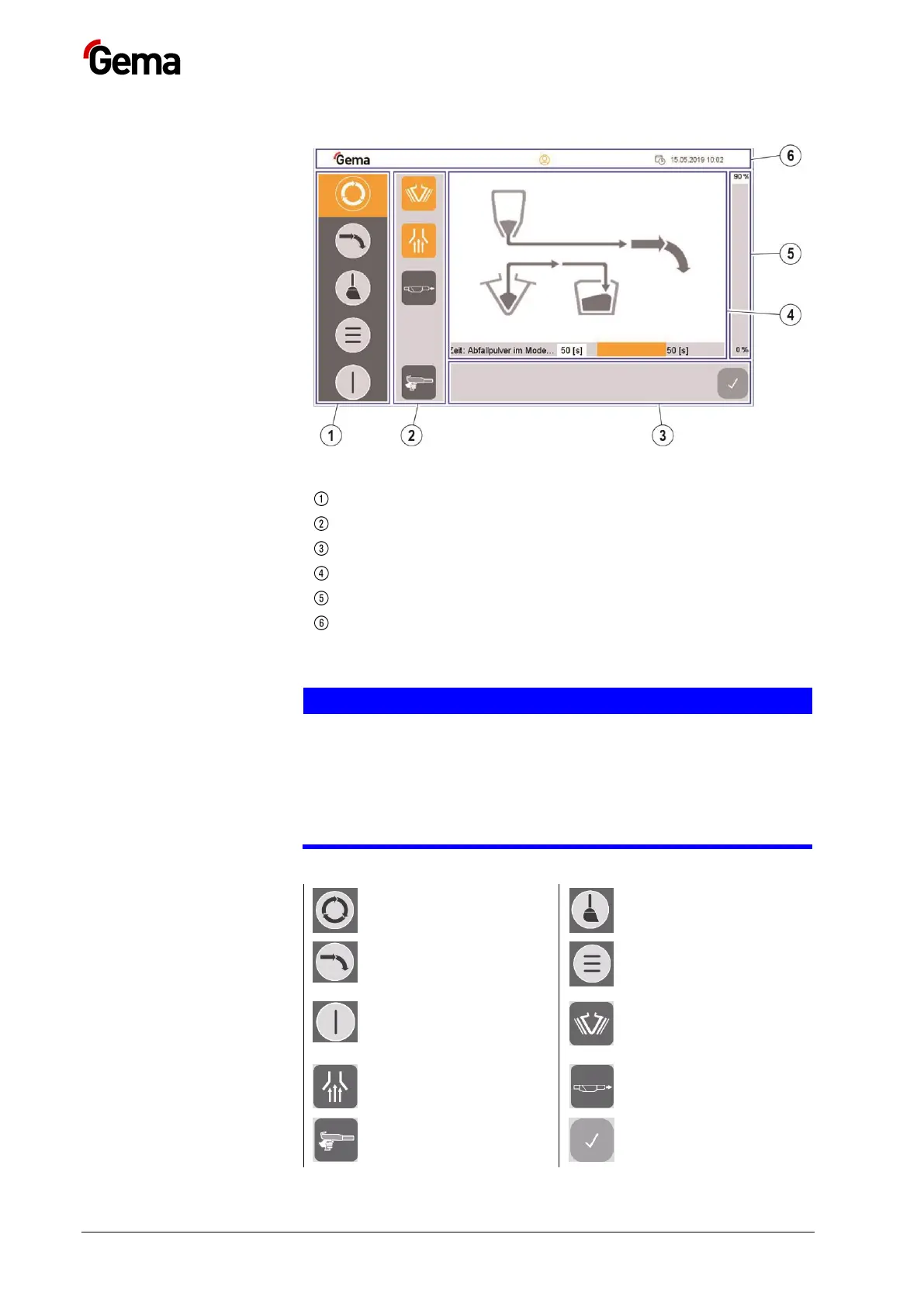
Touch panel / operating panel OptiCenter OC06
Symbols
Fig.
21
Navigation bar
Mode-dependent bar
Process-dependent bar
Plant overview
Powder filling level indicator
Login status bar
Function keys
ATTENTION
Sensitive touch surface.
Pointed or sharp objects can damage the screen.
Do not use any pointed or sharp objects (e.g. knife).
Only activate the touch panel with your finger or a stylus.
When wearing gloves, ensure that these are clean. They must not
be covered with abrasive dust or sharp particles.
The function keys are distributed on the user interface.
Coating with powder
recovery
Cleaning operation
mode
Coating without powder
recovery (spray to
waste container)
Main menu
OptiCenter OFF
(Press and hold 2
seconds)
Vibrator ON/OFF
Extraction system
ON/OFF
Gun hose rinsing
Manual coating
Confirm error
messages

Table of Contents

Related product manuals