Rev. 00 04/19
82
Maintenance / Repairs OptiCenter OC06
32. Compressed air pulses blow through the hose from the OptiCenter
to the cyclone
The process can be manually stopped and resumed by the
operator.
33. Swing the funnel on the cyclone slowly away and, at the same time,
clean it off with the air gun
34. Clean the inside of the cyclone with the cleaning wand
35. Reconnect the sieve machine and funnel to the cyclone
36. If a new color is to be used: See chapter "Color change" on page 67.
OTHERWISE
37. To switch the OptiCenter to stand-by mode, press and hold the
key for 2 seconds.
38. Store the powder properly
Cleaning with recovery in the powder bag
To use this function, parameter 3413 must be set and the optional
“powder recovery system” extension must be installed.
– See chapter "Parameter description" on page 54.
– See chapter "Color change" on page 67.
The powder circuit could contain more than 20 kg of powder.
– Be sure to estimate the powder volume in the system.
– If you suspect that there is too much powder in the system, the
process must be monitored and stopped if necessary.
1. End the coating procedure
2. To exit Coating mode, press and hold the key for 2 seconds.
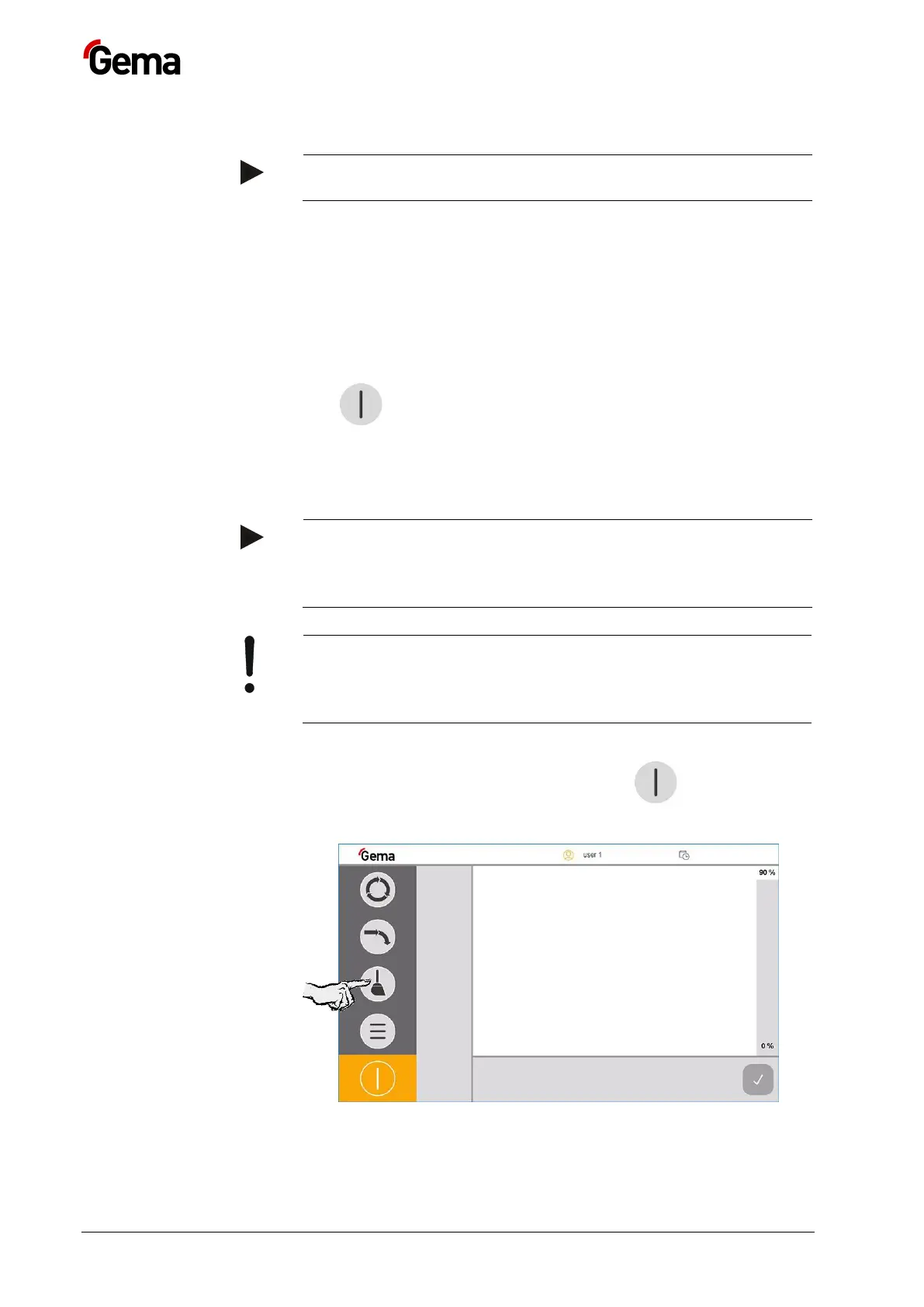
The following menu appears on the display:
3.
4. Select the desired cleaning mode


 To Next Page