78
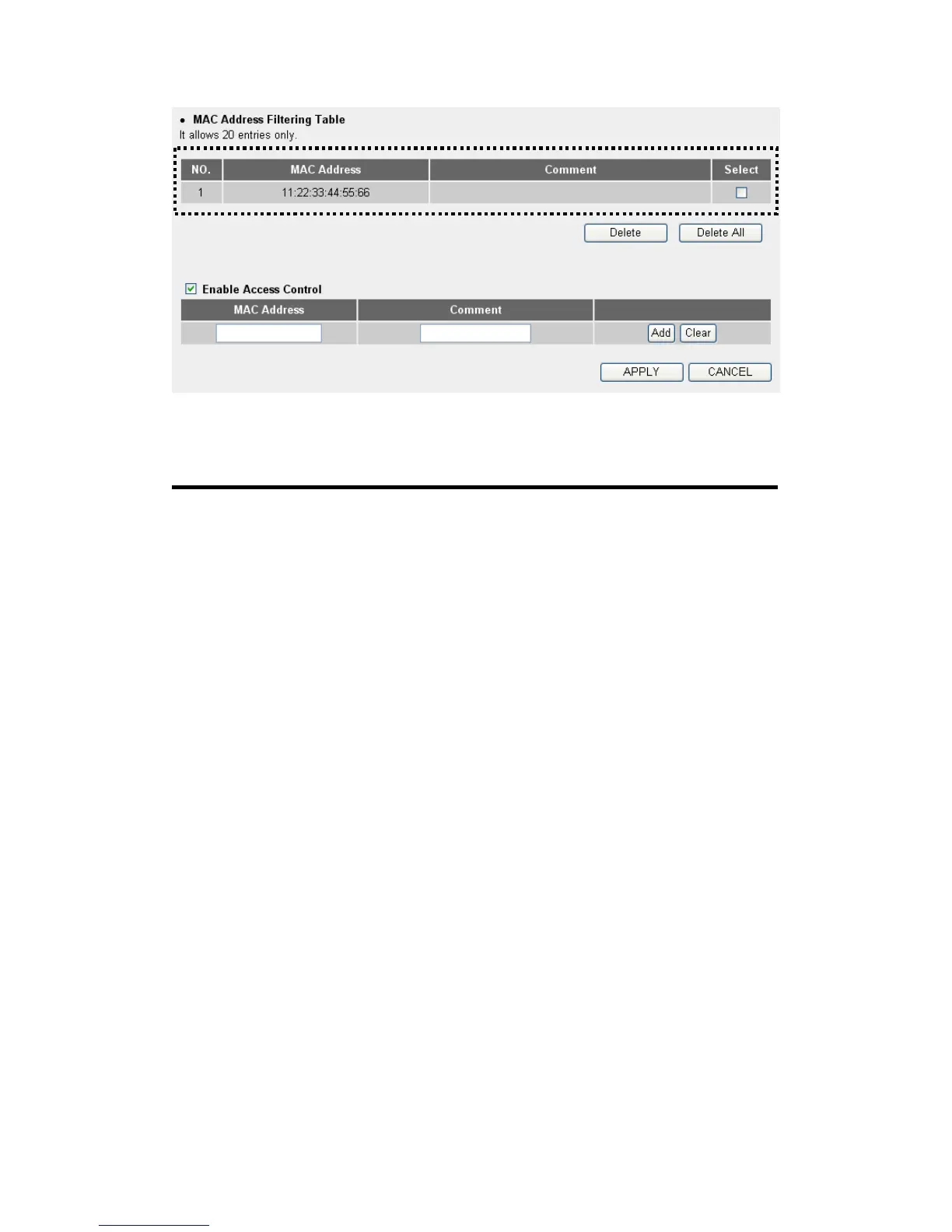
All allowed MAC addresses will be displayed in ‘MAC Address Filtering
Table’ (1). Here are descriptions of every setup items:
Delete Selected (2): If you want to delete a specific MAC address entry,
check the ‘select’ box of the MAC address you want
to delete, then click ‘Delete Selected’ button. (You
can select more than one MAC addresses).
Delete All (3): If you want to delete all MAC addresses listed here,
please click ‘Delete All’ button.
Enable To enforce MAC address filtering,
Access Control (4): you have to check ‘Enable Wireless Access Control’.
When this item is unchecked, wireless router will
not enforce MAC address filtering of wireless
clients.
MAC Address (5): Input the MAC address of your wireless devices here,
dash ( - ) or colon ( : ) are not required. (i.e. If the
MAC address label of your wireless device indicates
‘aa-bb-cc-dd-ee-ff’ or ‘aa:bb:cc:dd:ee:ff’, just input
‘aabbccddeeff’.
Comment (6): You can input any text here as the comment of this
MAC address, like ‘ROOM 2A Computer’ or
23
4



 To Next Page