EN - 14
See Figure 3 for all controls and features
locations.
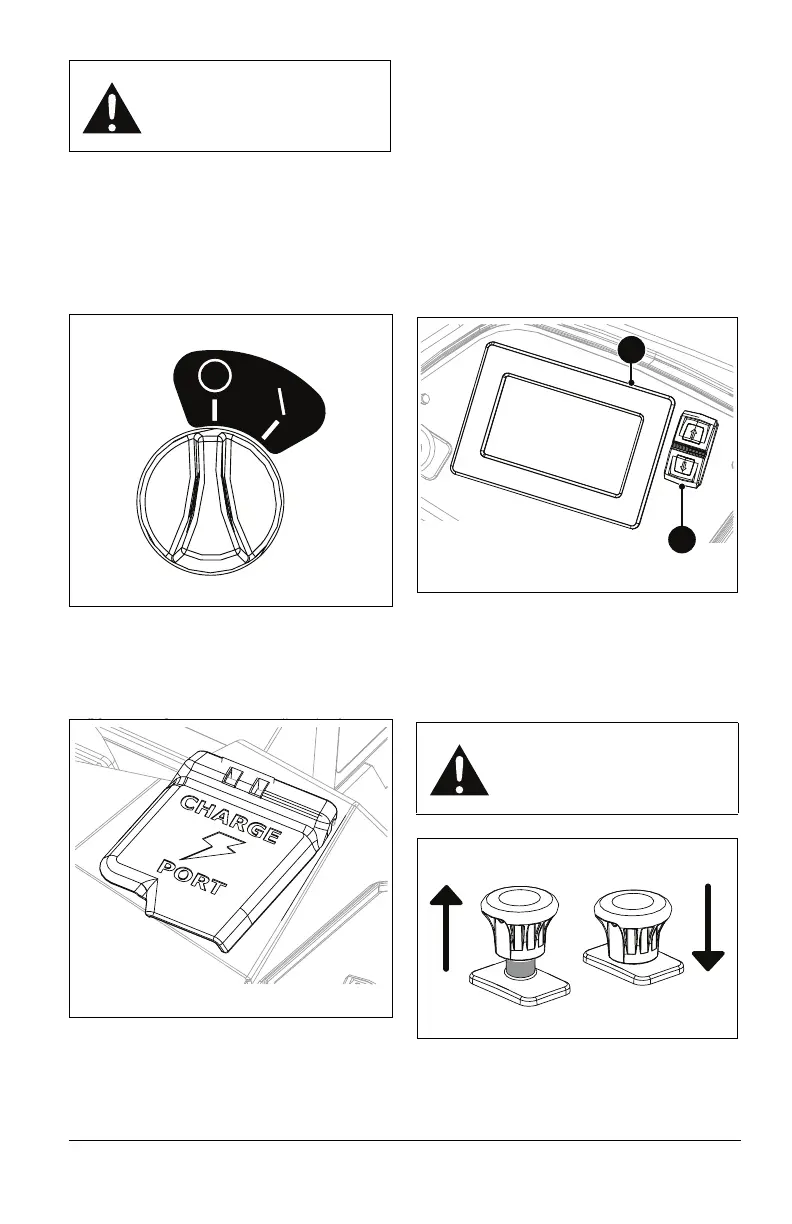
KEY SWITCH
See Figure 5.
Controls power to the system. The key
cannot be removed when in the on position.
CHARGE PORT
See Figure 6.
Provides a connection point from the charger
to the battery pack.
DIGITAL DISPLAY PANEL
See Figure 7.
Provides electrical system information to the
operator. Digital display is accessible when
key switch is turned to the on position, hood
assembly is closed, and seat is in the
operating position. Display will also turn to the
on position when charger is plugged in or
batteries are in balance mode.
DISPLAY NAVIGATION SWITCH
See Figure 7.
Navigates digital display functions.
POWER-TAKE-OFF (PTO) KNOB
See Figure 8.
Controls power to mower blades. Pull knob
up to engage and push knob down to
disengage the blades.
WARNING: AVOID INJURY.
Read and understand the
entire Safety section before
proceeding.
WARNING: AVOID INJURY.
Blades will not immediately
stop after pushing PTO knob
down to off position.
Figure 7
1. Digital Display Panel
2. Display Navigation Switch
1
2
Figure 8
Blades Off
Blades On



 To Next Page