EN - 37
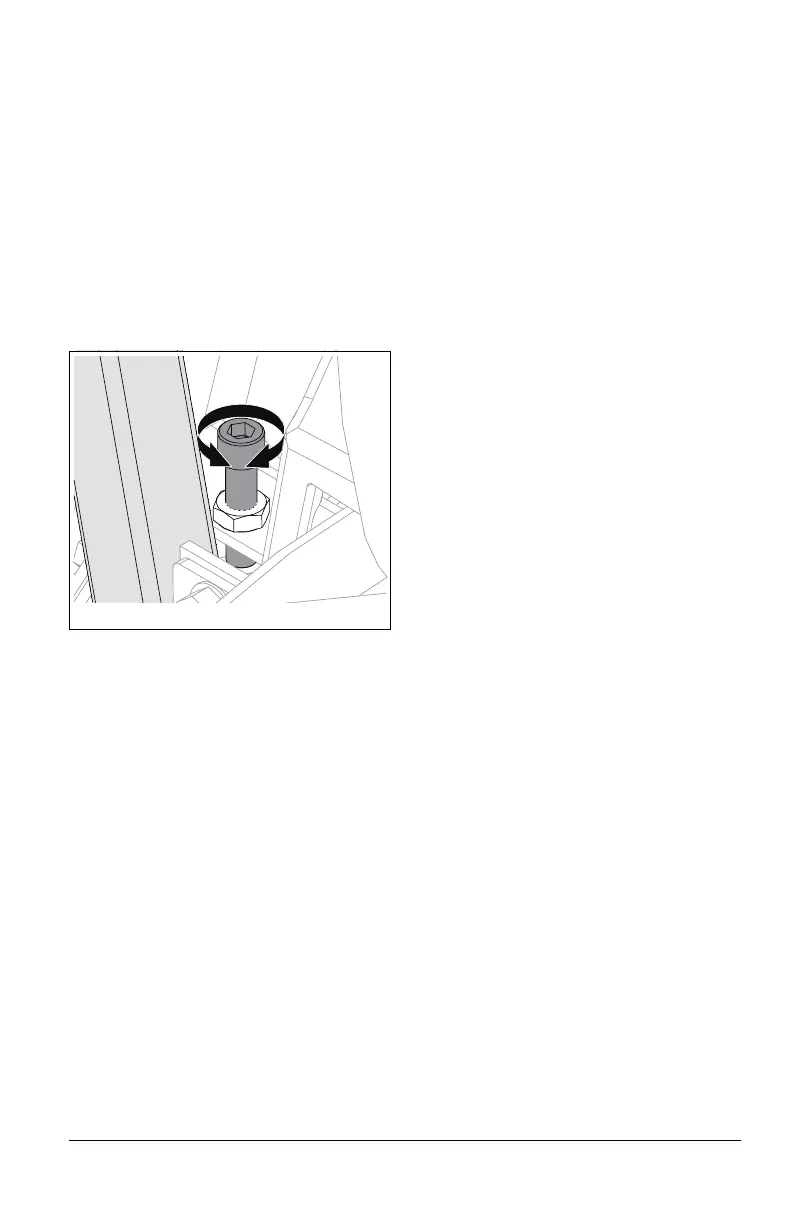
Adjust Limiter Bolts
See Figure 47.
IMPORTANT: Unit ships with limiter bolts set
to maximum drive speed.
Limiter bolts can be adjusted to increase or
decrease drive wheel speeds. To adjust:
1. Loosen jam nut.
• Turn limiter bolt counterclockwise to
increase maximum drive wheel speed
on that side.
• Turn limiter bolt clockwise to reduce
maximum drive wheel speed on that
side.
2. Tighten jam nut.
3. Align steering levers. See Adjust Steering
Levers on page 35.
CALIBRATE STEERING
SENSORS
In the event of a steering sensor, electrical, or
mechanical fault, steering sensor calibration
may be required using the user display.
NOTICE: If calibration does not properly set
neutral, forward, or reverse, contact an
authorized Gravely EV dealer.
Steering Sensor Positions
The digital display will prompt the following
steering positions during the steering sensor
calibration sequence (see Steering Sensor
Calibration Sequence on page 37):
• LN / RN: Left Neutral / Right Neutral
• LF / RF: Left Forward / Right Forward
• LR / LR: Left Reverse / Right Reverse
IMPORTANT: See Steering Sensor
Calibration Screen on page 23 for additional
user display details.
Steering Sensor Calibration
Sequence
1. Navigate to the maintenance screen on
the digital display See Maintenance
Screen on page 22.
2. Hold display switch down (approximately
10 seconds) until steering sensor
calibration screen appears. See Steering
Sensor Calibration Screen on page 23.
Follow the calibration sequence prompted on
the digital display:
IMPORTANT: Refer to the digital display for
to determine if levers are properly positioned
and step is complete.
3. Hold steering levers in neutral.
4. Position left steering lever in the forward-
most position.
5. Position left steering lever in the rear-
most position.
6. Position right steering lever in the
forward-most position.
7. Position right steering lever in the rear-
most position.
8. Position steering levers in neutral.
9. Use the navigation switch to save or
cancel the steering sensor parameters.
10. Wait until loading screen and splash
screen are complete.
11. Power cycle unit to clear calibration faults
(turn ignition key to the off position and
then return it to the on position).



 To Next Page