EN - 36
4. Adjust steering lever position.
5. Turn eccentric spacer so levers are at the
same height and have a 1.3 cm – 2.5 cm
(1/2" – 1") gap between lever ends. See
Figure 45.
If there is more than 3.2 mm (1/8") between
the horizontal alignment of the steering
levers, align the levers.
6. Remove key and wait for moving parts to
stop and for hot parts to cool.
7. Engage parking brake.
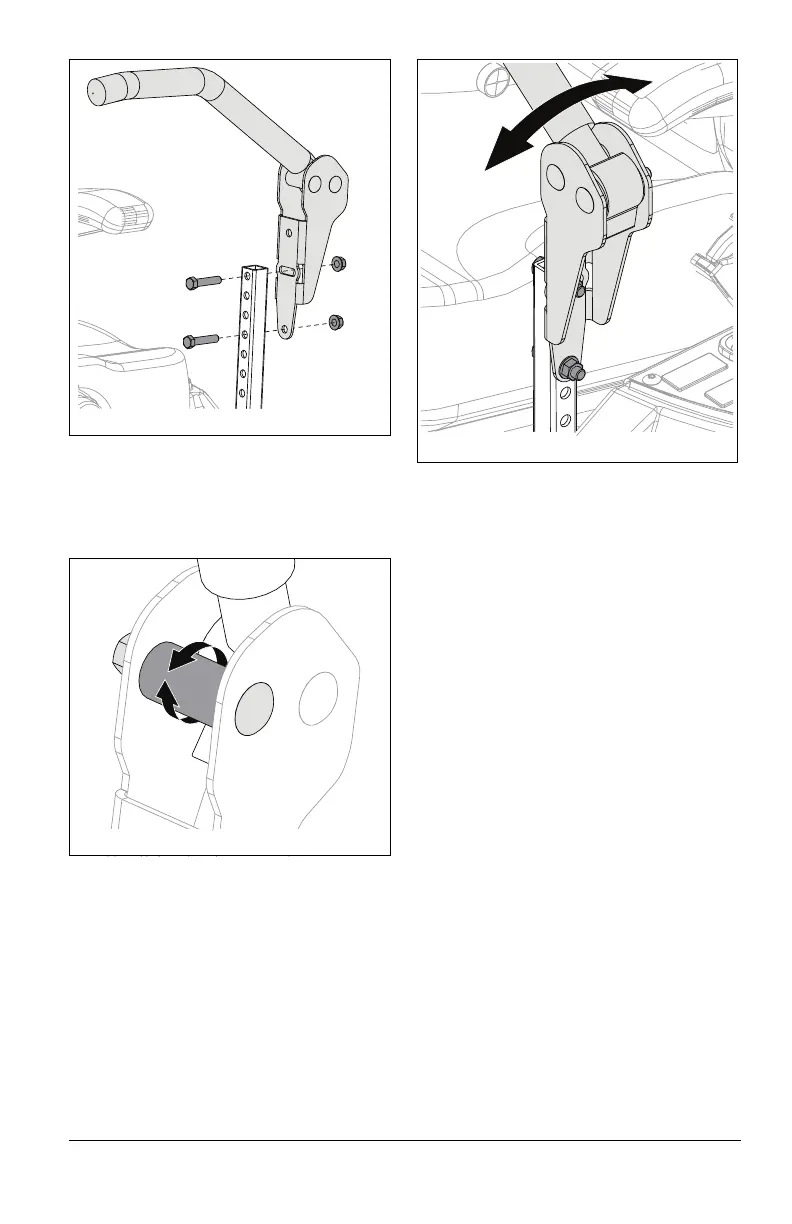
8. Loosen mounting hardware, align levers
and tighten hardware. See Figure 46.
Adjust Forward Position
The steering lever forward position may be
adjusted for operator comfort.
1. Remove key and wait for moving parts to
stop and for hot parts to cool.
2. Loosen mounting hardware on steering
lever assemblies.
3. Place steering levers in desired position:
• Gently push levers forward for greater
distance from operator.
• Gently pull levers back for closer
distance to operator.
4. Tighten hardware.
ADJUST UNIT TO DRIVE
STRAIGHT
Adjust Tire Pressure
1. Remove key and wait for moving parts to
stop and for hot parts to cool.
2. Check tire pressures. If needed, adjust to
recommended pressures. See
Specifications on page 45.
3. Check tracking.
• If unit does not track straight, increase
tire pressure to the drive wheel of the
side it moves toward.
IMPORTANT: DO NOT exceed maximum tire
pressure listed on tire sidewall.
• If increasing tire pressure does not
correct tracking, adjust the limiter bolts
as directed below.



 To Next Page