EN - 32
AUTO-BALANCE FEATURE
Auto-balance feature occurs under the
following conditions:
• Key switch is in the off position.
• Hood assembly is closed.
• Seat is in the operating position.
• Two or more batteries have at least a 12%
difference in SOC.
IMPORTANT: If battery charge levels vary
significantly, connect a battery charger. The
charger will always charge low SOC batteries
first. See Charge Batteries on page 32.
Fast Balance Feature
The fast balance feature balances two
batteries at a time that are within a 30% SOC.
Refer to the digital display for remaining
balance time.
IMPORTANT: Slow balancing will occur after
fast balancing is complete. See Slow Balance
Feature on page 32.
Slow Balance Feature
The slow balance feature operates on all
batteries in the system. Batteries can be at
any SOC to slow balance.
IMPORTANT: Batteries within 30% SOC will
begin to fast balance. See Fast Balance
Feature on page 32.
CHECK SOC
To check battery SOC, refer to the digital
display with key switch turned on or check
battery LED lights. See Check Battery LED
Lights and Charging Status on page 32.
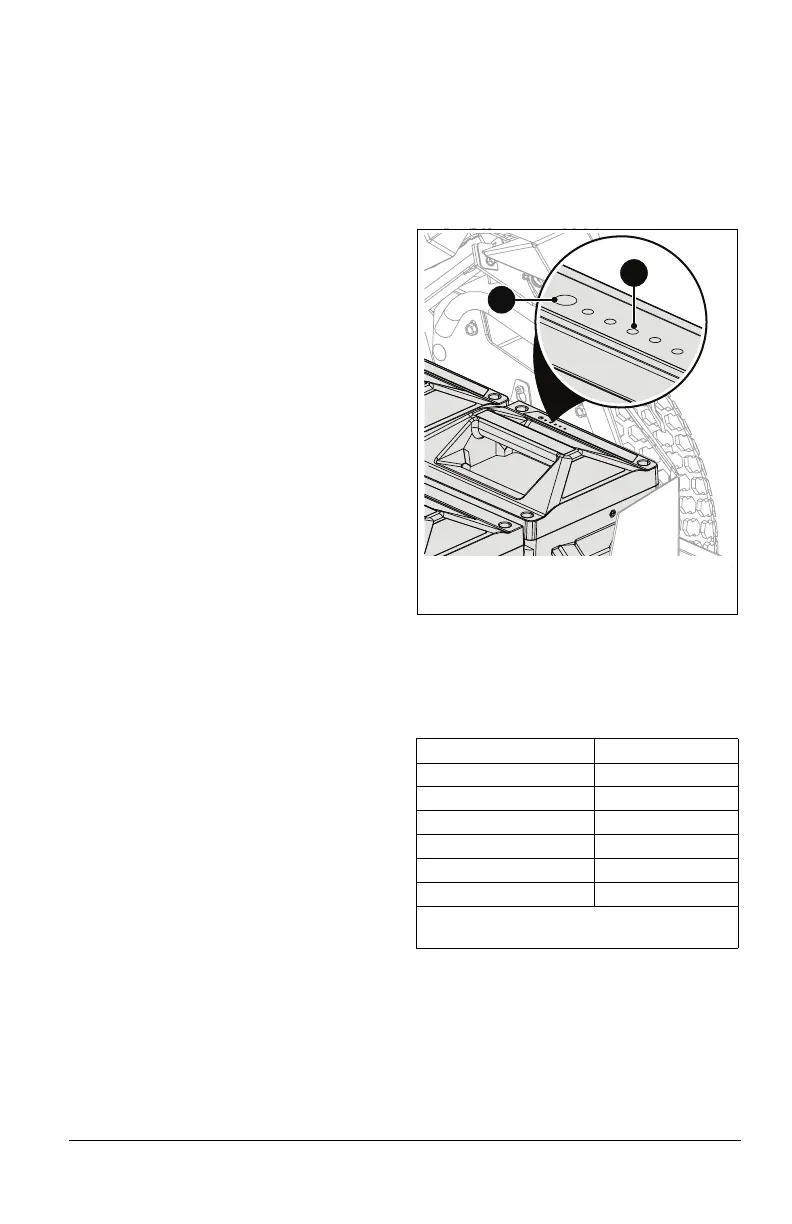
Check Battery LED Lights
See Figure 36.
IMPORTANT: Battery LED lights indicate
battery SOC in 20% increments and
automatically turn on when batteries are
charging.
1. Open hood assembly. See Battery
Access on page 30.
2. Press and hold SOC indicator button until
LED lights display. See Charging Status
on page 32 to determine if batteries
require charging.
NOTICE: If there is a battery fault, the battery
fault indicator will display a fault code instead
of a charge status. See Fault Codes on
page 38. If any battery fault indicators not
listed on page 38 are present, open hood,
remove batteries, and reinstall batteries. If
fault persists, contact an authorized Gravley
EV dealer. Charge status will return when
fault is cleared.
Charging Status
LED display should blink and then transition
to a solid color within SOC range indicated
below. Once charger is removed, LED display
will turn off.
CHARGE BATTERIES
IMPORTANT: AriensCo recommends
changing all four batteries at the same time
and replacing all batteries with batteries at
the same state of charge. Failure to change
batteries at the same state of charge may
require batteries to auto balance in the
machine.
Charging Status SOC
1 LED Light 0% – 20%
2 LED Lights 20% – 40%
3 LED Lights 40% – 60%
4 LED Lights 60% – 80%
5 LED Lights 80% – 99%
5 LED Lights * 100%
* Displays for one minute after charge
completion.
1
2
1. SOC Indicator Button
2. LED Display
Figure 36



 To Next Page