EN - 23
BALANCE SCREEN
Displays when:
a. Key switch is in the off position.
b. Hood assembly is closed.
c. Two or more batteries have at least a 12% difference in SOC.
IMPORTANT: To check battery balance, see Check Battery Balance on page 31. For battery
balancing details, see Auto-Balance Feature on page 32.
STEERING SENSOR CALIBRATION SCREEN
Displays when operator holds display switch down for 10 seconds while on the maintenance
page.
IMPORTANT: See Steering Sensor Calibration Screen on page 23 for steering sensor
calibration sequence.
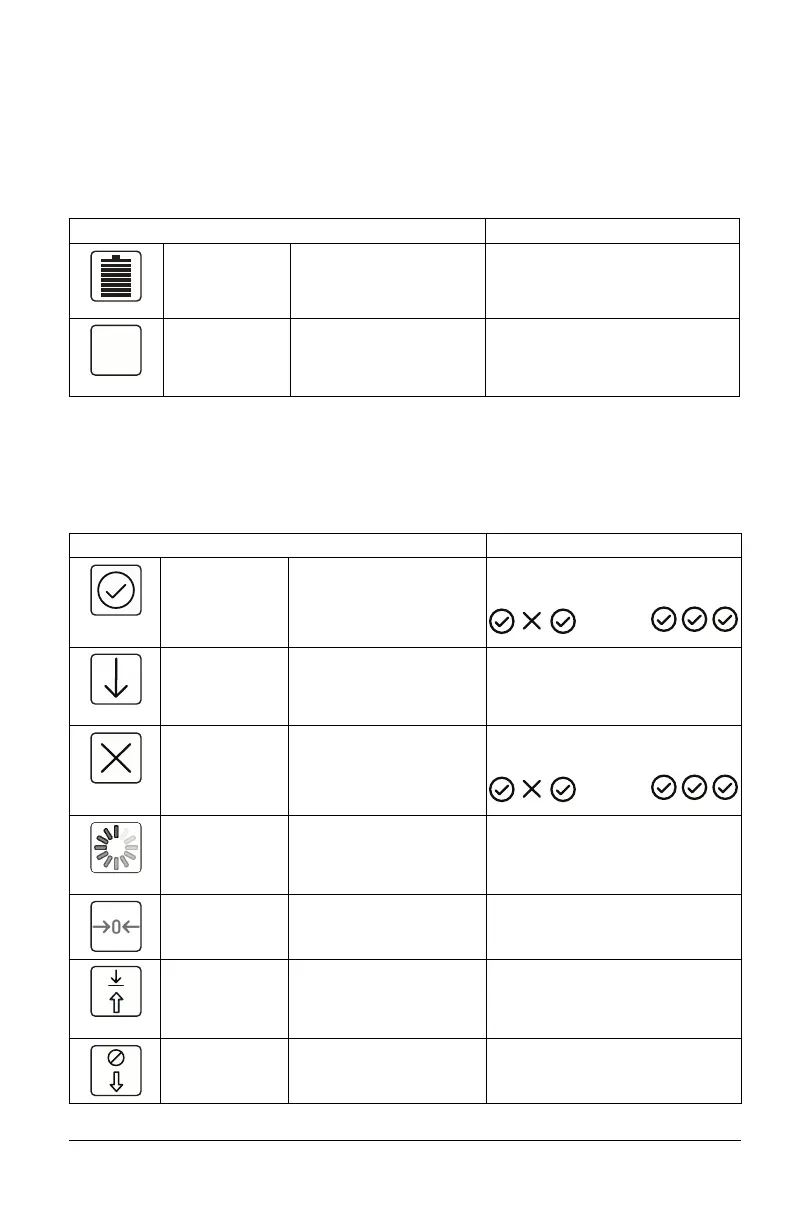
Icon Meaning Description Color Code(s)
State of Charge
(SOC)
Displays battery charge in
12.5% increments.
Light Green / Blue: 100% – 37.5%
Yellow / Orange: 37.4% – 12.5%
Red: 12.4% – 0%
Balance Time Displays time remaining
until machine is fully
operational with two
balanced batteries.
N/A
Icon Meaning Description Color Code(s) / Additional Icons
Complete Displays when step is
complete.
Example:
Left / Right
Arrow
Instructs operator of
proper steering sensor
direction / position during
calibration sequence.
N/A
Not Complete Displays when step is not
complete.
Example:
Loading Displays when entering
the steering sensor
calibration sequence and
save calibration step.
N/A
Neutral
Calibration
Displays when neutral
position is being
calibrated.
N/A
Save Calibration Allows user to save
parameters in each
steering sensor when
calibration is complete.
N/A
Cancel
Calibration
Allows user to cancel
calibration.
N/A
RN RF RR
LN LRLF
RN RF RR
LN LRLF



 To Next Page