EN - 20
SIDE BAR NAVIGATION
Displays when key switch is turned to the on position.
HOME SCREEN
Displays when key switch is turned to the on position.
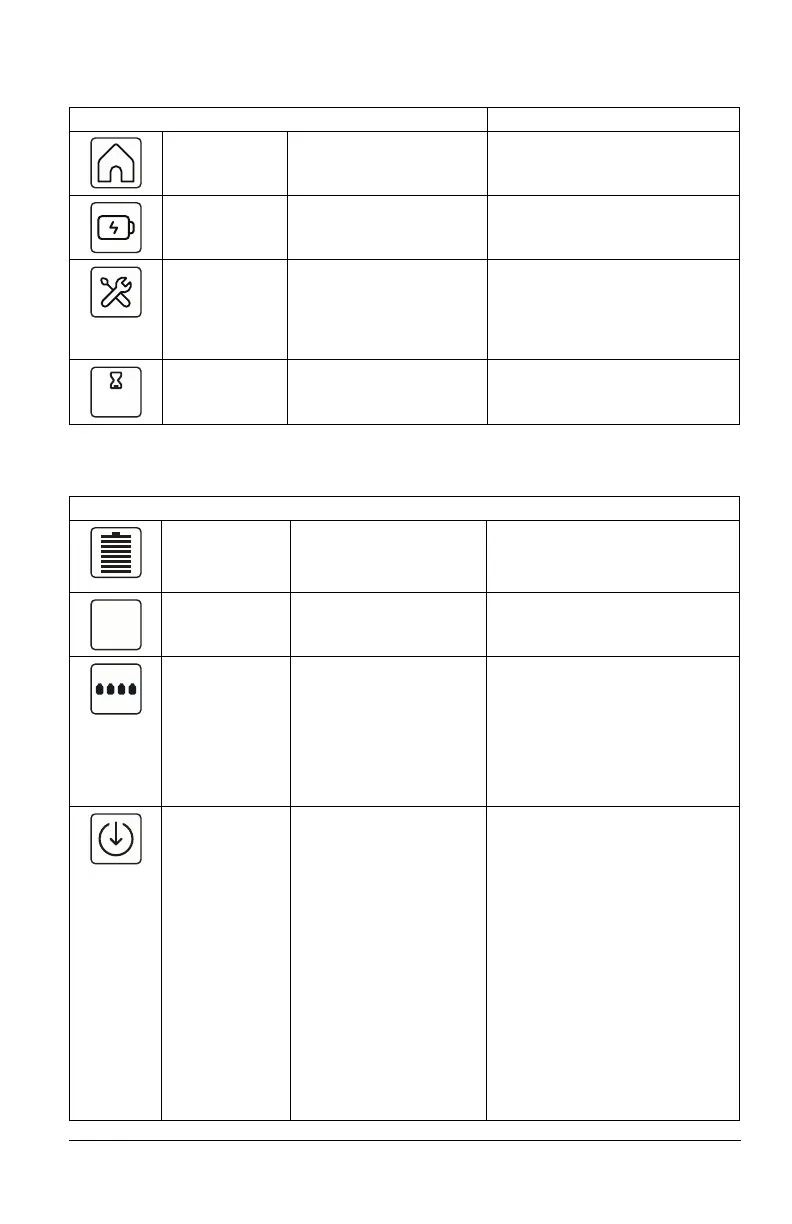
Icon Meaning Description Color Code(s)
Home Screen See Home Screen on
page 20.
Blue: Default color when operator
navigates to home screen.
Power Screen See Power Screen on
page 21.
N/A
Maintenance
Screen
See Maintenance Screen
on page 22.
Red: Maintenance or repair
required and / or fault is present.
Blue: Default color when operator
navigates to maintenance screen
and unit is clear of faults.
Hour Meter Measures and displays
battery runtime.
N/A
Icon Meaning Description Color Code(s)
State of Charge
(SOC)
Displays battery charge in
12.5% increments.
Light Green / Blue: 100% – 37.5%
Yellow / Orange: 37.4% – 12.5%
Red: 12.4% – 0%
Percentage
Digital Readout
Displays average state of
charge of active batteries
in 1% increments.
N/A
Battery
Recognition
Displays number of
batteries properly
mounted in machine.
Black: Batteries are discharging.
White with Black Outline: Batteries
are properly installed but not
active.
White with Grey Outline: Batteries
are not installed.
Red: Battery recognition fault.
Live-to-Drive Notifies operator when
machine is ready to drive.
The following conditions
must exist for Live-to-
Drive feature to be
activated:
• Key switch in the on
position.
• Parking brake engaged.
• Operator presence
switch (OPC) engaged
(operator seated).
• Steering levers in
neutral position.
• Hood assembly closed
and securely latched.
White: Live-to-Drive feature not
activated.
Blue: Live-to-Drive feature
activated (ready to drive).
Red: Live-to-Drive fault.



 To Next Page