EN - 22
MAINTENANCE SCREEN
Displays when key switch is turned to the on position and operator navigates to the
maintenance screen.
IMPORTANT: See Warnings on page 39 for digital readout warning codes. For fault codes,
contact an authorized Gravely EV dealer.
CHARGE SCREEN
Displays when operator connects battery charger to charge port.
IMPORTANT: See Check SOC on page 32 to check battery SOC. For battery charging details,
see Charge Batteries on page 32.
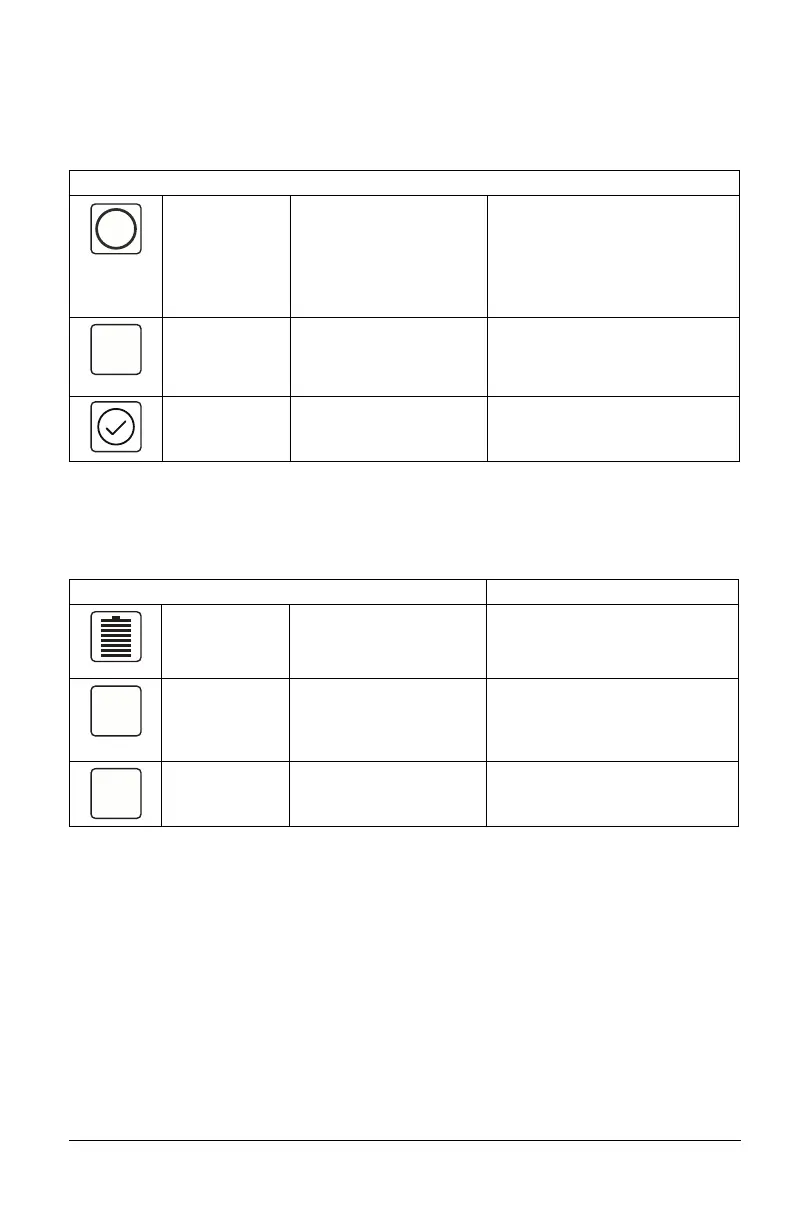
Icon Meaning Description Color Code(s)
Fault Icon &
Temporary
Warning Icon
Displays fault and warning
notifications. See Check
Faults / Warnings on
page 30.
Red: Displays location of issue
causing fault notification on top
view of machine.
Yellow: Displays location of issue
causing warning notification on top
view of machine.
Fault / Warning
Digital Readout
Displays a five digit
number that indicates the
fault or warning that
occurred.
N/A
No Faults or
Warnings
Displays when the
machine is clear of faults
or warnings.
N/A
Icon Meaning Description Color Code(s)
State of Charge
(SOC)
Displays battery charge
level in 12.5% increments.
Light Green / Blue: 100% – 37.5%
Yellow / Orange: 37.4% – 12.5%
Red: 12.4% – 0%
Percentage
Digital Readout
Displays average SOC of
active batteries in 1%
increments.
N/A
Charge Time Displays time remaining
until batteries are fully
charged.
N/A





 To Next Page