EN - 21
POWER SCREEN
Displays when key switch is turned to the on position and operator navigates to the power
screen.
IMPORTANT: See Check SOC on page 32 to check battery SOC. For battery charging details,
see Charge Batteries on page 32.
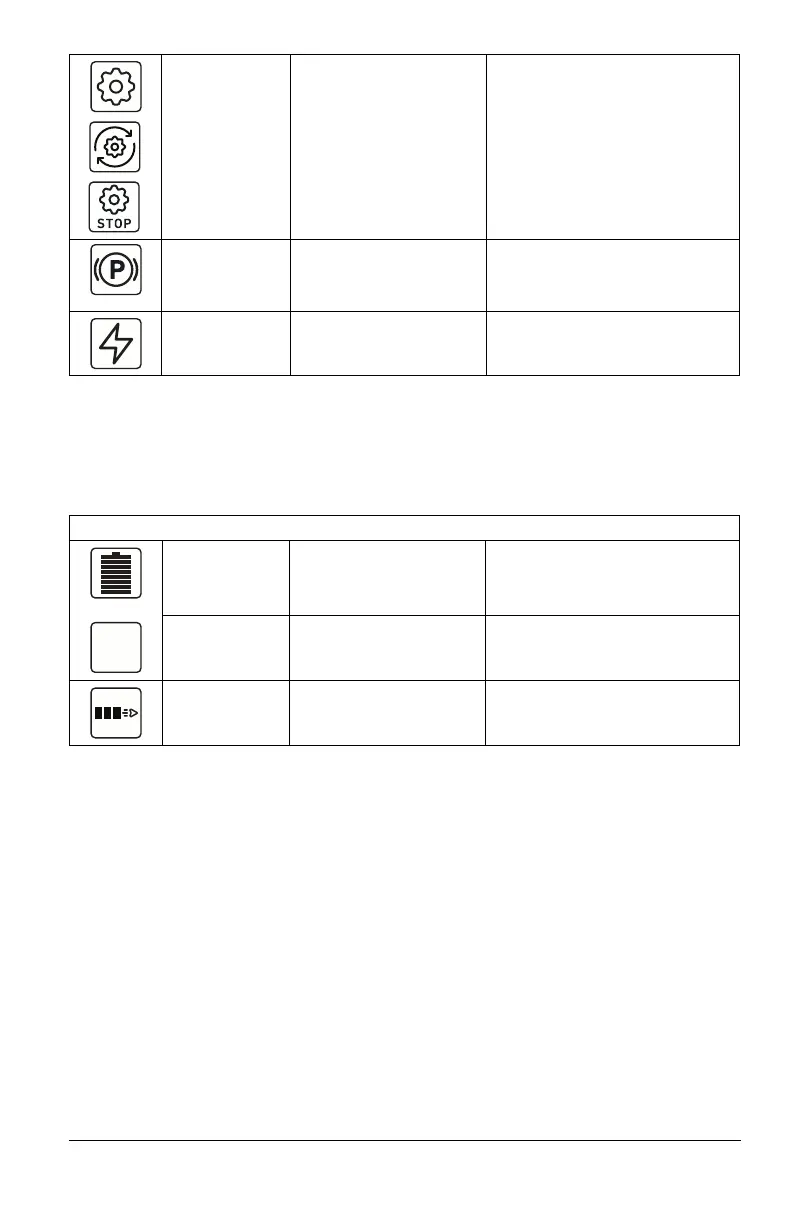
Blade Status Displays blade status. White: PTO switch disengaged
(blades off).
Blue: PTO switch engaged
(blades on).
Yellow: PTO switch engaged when
machine is turned on (blades
locked) and / or fault condition.
Red: Blade status fault.
Parking Brake Displays parking brake
status.
White: Parking brake engaged.
Blue: Parking brake disengaged.
Red: Parking brake fault.
Low Battery Displays battery SOC
status.
White: SOC above 12.5%.
Red: SOC below 12.5%.
Icon Meaning Description Color Code(s)
State of Charge
(SOC)
Displays battery charge
level in 12.5% increments.
Light Green / Blue: 100% – 37.5%
Yellow / Orange: 37.4% – 12.5%
Red: 12.4% – 0%
Percentage
Digital Readout
Displays average state of
charge of active batteries
in 1% increments.
N/A
Power Bar
Status
Displays available power
in 25% increments.
N/A





 To Next Page