EN - 33
IMPORTANT: Batteries will not charge if
batteries have entered sleep mode. See
Sleep Mode on page 33.
1. Engage parking brake and place steering
levers in neutral position.
2. Ensure hood and seat are in the
operating position.
3. Remove key and wait for moving parts to
stop and for hot parts to cool.
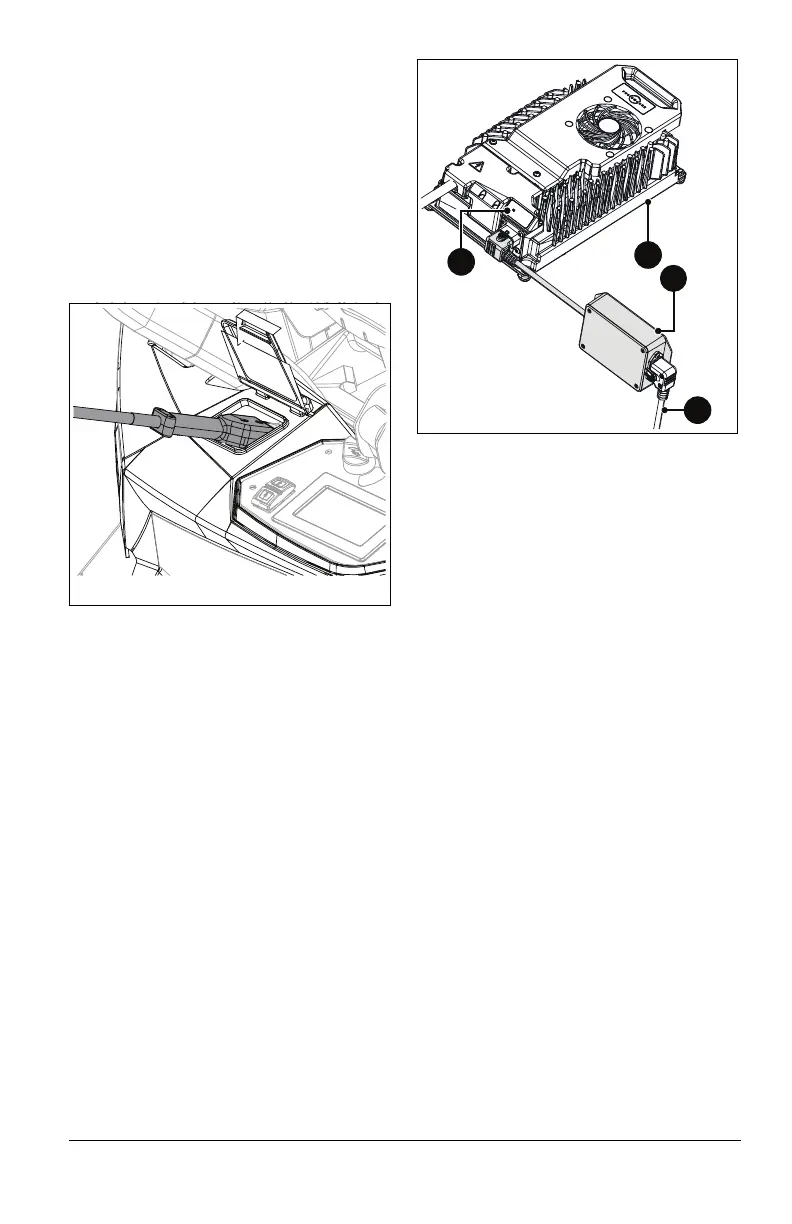
4. Lift charging port cover.
5. Connect charger connector to charging
port on the machine. See Figure 37.
See Figure 38.
6. Connect EMI filter to charger.
7. Connect 110V or 220V power cord to EMI
filter.
8. Connect power cord to 110V or 220V wall
outlet.
IMPORTANT: Avoid using electrical
extension cords. If an extension cord must be
used, use one that is UL listed or CSA
certified, rated for a minimum of 13 amps,
grounded and labeled as suitable for outdoor
use.
9. Verify that charger is functioning by
observing the flashing green light on the
charger (battery synchronization may
take up to 30 seconds).
10. Continue to charge batteries until light on
charger is no longer flashing. Refer to
digital display for remaining charge time
and charging exit options.
11. Disconnect battery charger from wall
outlet.
12. Disconnect battery charger from charge
port.
Sleep Mode
Batteries enter sleep mode after extended
periods of time (approximately 20 minutes) if:
• Key switch is in the on position
• Charger is plugged into the machine but
power from outlet is not present.
To wake batteries from sleep mode, perform
one of the following steps:
• Open and close hood assembly.
• Rotate seat forward and return it to the
operating position (see Seat Latch on
page 17).
• Press SOC indicator button (see
Figure 36).
• Power cycle unit (turn ignition key to the
off position and then return it to the on
position).
Figure 38
1. Charger
2. EMI Filter
3. Green Light
4. Power Cord
3
1
2
4



 To Next Page