120
GB
Fitting the Two-Part Tube
(Picture 3)
1. Remove the protective transport cap
(29) from the bottom shaft tube (13).
2. Loosen the tube xing screw (12) on
the top shaft tube (10).
3. Plug the two shaft tubes (10 + 13) into
each other so the safety button (30)
clicks into the notch provided for it in
the top shaft tube.
4. Retighten the tube xing screws (12).
pic. 3
12
10
13
30
29
Ensure that the bottom shaft tube
is sitting rmly and safely before
starting the equipment.
5. Dismantling:
Loosen the tube xing screw (12).
Press the safety button (30) and pull
the tubes apart
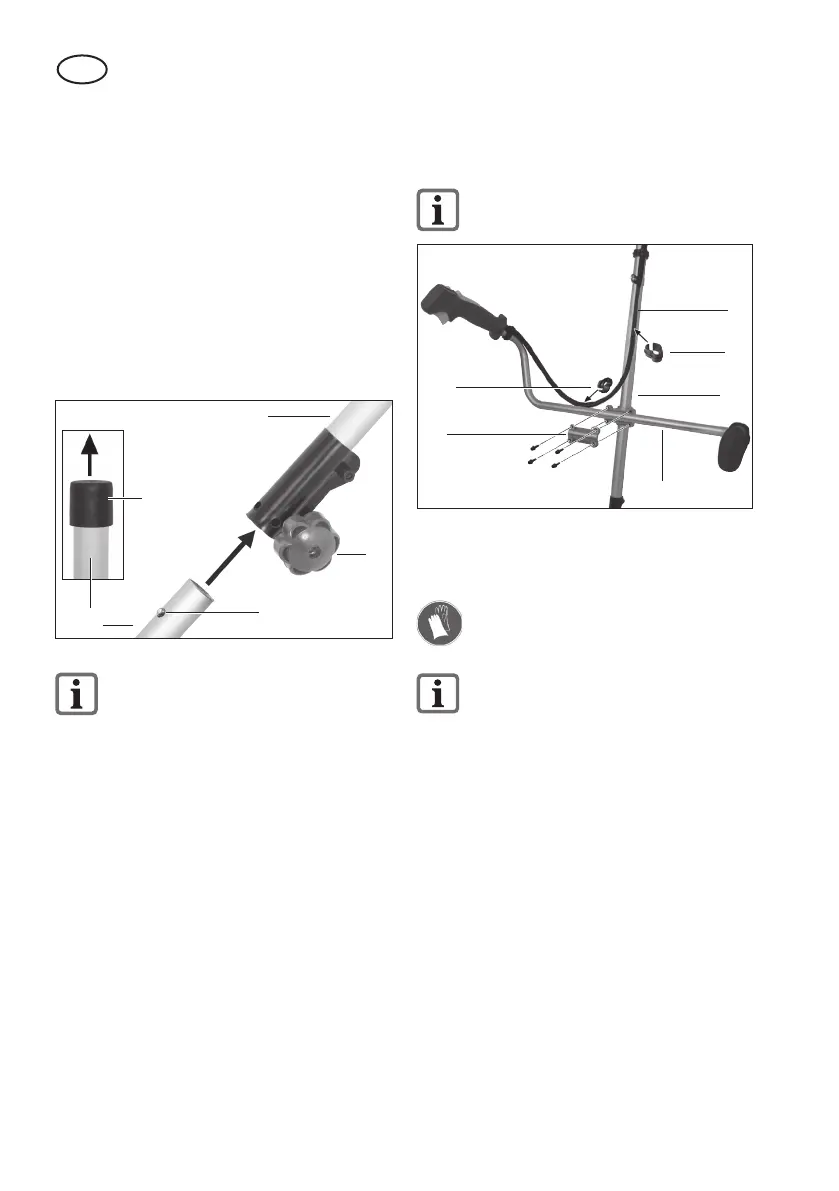
Fitting the Handle (Picture 4)
1. Loosen the 4 Allen screws (31) on the
top shaft tube (10) and take off the
handle holder (32).
2. Place the multifunction handle (11) in
the handle slot on the top shaft tube
(10) and x it using the handle holder
and the 4 screws.
3. Fix the accelerator cable (8):
With the large cable clamp (9) on the
top shaft tube (10);
With the small cable clamp (21) on the
multifunction handle (11).
Ensure that the accelerator cable
(8) is not twisted or kinked.
10
9
21
32
11
31
pic. 4
8
Installing/Removing the Metal
Cutting Blade
Wear protective gloves when han-
dling the metal cutting blade.
Dismantling the reel capsule is
described in the section on “Install-
ing/Removing the Reel Capsule”.
Installing the protective cover / metal
cutting blade (picture 5):
1. If applicable, unscrew the top (33b)
and bottom (33a) anges mounted on
the cutting head holder (19).
2. Screw the protective cover (15) onto
the cutting head holder (19) using the
3 screws (34) enclosed.
Installing the metal cutting blade
(picture 5):
3. Place the metal cutting blade (18) and
anges (33a+b) on the cutting head
holder (19) in the following order:
Bottom ange (33a) – metal cutting
blade (18) – top ange (33b).


 To Next Page
 Loading...