User Manual
H3C S1526 Smart Ethernet Switch Chapter 2
Web-based Configuration
2-29
2.6 VLAN
Virtual local area network (VLAN) is a technology that
allows you to assign network segments to devices within a LAN
logically rather than physically, to create virtual work groups.
With the VLAN technology, the network administrator can
divide a physical LAN into different broadcast domains (namely,
VLANs) logically, with each VLAN consisting of a group of
computers having the same needs. Since VLAN is divided
logically rather than physically, computers in the same VLAN
do not need to be located in the same physical area. In other
words, these computers do not have to belong to the same
physical LAN segment.
2.6.1 VLAN Types
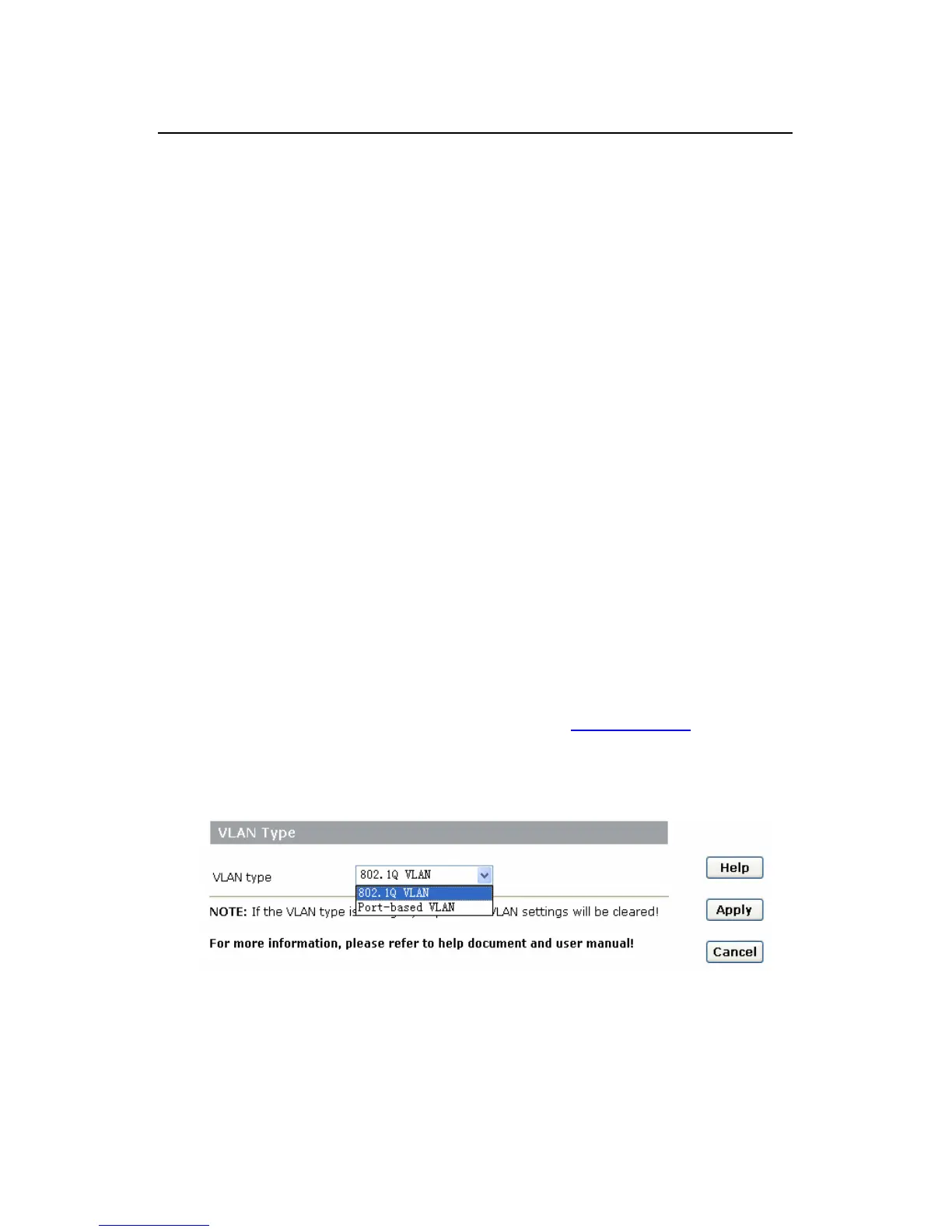
The S1526 supports two types of VLANs: 802.1Q VLAN
and port-based VLAN. Click [VLAN/Advanced] to enter the
[Select VLAN Type] page, as shown in
Figure 2-20. Select a
VLAN type from the drop-down list and click <Apply> to change
the VLAN type.
Figure 2-20 VLAN type selection



 To Next Page