836LE005550A
Starting, commissioning, operation
4.2 Starting and configuring the circuit breaker
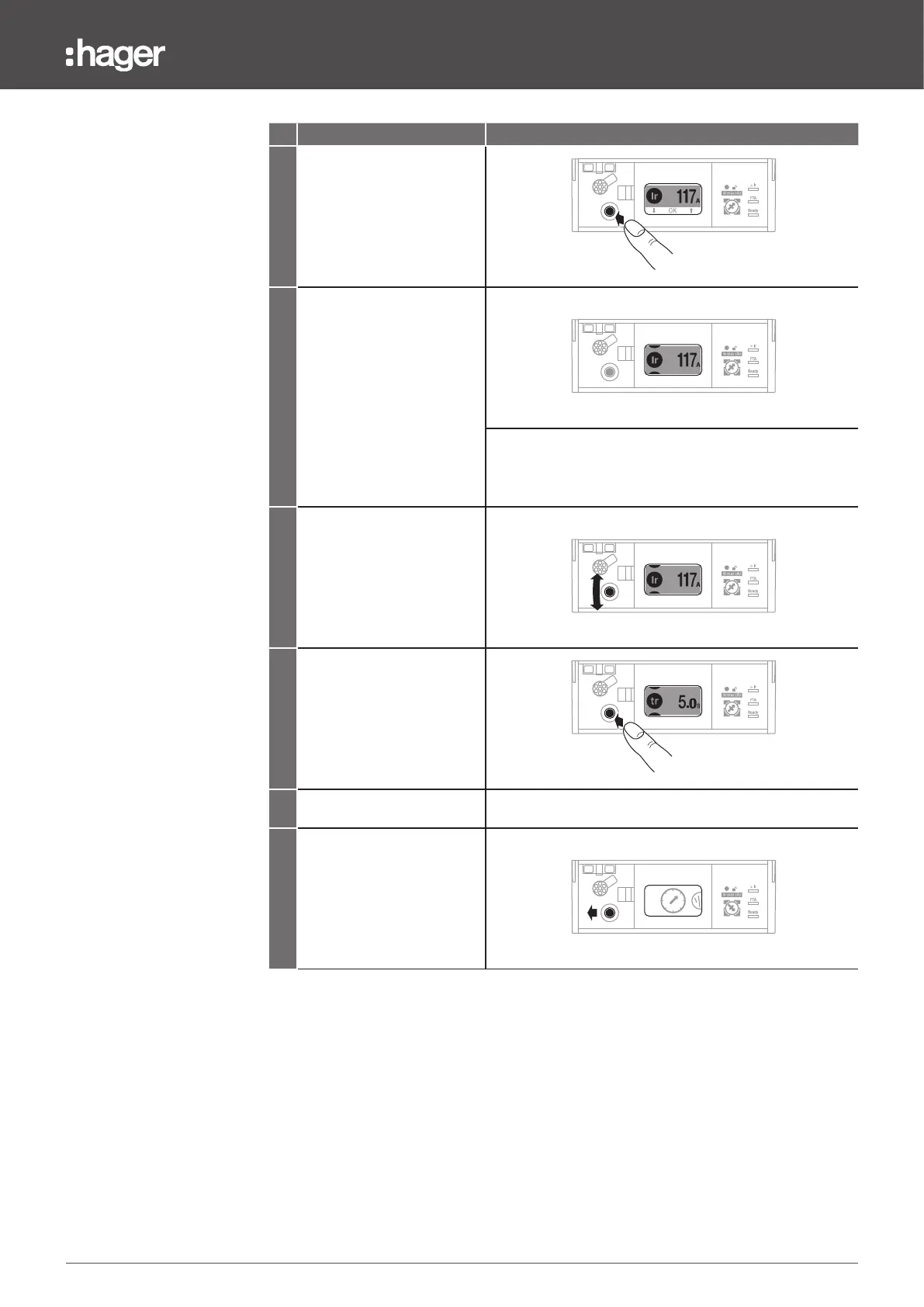
Action Note/Illustration
7
Press the centre of the
joystick to confirm the
new setting
63 160
125
100
8
At this stage it is possible to
modify other settings of the
current menu. To do this,
it is important to remain in
Unlocked mode
63 160
125
100
Note
Check that the entire setting parameters icon to the left of
the setting value remains displayed in the inverted colour
9
Move the navigation joystick
upwards or downwards
to select another setting
parameter
63 160
125
100
10
Press the centre of the
joystick or move it to the right
to reverse the background
colour of the icon and value
assembly. The display will
then ask you to modify the
value or the method selected.
63 160
125
100
11 Repeat steps 6 and 7.
12
Move the joystick to the left
to exit Unlocked mode and
return to the Main menu.
63 160
125
100
Note
If there is no movement on the navigation joystick for more than 30seconds, Locked
mode is automatically activated again.


 To Next Page