82 6LE005550A
Starting, commissioning, operation
4.2 Starting and configuring the circuit breaker
4.2.4
Configuration via the
unlock button
After setting the max Ir setpoint, it is necessary to:
- Set the other protection parameters for the circuit breaker
- Set the trip unit clock
- Possibly lock the circuit breaker configuration
Proceed as follows:
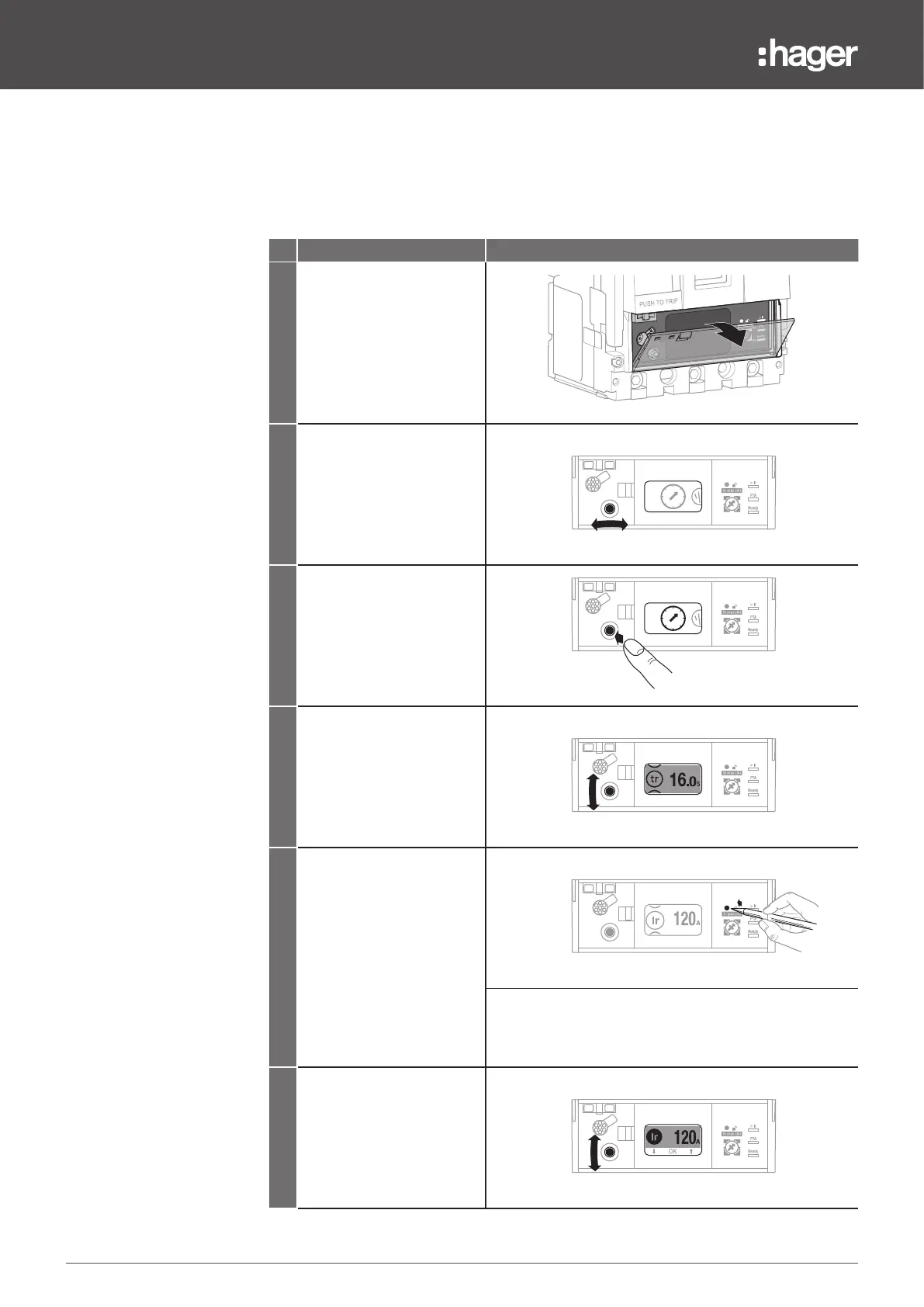
Action Note/Illustration
1
Open the transparent flap in
order to access the unlock
button.
Ready
PTA
63 160
125
100
Ir max (A)
2
Move the joystick to the left
or right to select the menu
(Protection or Configuration)
containing the parameter to
be set.
63 160
125
100
3
Press the centre of the
joystick to access the menu.
63 160
125
100
4
Move the joystick upwards
or downwards to select the
parameter to be set.
63 160
125
100
5
Briefly press the unlock
button using a rounded tip
such as a ballpoint pen.
63 160
125
100
Note
The embedded display automatically switches to Unlocked
mode. The parameter icon found to the left of the value to
be set is then displayed in inverted colours.
6
Move the navigation joystick
upwards or downwards to
select the desired value or
method.
63 160
125
100


 To Next Page